Store Guide
The Store Guide explains how to use ReportWisp after installation and data sync.
This is the main guide for understanding each report category, the report types inside each category, what each report helps you understand, and how merchants can use the reports to support better store decisions.
ReportWisp helps Shopify merchants move from scattered data, manual exports, and disconnected spreadsheets to clearer reports, dashboards, table views, and decision-ready analytics.
At the current stage, ReportWisp supports:
- Report categories
- Dashboard views
- KPI cards
- Charts and visualizations
- Report tables
- Basic filters
- Table exports where available
Before You Start Using Reports
Before using ReportWisp reports, make sure your store data sync is complete.
ReportWisp prepares reports using the store data available through Shopify permissions, historical order access, and the data already available in your store.
Use these steps before reviewing any report:
- Open ReportWisp from your Shopify admin.
- Confirm that the data sync is complete.
- Select the report category you want to review.
- Use the available date filter to choose the reporting period.
- Review KPI cards for quick performance signals.
- Review charts to understand trends and comparisons.
- Review tables to investigate detailed records.
- Export table data where available if your team needs offline review or further analysis.
If a report appears empty or incomplete, first check:
- Selected date range
- Store data availability
- Shopify permissions
- ReportWisp plan access
- Whether your store uses the related Shopify feature
For example:
- Gift Card reports need gift card data.
- POS reports need Shopify POS activity.
- Payout and dispute reports may depend on Shopify Payments availability.
- Inventory reports depend on product, variant, location, and inventory tracking data.
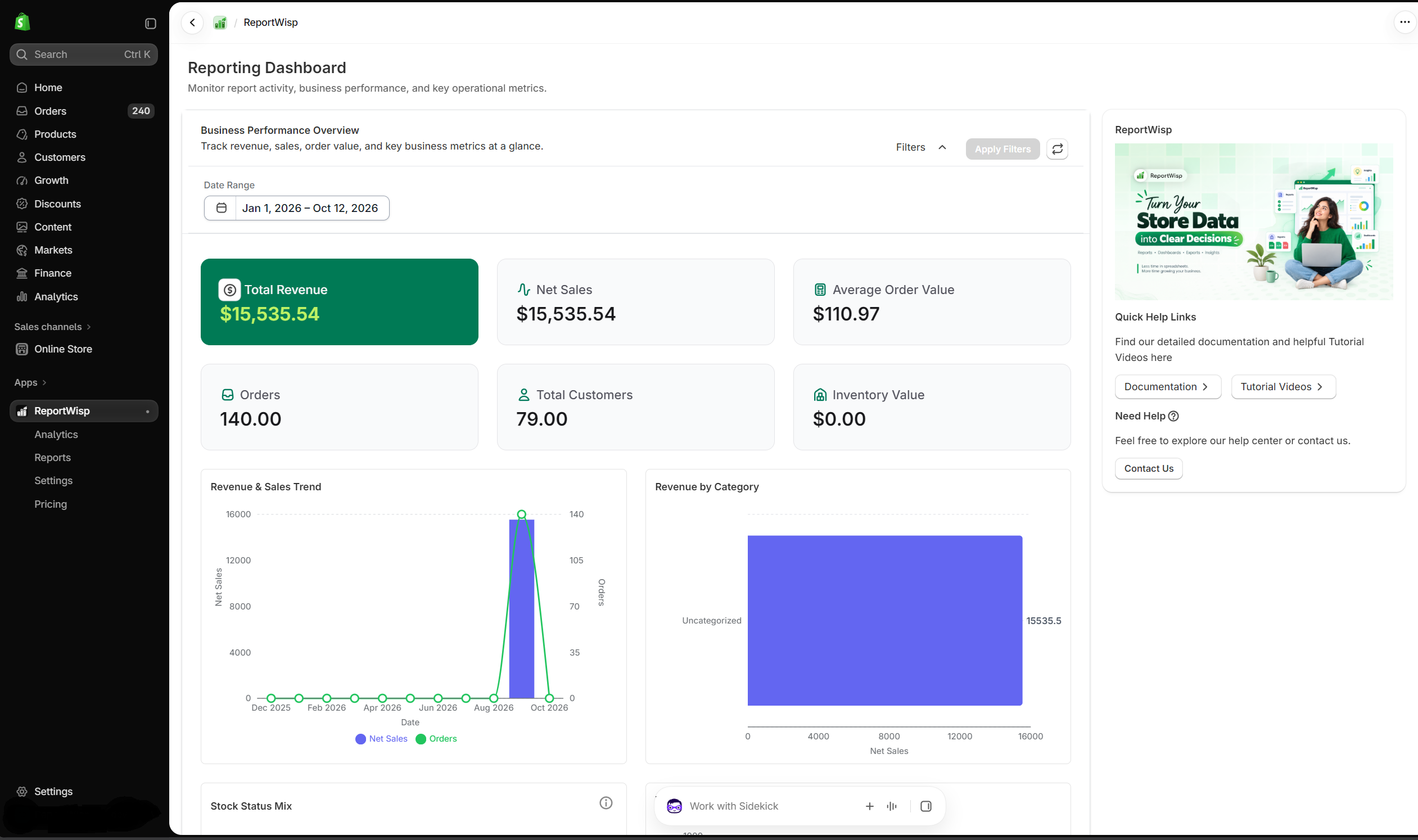
Understanding Report Components
ReportWisp reports may include KPI cards, charts, plots, and tables. Each component serves a different purpose.
KPI Cards
KPI cards show important numbers at a glance.
They are useful for quickly understanding whether a metric needs attention.
Examples include:
- Net Sales
- Gross Sales
- Orders
- Average Order Value
- Refund Rate
- Discount Leakage
- Low-Stock SKUs
- Total Customers
- Failed Transactions
- Inventory Value
- Payout Amount
- Dispute Amount
Use KPI cards as the first layer of review. If a KPI looks high, low, or unusual, review the related chart or table to understand the reason.
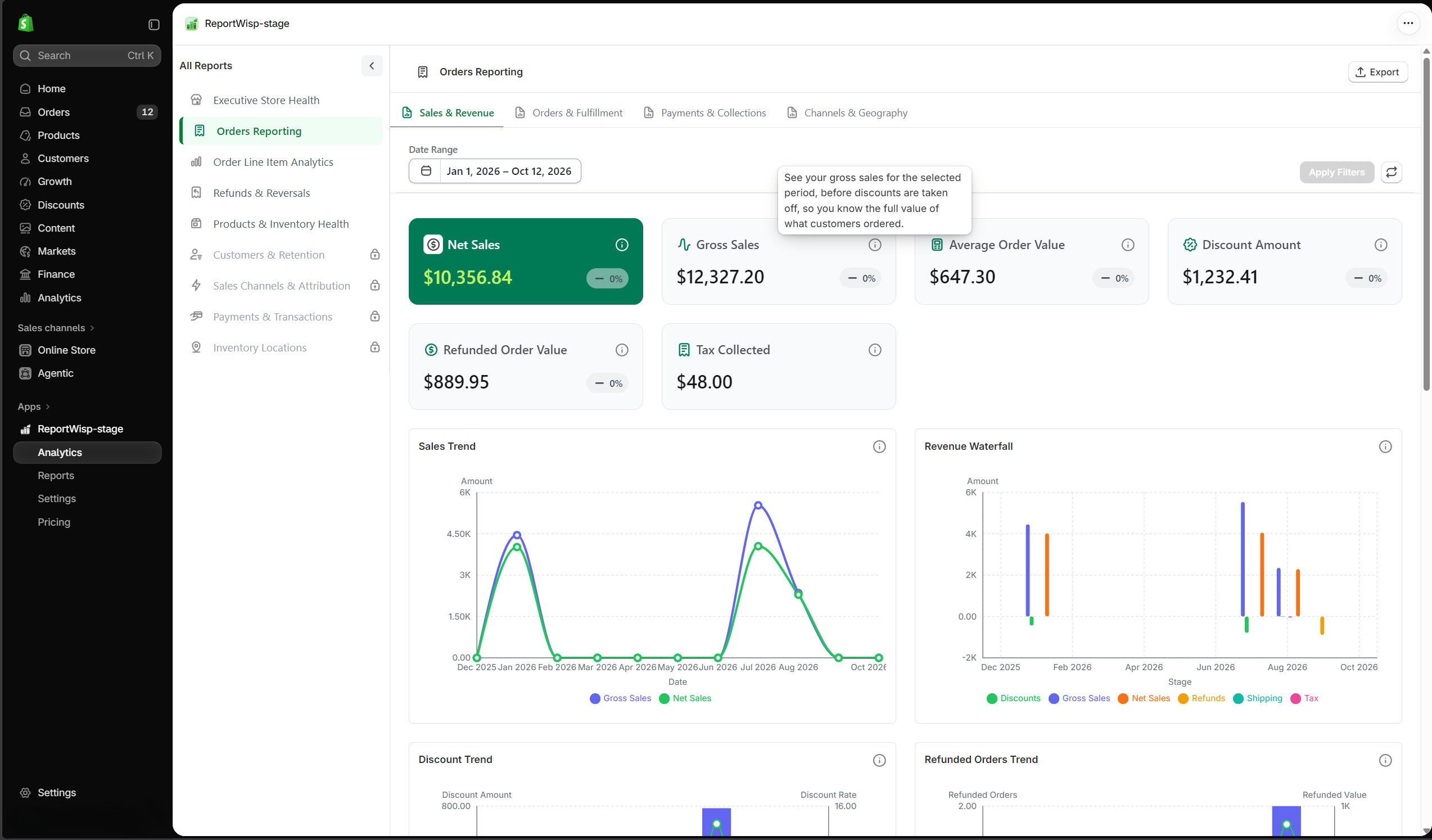
Charts and Plots
Charts help visualize trends, comparisons, patterns, and distributions.
They are useful when you need to understand movement over time or compare performance across products, customers, locations, sales channels, payment gateways, or statuses.
Charts can help identify:
- Sales trends
- Refund patterns
- Product performance differences
- Channel performance differences
- Inventory risk
- Customer behavior
- Payment issues
- Payout movement
- Dispute risk
Use charts to quickly identify what changed and where to investigate further.
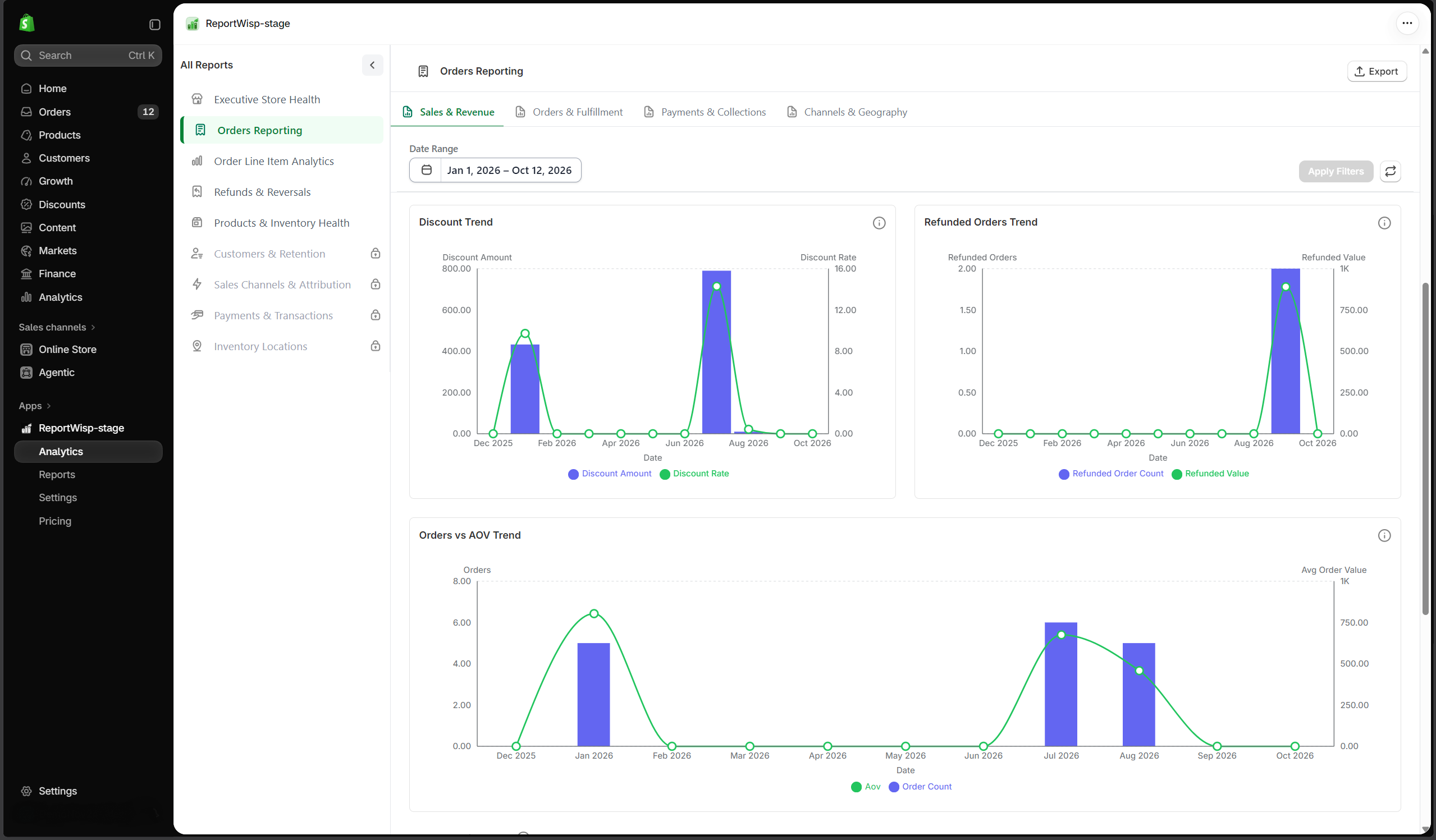
Tables
Tables show detailed records and breakdowns.
They are useful when your team needs to investigate the data behind a KPI or chart.
Tables help teams review:
- Orders
- Products
- Variants
- Customers
- Refunds
- Transactions
- Inventory records
- Payout records
- Gift cards
- Disputes
- POS activity
At the current stage, ReportWisp supports table exports where available. Use table exports for finance review, operational follow-up, internal reporting, accounting workflows, or offline analysis.
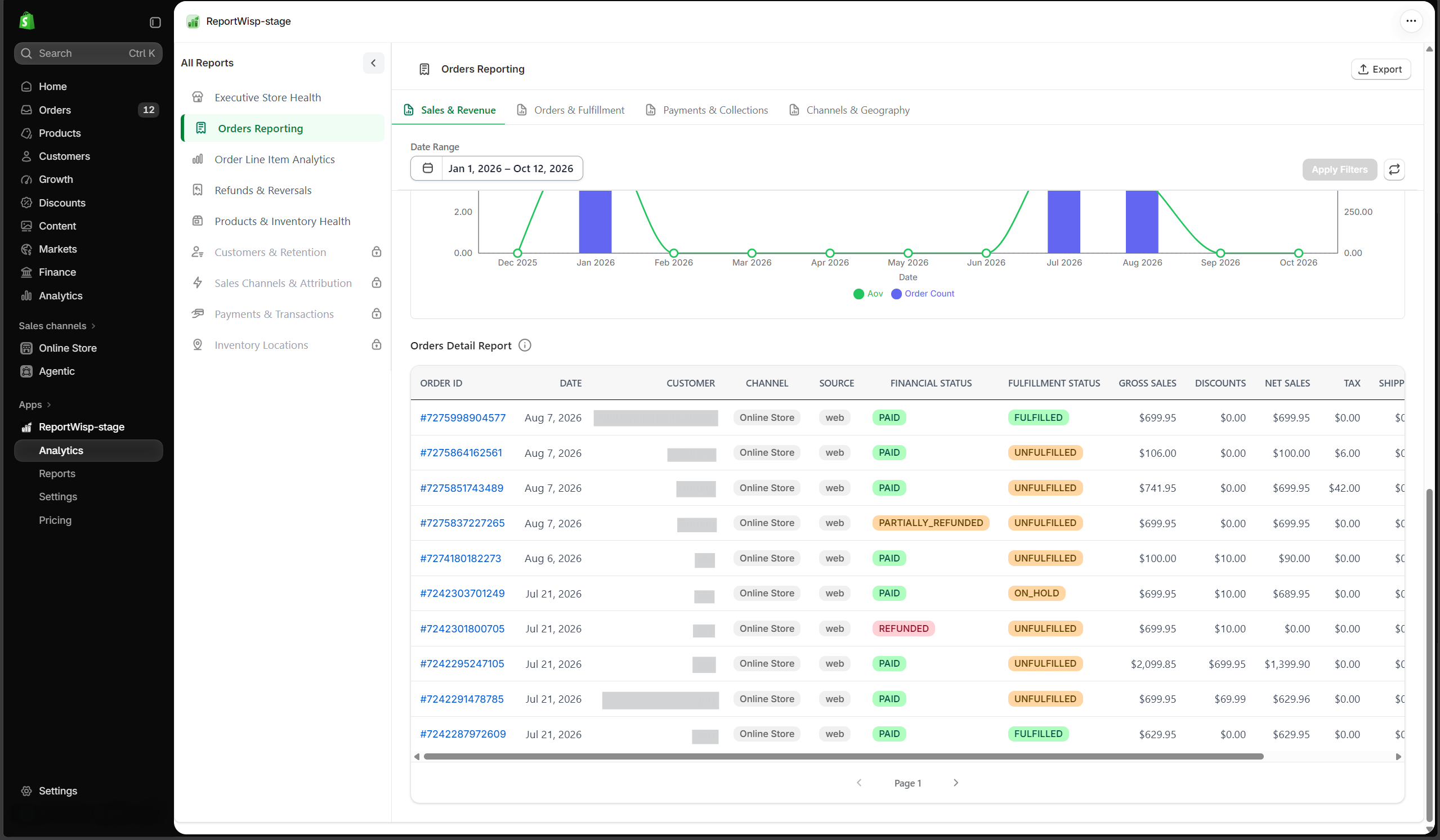
Report Categories Overview
ReportWisp organizes store reporting into the following report categories:
- Executive Store Health
- Orders Reporting
- Order Line Item Analytics
- Refunds & Reversals
- Products & Inventory Health
- Customers & Retention
- Sales Channels & Attribution
- Payments & Transactions
- Payout Reconciliation
- Inventory Locations
- Gift Cards
- Disputes & Risk
- POS & Retail Operations
Each report category is designed to answer a specific set of business questions.
1. Executive Store Health
What this report category is
Executive Store Health is the top-level business overview report.
It gives merchants a high-level view of overall store performance by combining important signals from revenue, orders, discounts, refunds, inventory, customers, sales channels, payments, and business risk.
This report is useful when you want to quickly understand how the store is performing without opening multiple detailed reports first.
Who should use it
This report is useful for:
- Store owners
- Founders
- Leadership teams
- Operations managers
- Finance leads
- Business analysts
What this report helps you understand
Executive Store Health helps answer questions such as:
- Is the store growing or declining?
- Are sales increasing because of healthy demand or heavy discounting?
- Are refunds affecting revenue quality?
- Are orders and average order value moving in the right direction?
- Are inventory issues creating revenue risk?
- Are new and repeat customers contributing to revenue?
- Which channels are driving sales?
- Are payments, fees, or financial risks visible?
Decision-making support
Use this report to decide which business area needs deeper review. For example:
- If revenue is down, review Orders Reporting and Sales Channels & Attribution.
- If refunds are increasing, review Refunds & Reversals and Order Line Item Analytics.
- If discounts are high, review Orders Reporting and channel/product performance.
- If inventory risk is visible, review Products & Inventory Health and Inventory Locations.
- If payment or business risk appears, review Payments & Transactions, Payout Reconciliation, or Disputes & Risk.
Tabs and individual reports
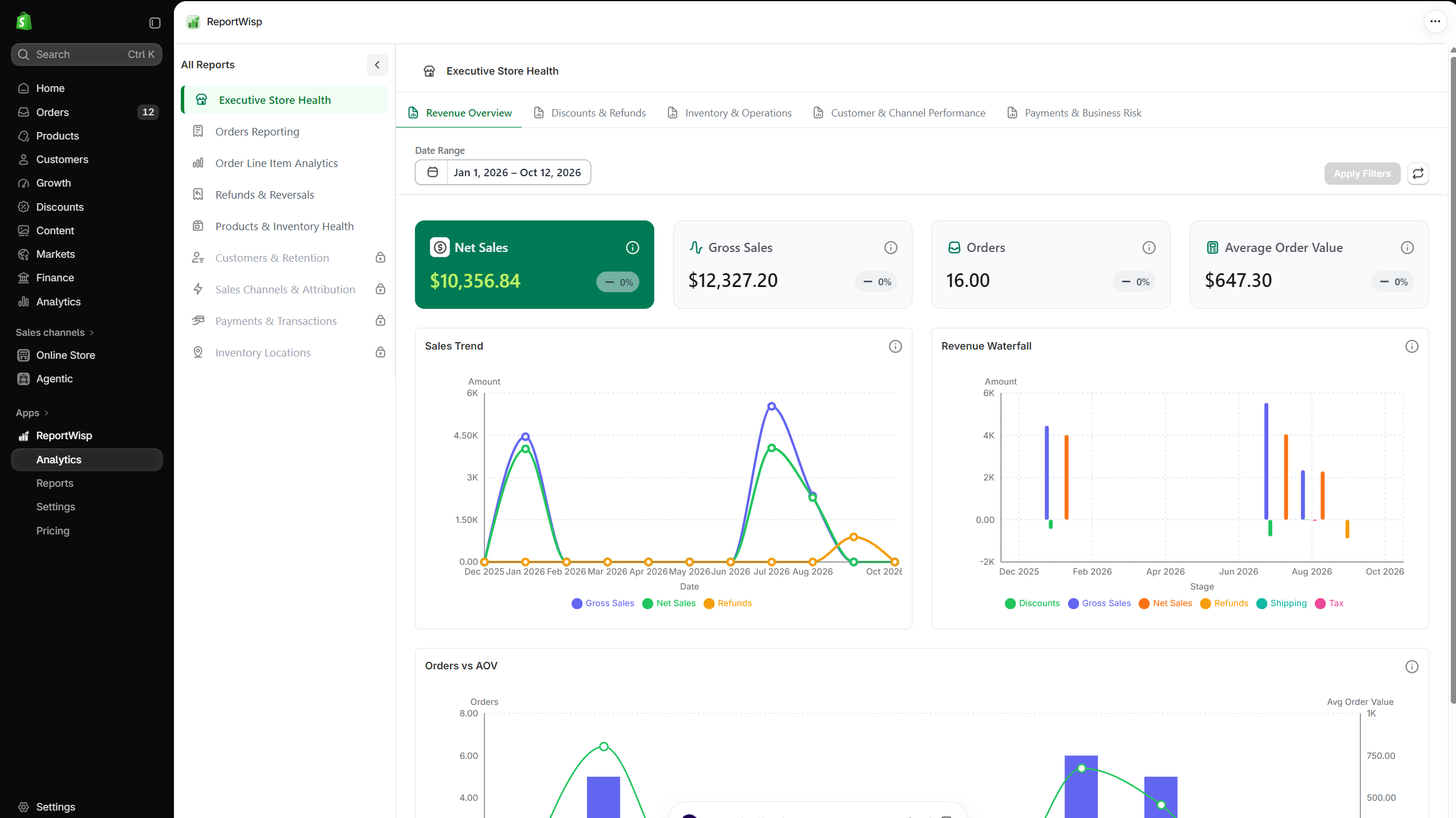
1.1 Revenue Overview
This tab focuses on revenue movement, order value, sales quality, and period-over-period performance.
| Report | Type | What it presents | Why it matters |
|---|---|---|---|
| Net Sales | KPI | Net sales for the selected period, excluding tax and shipping where applicable. | Helps merchants understand actual sales performance after key adjustments. |
| Gross Sales | KPI | Gross sales before discounts and refunds. | Helps compare total selling activity before revenue deductions. |
| Orders | KPI | Total order volume for the selected period. | Helps understand demand and sales activity. |
| Average Order Value | KPI | Average revenue per order. | Helps understand whether customers are spending more or less per purchase. |
| Sales Trend | Chart | Gross sales, net sales, and refunds over time. | Helps identify whether revenue is growing, declining, or being reduced by refunds. |
| Revenue Waterfall | Chart | Movement from gross sales to net sales through discounts and refunds. | Helps explain where revenue is being reduced. |
| Orders vs AOV | Chart | Relationship between order volume and average order value. | Helps identify whether growth is coming from more orders, higher order value, or both. |
How to use this tab
Start here when reviewing store performance. If revenue changed, use the Sales Trend and Revenue Waterfall charts to understand whether the change came from order volume, pricing, discounts, or refunds.
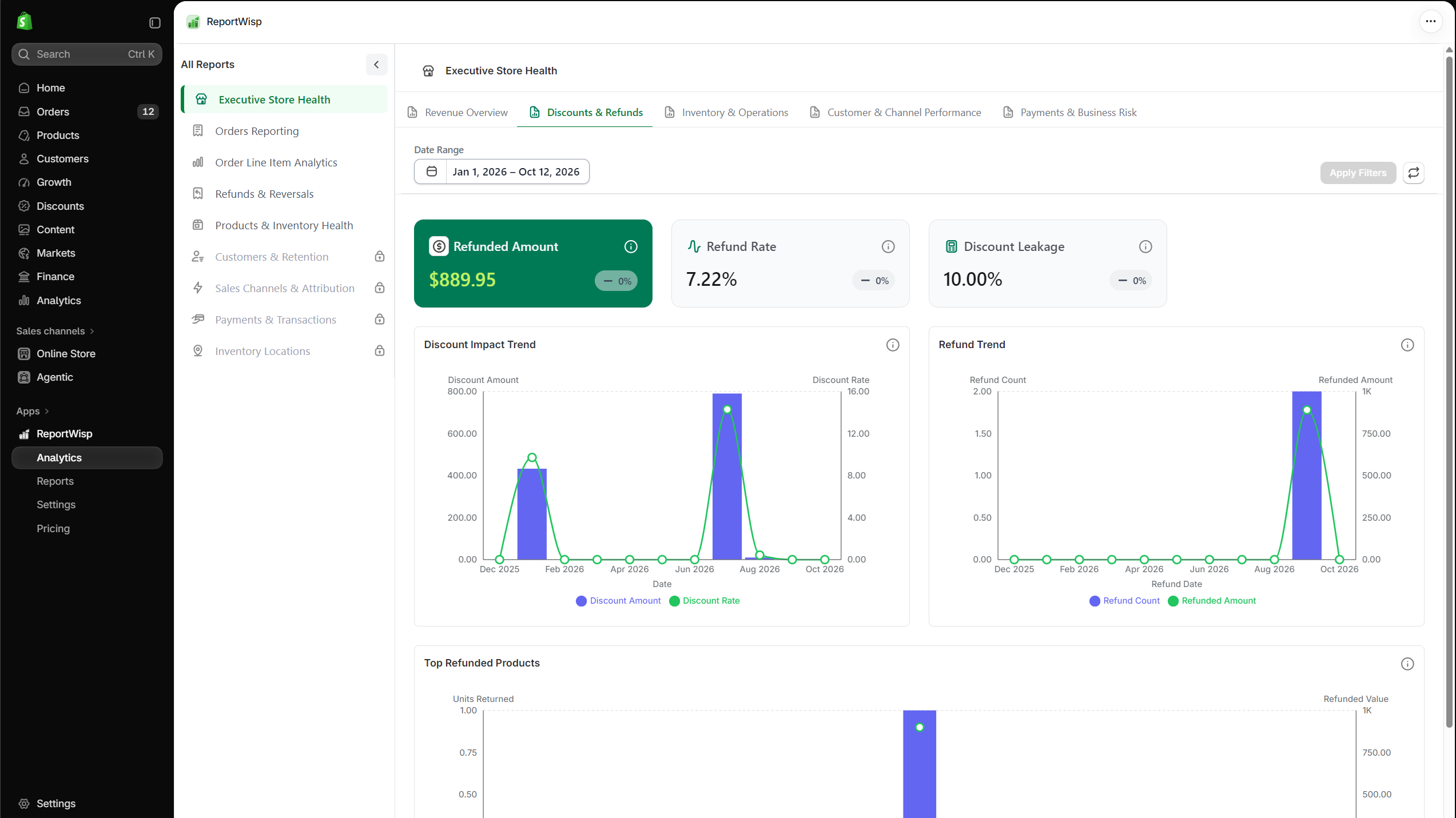
1.2 Discounts & Refunds
This tab focuses on discount impact, refund activity, and revenue leakage.
| Report | Type | What it presents | Why it matters |
|---|---|---|---|
| Refunded Amount | KPI | Total amount refunded during the selected period. | Shows how much revenue was reversed. |
| Refund Rate | KPI | Refund amount as a percentage of sales. | Helps measure how strongly refunds are affecting revenue quality. |
| Discount Leakage | KPI | Discounts as a percentage of gross sales. | Helps understand whether promotions are reducing revenue too heavily. |
| Discount Impact Trend | Chart | Discount activity over time. | Helps review whether discounting is increasing or concentrated in specific periods. |
| Refund Trend | Chart | Refund activity over time. | Helps identify refund spikes or recurring refund patterns. |
| Top Refunded Products | Chart/Table | Products with the highest refunded value or quantity. | Helps identify products that may need review. |
How to use this tab
Use this tab when sales look strong but net revenue feels weak. High discount leakage or refund rates may show that revenue growth is not as healthy as it appears.
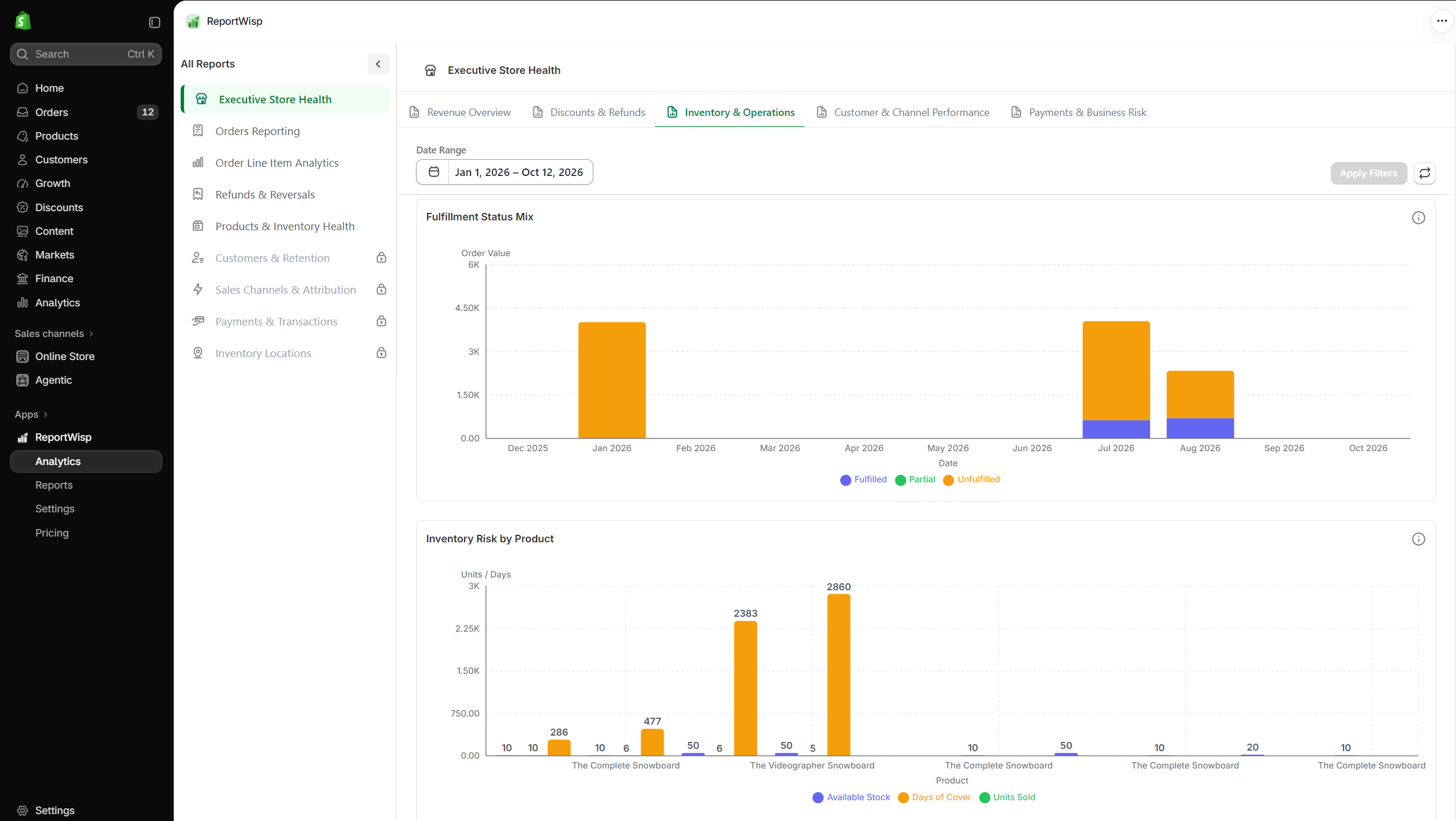
1.3 Inventory & Operations
This tab focuses on inventory-related business risk and operational visibility.
| Report | Type | What it presents | Why it matters |
|---|---|---|---|
| Low Stock Revenue Risk | KPI | Revenue risk connected to products with low stock. | Helps identify possible lost sales due to stock shortage. |
| Outstanding Amount | KPI | Unpaid or outstanding order value. | Helps finance and operations monitor pending collections. |
| Stock Value by Location | Chart | Inventory value distributed across store locations. | Helps identify where inventory capital is concentrated. |
| Unfulfilled Revenue Risk | Chart | Revenue tied to unfulfilled orders. | Helps identify fulfillment backlog and operational risk. |
| Fulfillment Status Mix | Chart | Orders grouped by fulfillment status. | Helps understand fulfillment health. |
| Inventory Risk by Product | Chart/Table | Products with stock or fulfillment risk. | Helps prioritize replenishment or operational follow-up. |
How to use this tab
Use this tab to connect sales performance with operational readiness. A store may have strong sales, but low stock or fulfillment backlog can create future revenue loss.
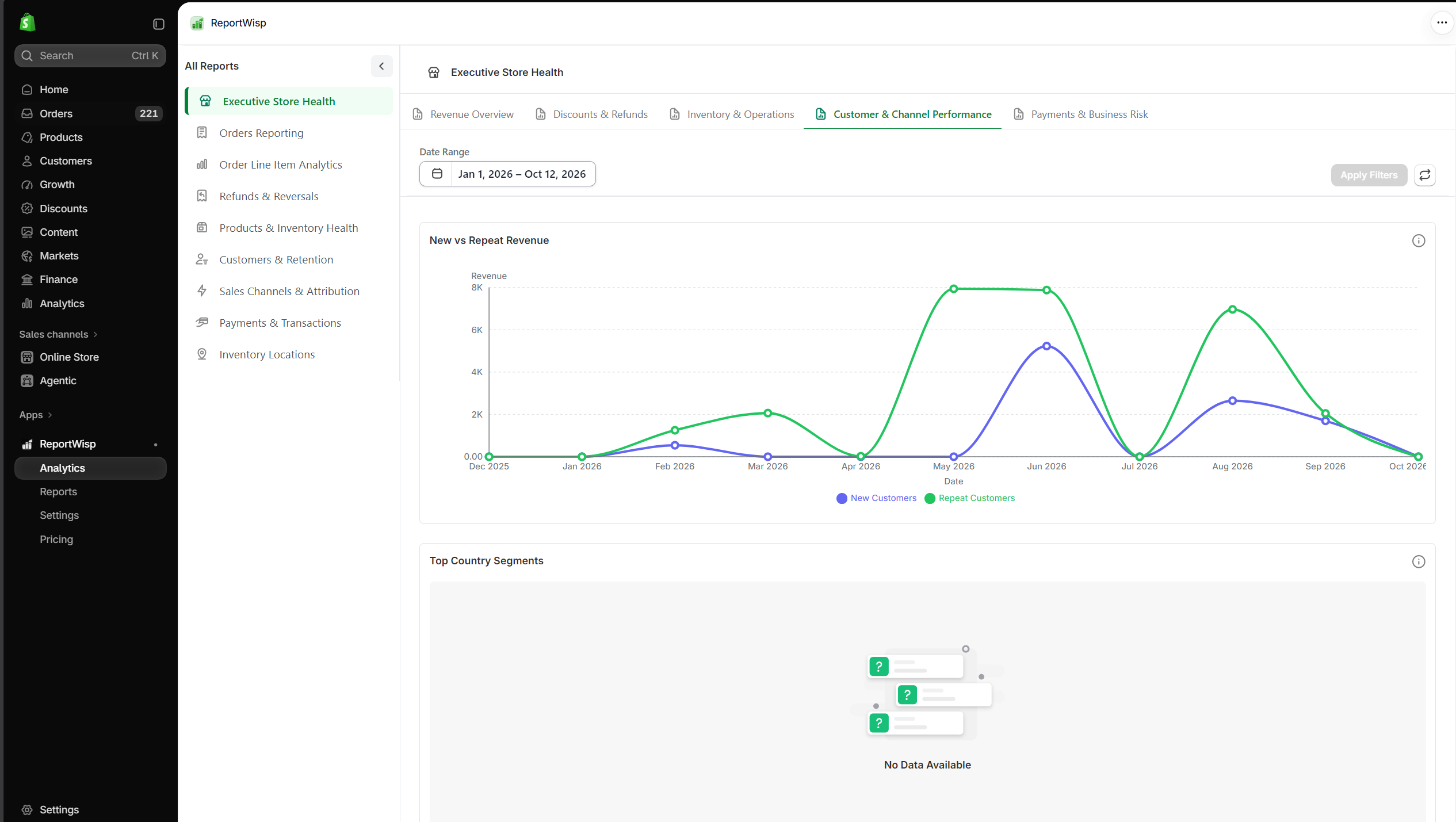
1.4 Customer & Channel Performance
This tab focuses on customer revenue mix and sales channel quality.
| Report | Type | What it presents | Why it matters |
|---|---|---|---|
| New vs Repeat Revenue | Chart | Revenue split between new and returning customers. | Helps understand whether the store depends more on acquisition or retention. |
| Top Customer Segments | Chart/Table | Highest-value customer groups or segments. | Helps identify important customer groups. |
| Sales by Channel | Chart | Revenue or orders by channel. | Helps identify which channels drive performance. |
| Channel Quality Matrix | Chart | Channel comparison based on revenue, refunds, discounts, or quality signals. | Helps compare channel performance beyond order volume. |
How to use this tab
Use this tab to understand whether revenue is coming from healthy customer and channel sources. A channel may bring many orders, but it may also have high refunds or discount dependency.
1.5 Payments & Business Risk
This tab focuses on payment mix, fee impact, and business risk indicators.
| Report | Type | What it presents | Why it matters |
|---|---|---|---|
| Gross Margin Estimate | KPI | Estimated margin signal based on available store data. | Helps merchants understand revenue quality beyond sales totals. |
| Payment Method Mix | Chart | Payment methods used by customers. | Helps understand payment preferences and gateway dependency. |
| Transaction Fee Impact | Chart/KPI | Estimated effect of transaction fees. | Helps finance teams understand cost impact from payment activity. |
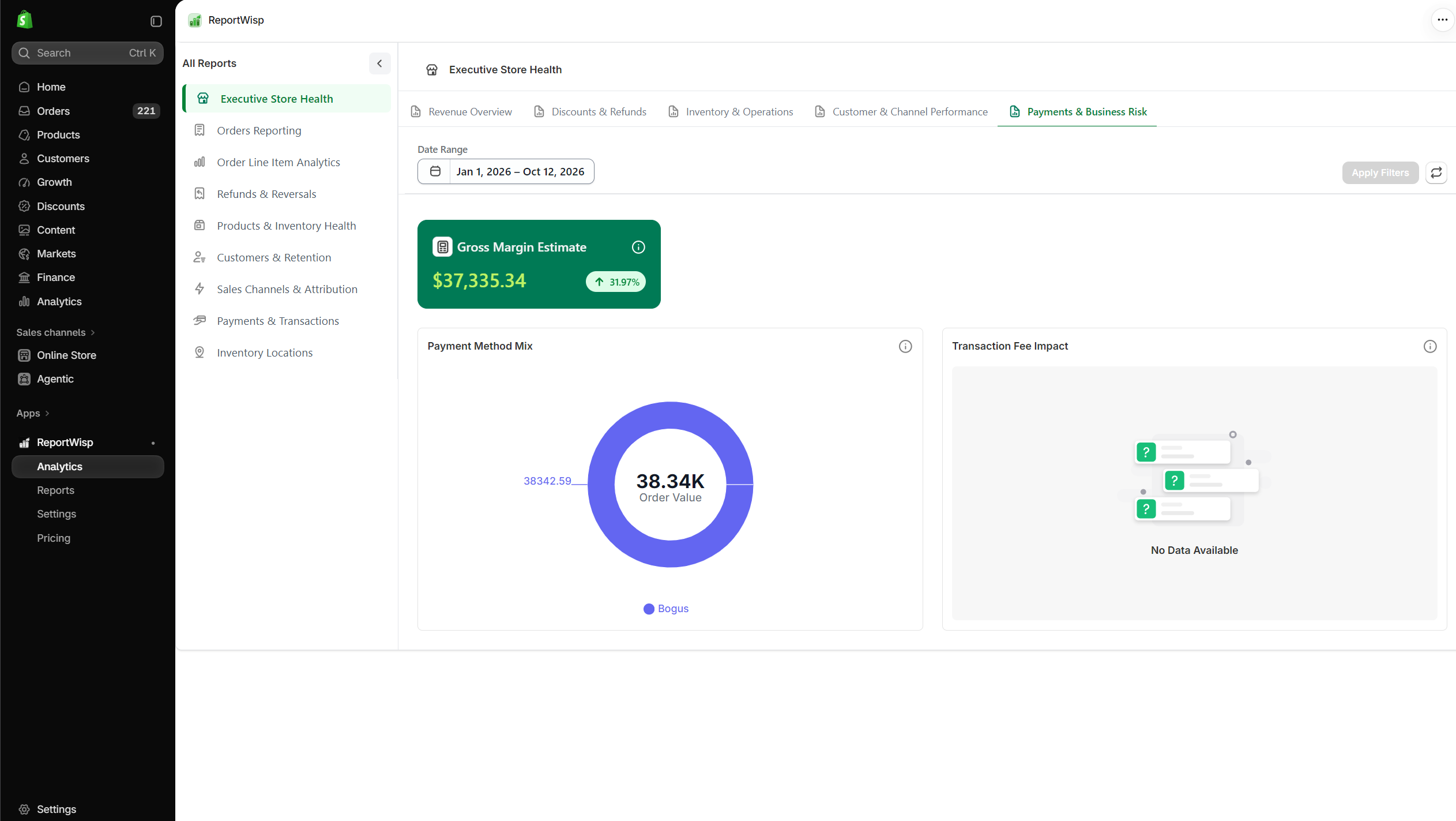
How to use this tab
Use this tab to understand whether payment methods, fees, or business risk signals are affecting store performance.
Recommended use cases for Executive Store Health
Use this report for:
- Daily store performance checks
- Weekly leadership review
- Monthly business review
- Revenue health monitoring
- Refund and discount monitoring
- Inventory and fulfillment risk review
- High-level finance and operations alignment
2. Orders Reporting
What this report category is
Orders Reporting focuses on order-level performance.
It helps merchants understand revenue, order volume, discounts, taxes, refunds, fulfillment status, payment status, channels, geography, and customer behavior from the order perspective.
Who should use it
This report is useful for:
- Store owners
- Operations teams
- Fulfillment teams
- Finance teams
- Customer support teams
- Business analysts
What this report helps you understand
Orders Reporting helps answer questions such as:
- How many orders were placed?
- How much revenue was generated?
- How much was discounted?
- How much tax was collected?
- How many orders are fulfilled or pending?
- How many orders are unpaid?
- Which channels generated orders?
- Which countries or regions contributed to sales?
- How much revenue came from new vs repeat customers?
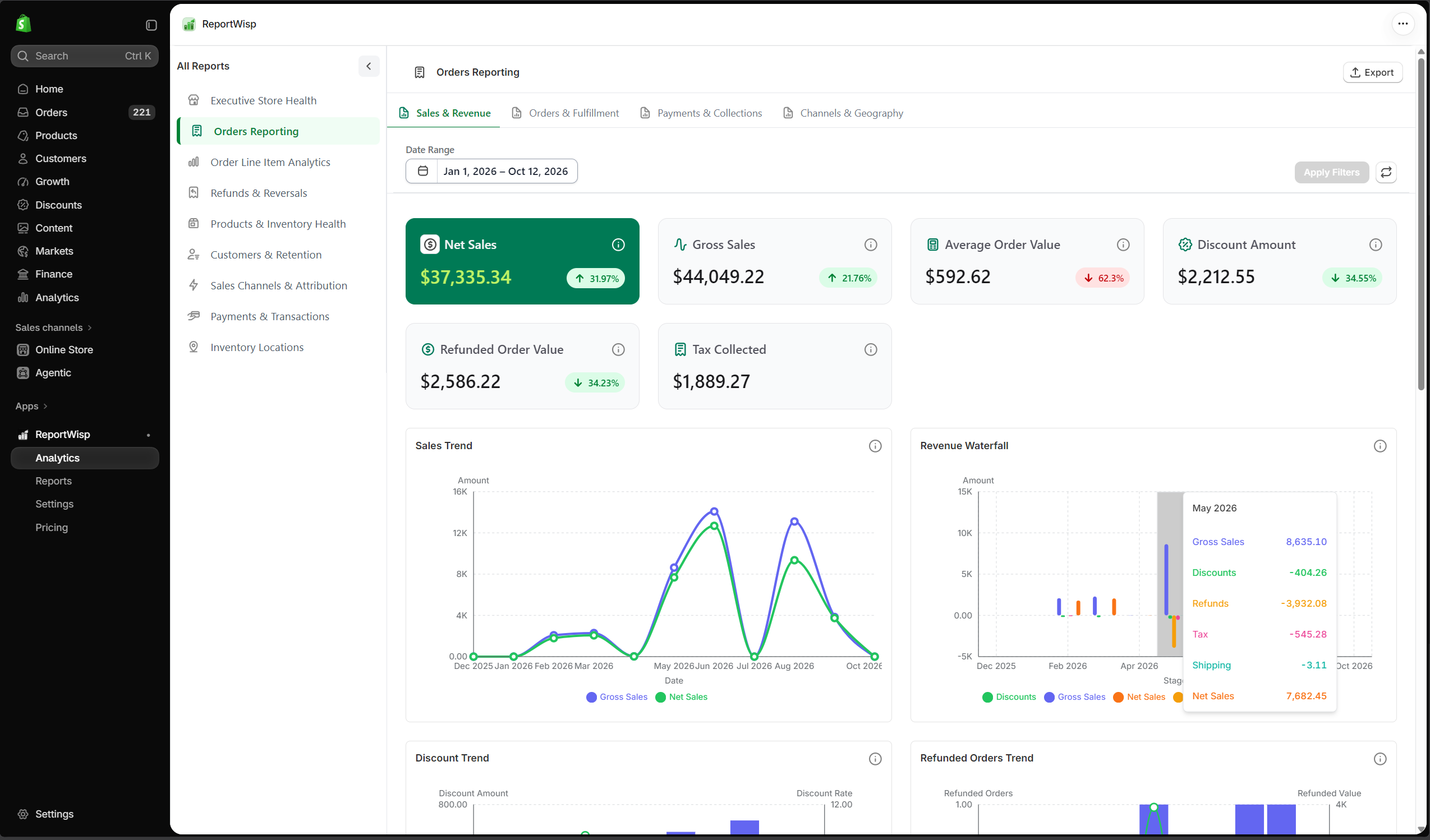
2.1 Sales & Revenue
| Report | Type | What it presents | Decision-making support |
|---|---|---|---|
| Net Sales | KPI | Net sales from orders in the selected period. | Helps measure actual order revenue. |
| Gross Sales | KPI | Gross order sales before discounts and refunds. | Helps understand total sales activity before adjustments. |
| Average Order Value | KPI | Average value per order. | Helps evaluate customer spend and pricing effectiveness. |
| Discount Amount | KPI | Total discount amount applied to orders. | Helps review promotion impact. |
| Refunded Order Value | KPI | Value refunded from orders. | Helps understand revenue reversal. |
| Tax Collected | KPI | Tax amount collected from orders. | Helps support finance and tax review. |
| Sales Trend | Chart | Sales movement over time. | Helps identify growth, decline, seasonality, or spikes. |
| Revenue Waterfall | Chart | Gross sales adjusted by discounts and refunds. | Helps explain how net revenue is formed. |
| Discount Trend | Chart | Discount usage over time. | Helps monitor promotion behavior. |
| Refunded Orders Trend | Chart | Refund activity over time. | Helps detect refund spikes. |
| Orders vs AOV Trend | Chart | Order count and average order value trend. | Helps understand whether revenue change came from volume or order value. |
| Orders Detail Report | Table | Detailed order-level records. | Helps investigate individual orders and export order data. |
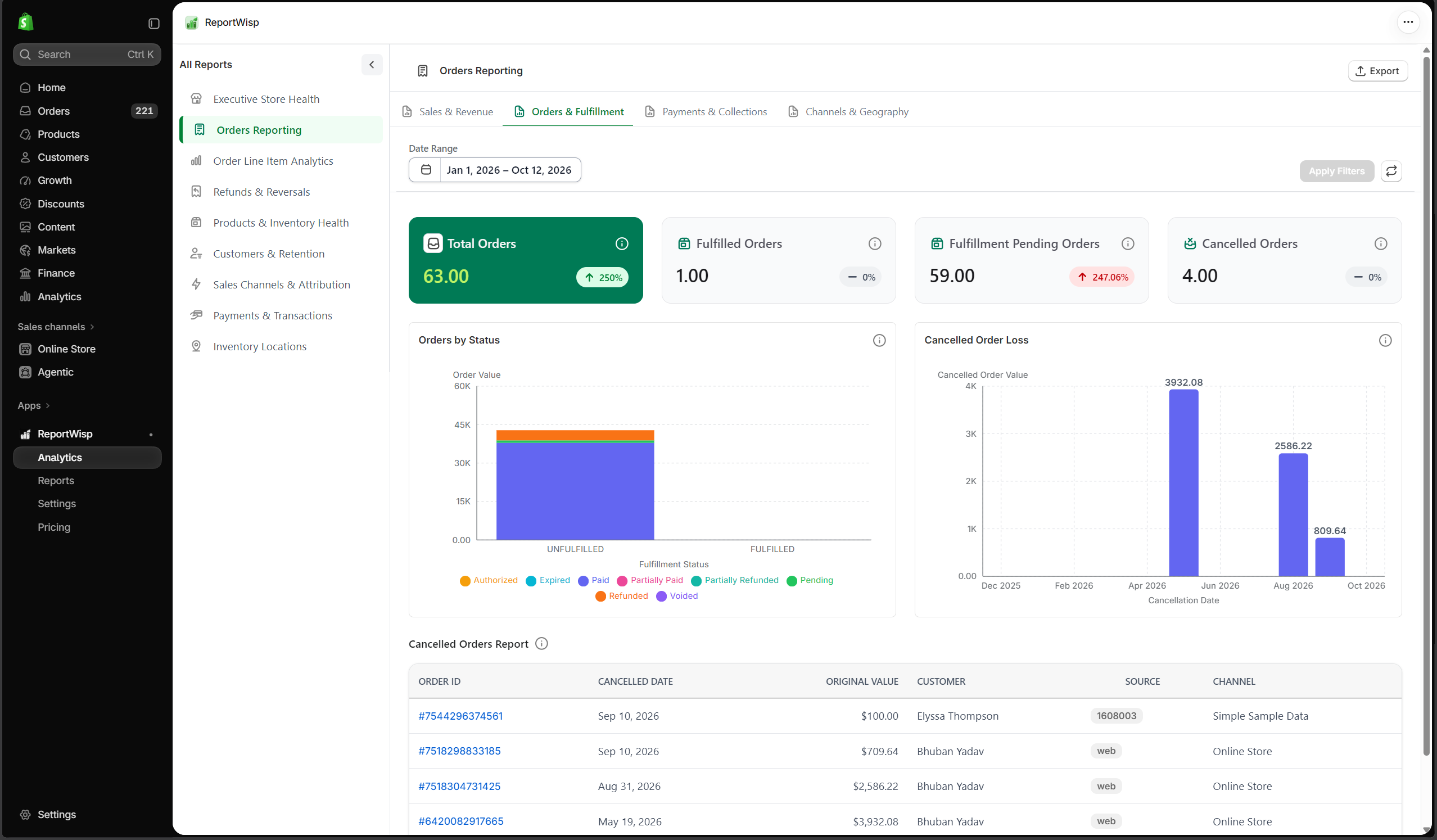
2.2 Orders & Fulfillment
| Report | Type | What it presents | Decision-making support |
|---|---|---|---|
| Total Orders | KPI | Total number of orders. | Helps monitor order volume. |
| Fulfilled Orders | KPI | Number of fulfilled orders. | Helps measure fulfillment completion. |
| Fulfillment Pending Orders | KPI | Orders still pending fulfillment. | Helps identify operational backlog. |
| Cancelled Orders | KPI | Number of cancelled orders. | Helps review lost order activity. |
| Orders by Status | Chart | Orders grouped by status. | Helps understand fulfillment and order processing health. |
| Cancelled Order Loss | Chart/KPI | Revenue value connected to cancelled orders. | Helps estimate lost sales from cancellations. |
| Cancelled Orders Report | Table | Detailed list of cancelled orders. | Helps investigate cancellation patterns and reasons. |
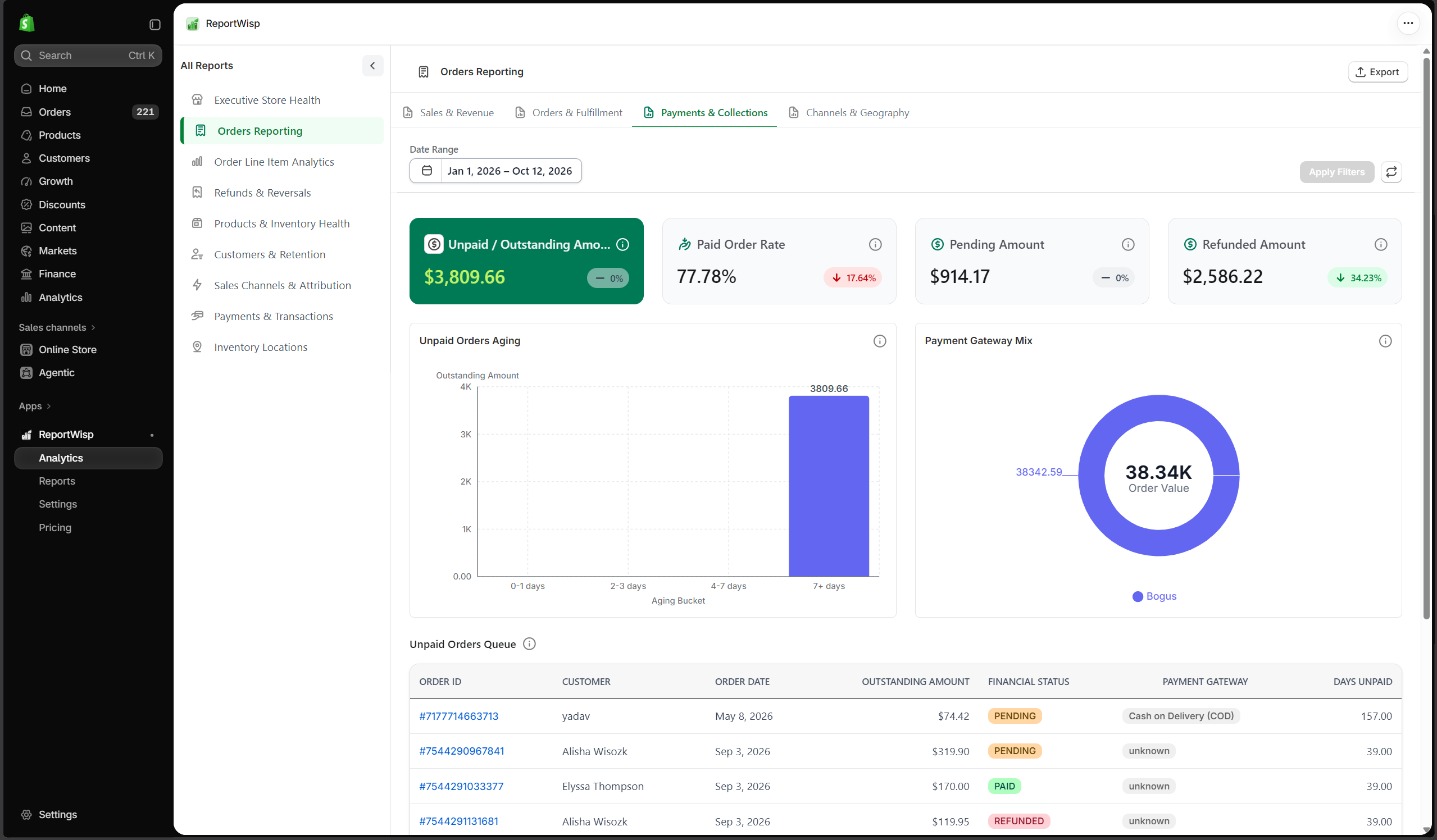
2.3 Payments & Collections
| Report | Type | What it presents | Decision-making support |
|---|---|---|---|
| Unpaid / Outstanding Amount | KPI | Amount not yet paid or collected. | Helps finance track pending collections. |
| Paid Order Rate | KPI | Percentage of orders that are paid. | Helps monitor payment completion. |
| Unpaid Orders Aging | Chart/Table | Unpaid orders grouped by age. | Helps prioritize follow-up on older unpaid orders. |
| Payment Gateway Mix | Chart | Orders grouped by payment gateway. | Helps understand payment method distribution. |
| Unpaid Orders Queue | Table | Detailed unpaid order list. | Helps operations or finance follow up on unpaid orders. |
2.4 Customers
| Report | Type | What it presents | Decision-making support |
|---|---|---|---|
| New Customer Orders | KPI | Orders from new customers. | Helps measure acquisition-driven order activity. |
| Repeat Customer Orders | KPI | Orders from returning customers. | Helps measure retention-driven order activity. |
| New vs Repeat Orders | Chart | Order split between new and repeat customers. | Helps understand whether revenue depends on acquisition or retention. |
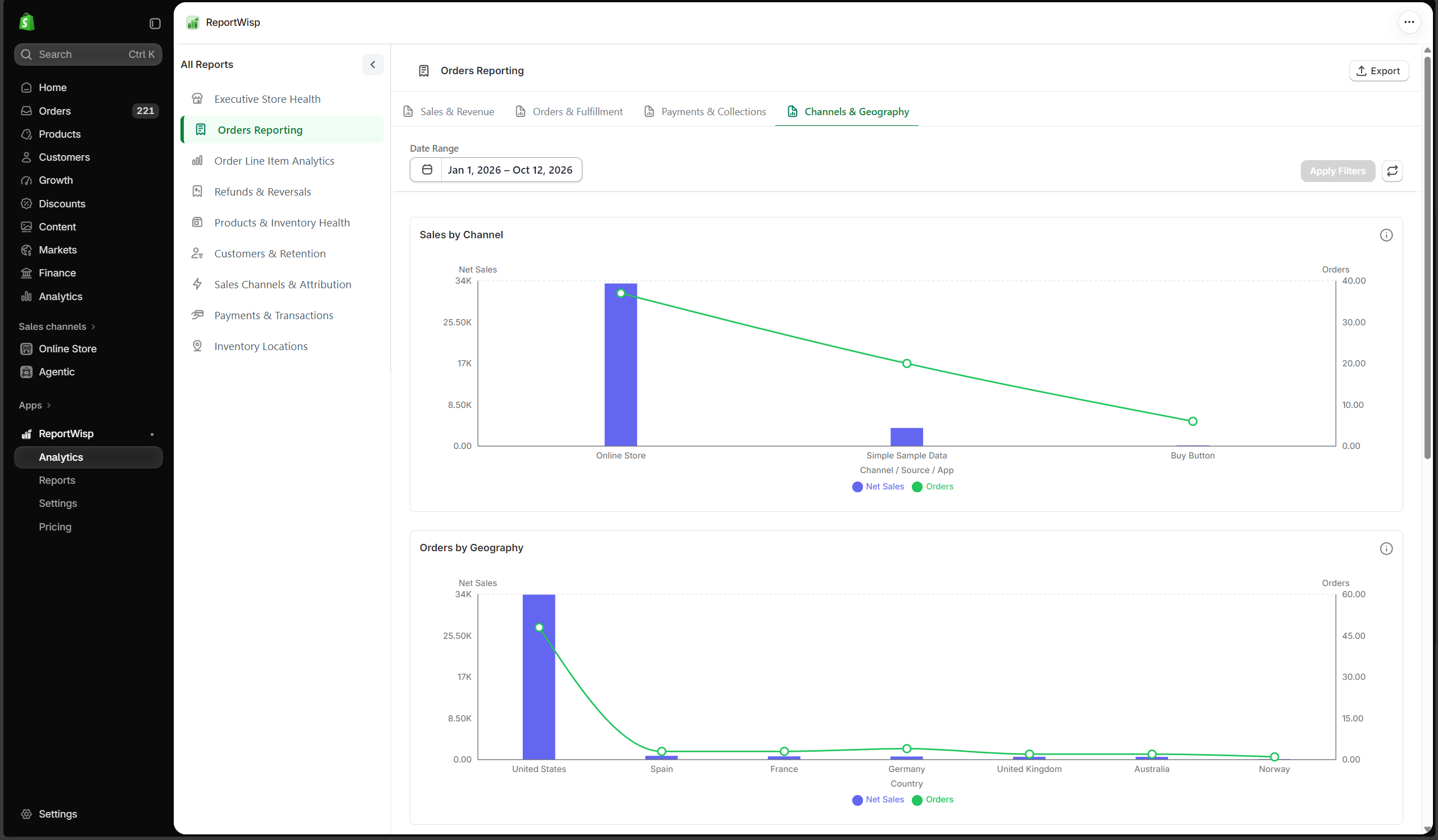
2.5 Channels & Geography
| Report | Type | What it presents | Decision-making support |
|---|---|---|---|
| Sales by Channel | Chart | Sales grouped by sales channel. | Helps identify top-performing channels. |
| Channel Order Report | Table | Order details by channel. | Helps review channel-level order performance. |
| Orders by Geography | Chart | Orders grouped by country or region. | Helps understand geographic demand. |
| Geography Sales Report | Table | Sales details by geography. | Helps support regional analysis and planning. |
Recommended use cases for Orders Reporting
Use Orders Reporting to:
- Monitor daily and weekly order performance
- Track fulfillment progress
- Review unpaid or pending orders
- Understand sales by channel and geography
- Review discounts, refunds, and taxes
- Export order-level tables for operations or finance review
3. Order Line Item Analytics
What this report category is
Order Line Item Analytics focuses on the product and variant-level details inside orders.
While Orders Reporting explains order-level performance, Order Line Item Analytics explains what was actually sold inside those orders.
Who should use it
This report is useful for:
- Store owners
- Merchandising teams
- Product teams
- Inventory managers
- Operations teams
- Finance teams
What this report helps you understand
Order Line Item Analytics helps answer questions such as:
- Which products sold the most units?
- Which SKUs generated the most revenue?
- Which variants performed best?
- Which vendors or collections contributed most to sales?
- Which products received the most discounts?
- Which products are creating fulfillment backlog?
- Which products are being refunded or removed most often?
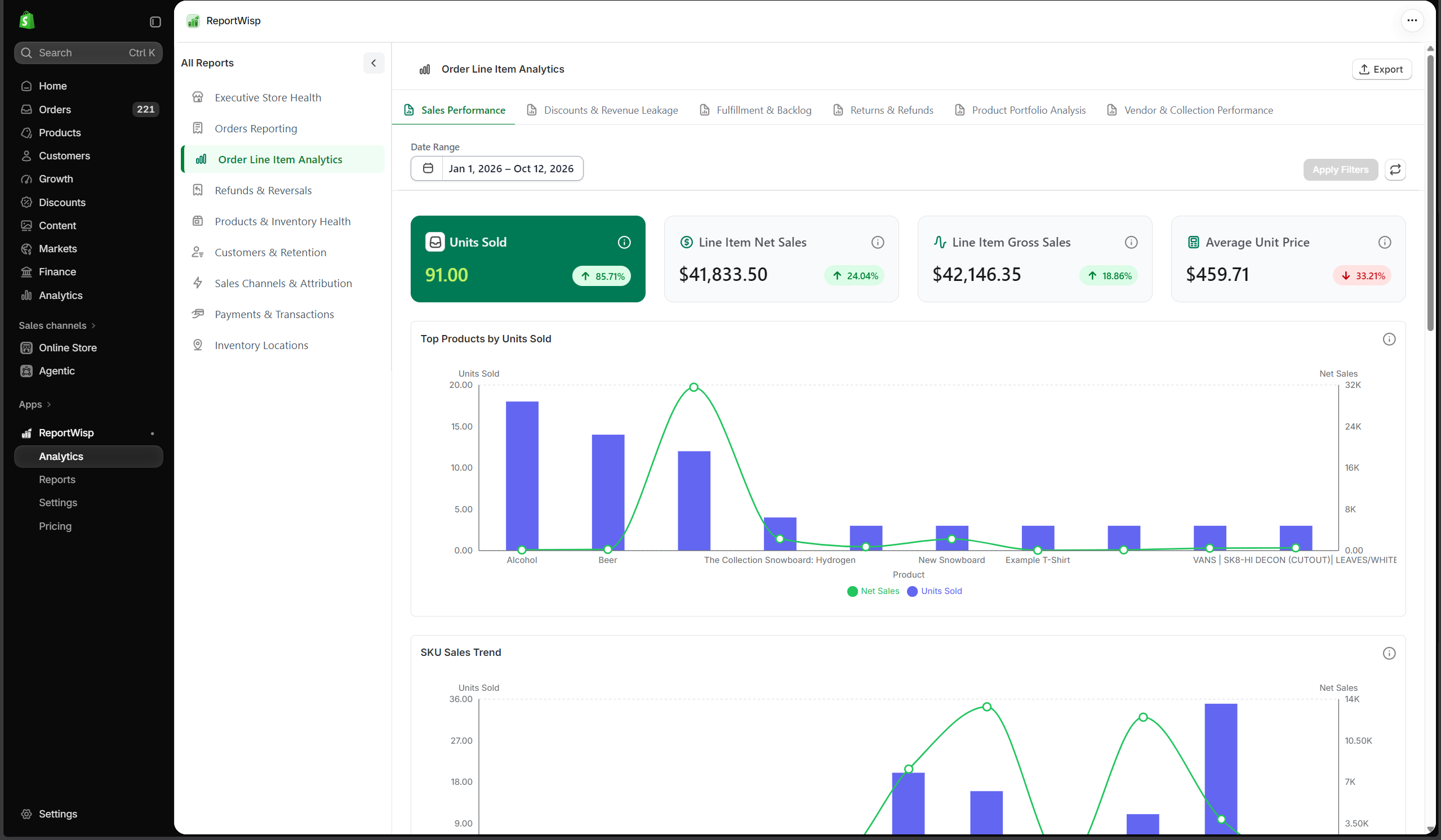
3.1 Sales Performance
| Report | Type | What it presents | Decision-making support |
|---|---|---|---|
| Units Sold | KPI | Total quantity sold. | Helps measure product movement. |
| Line Item Net Sales | KPI | Net sales at line-item level. | Helps understand product-level revenue after adjustments. |
| Line Item Gross Sales | KPI | Gross sales from line items. | Helps understand raw product revenue. |
| Average Unit Price | KPI | Average price per unit sold. | Helps review pricing and discount impact. |
| Top Products by Units Sold | Chart | Products ranked by units sold. | Helps identify fast-moving products. |
| SKU Sales Trend | Chart | SKU sales over time. | Helps understand product demand patterns. |
| Top SKUs by Net Sales | Chart | SKUs ranked by net revenue. | Helps identify highest revenue contributors. |
| SKU Performance Report | Table | Detailed SKU-level performance. | Helps product and inventory teams investigate SKU results. |
| Product Performance Report | Table | Product-level sales details. | Helps review product performance and export product data. |
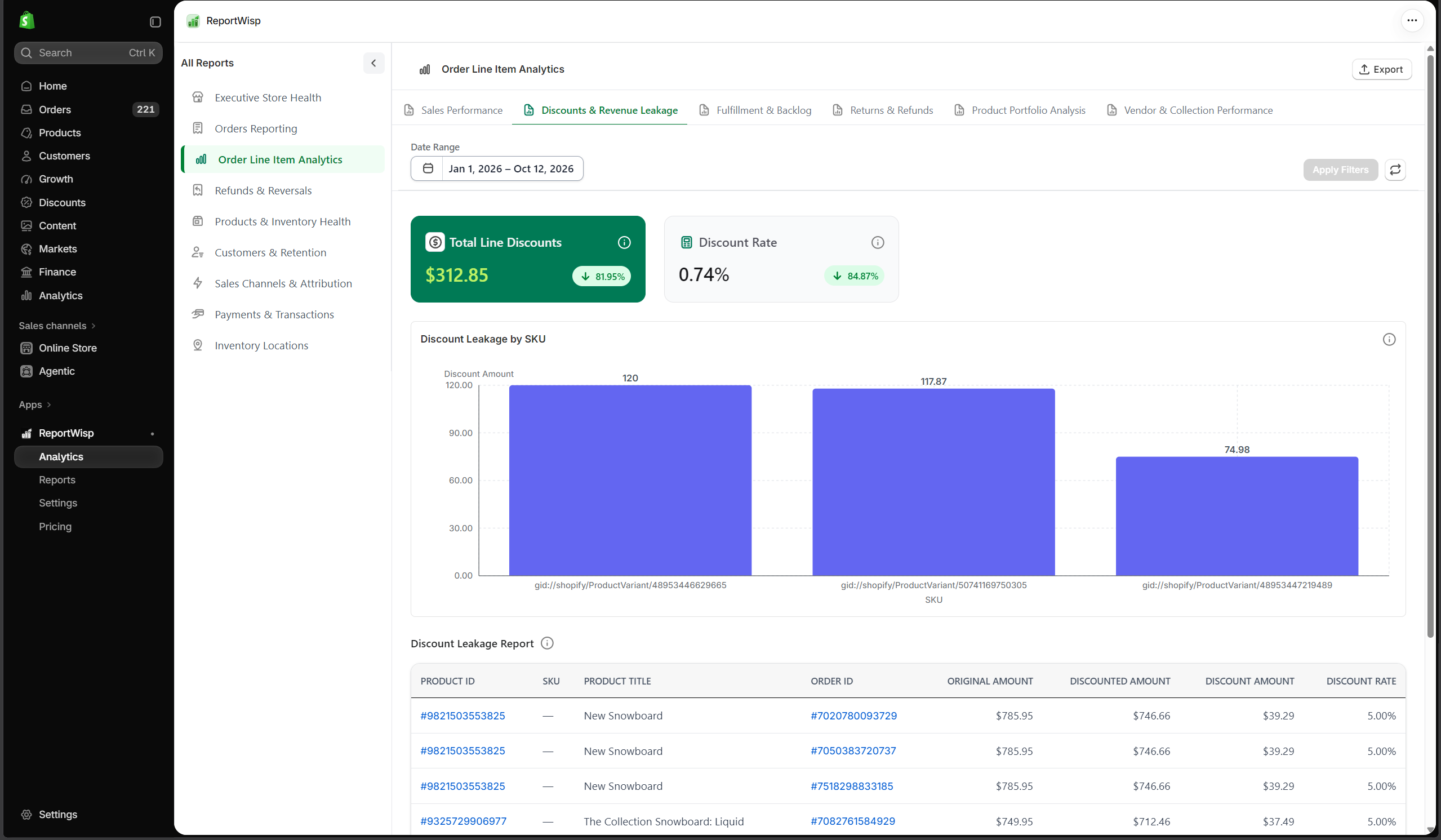
3.2 Discounts & Revenue Leakage
| Report | Type | What it presents | Decision-making support |
|---|---|---|---|
| Total Line Discounts | KPI | Total discounts applied at line-item level. | Helps measure product-level discounting. |
| Discount Rate | KPI | Discount percentage at line-item level. | Helps understand revenue leakage from discounts. |
| Discount Leakage by SKU | Chart | Discount impact by SKU. | Helps identify products with high discount dependency. |
| Discount Leakage Report | Table | Detailed line-item discount report. | Helps review discount behavior by product or SKU. |
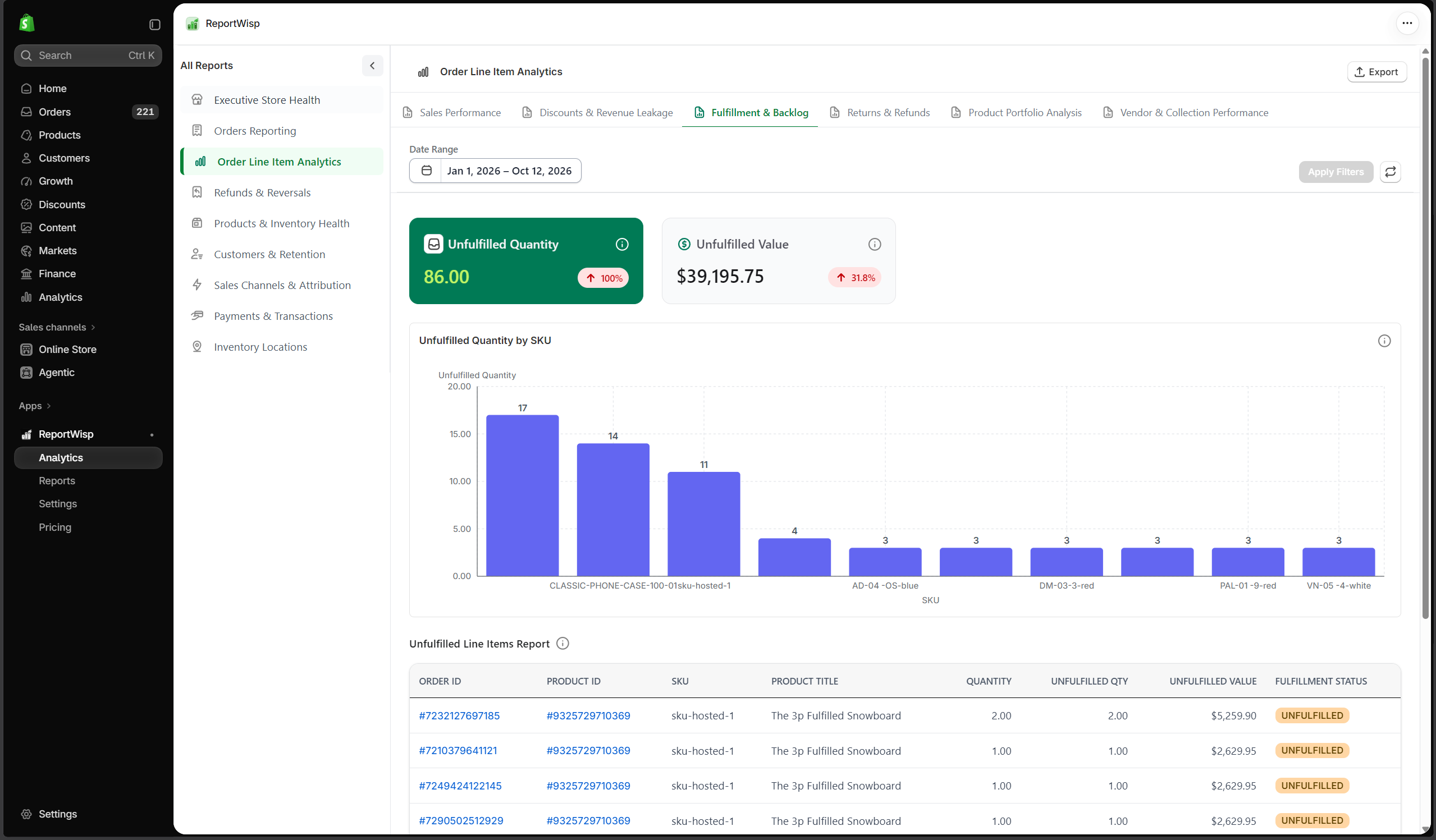
3.3 Fulfillment & Backlog
| Report | Type | What it presents | Decision-making support |
|---|---|---|---|
| Unfulfilled Quantity | KPI | Quantity not yet fulfilled. | Helps operations identify backlog. |
| Unfulfilled Value | KPI | Revenue value tied to unfulfilled items. | Helps estimate fulfillment-related revenue risk. |
| Unfulfilled Quantity by SKU | Chart | Unfulfilled quantity grouped by SKU. | Helps identify products causing fulfillment backlog. |
| Unfulfilled Line Items Report | Table | Detailed unfulfilled line-item records. | Helps operations teams prioritize fulfillment. |
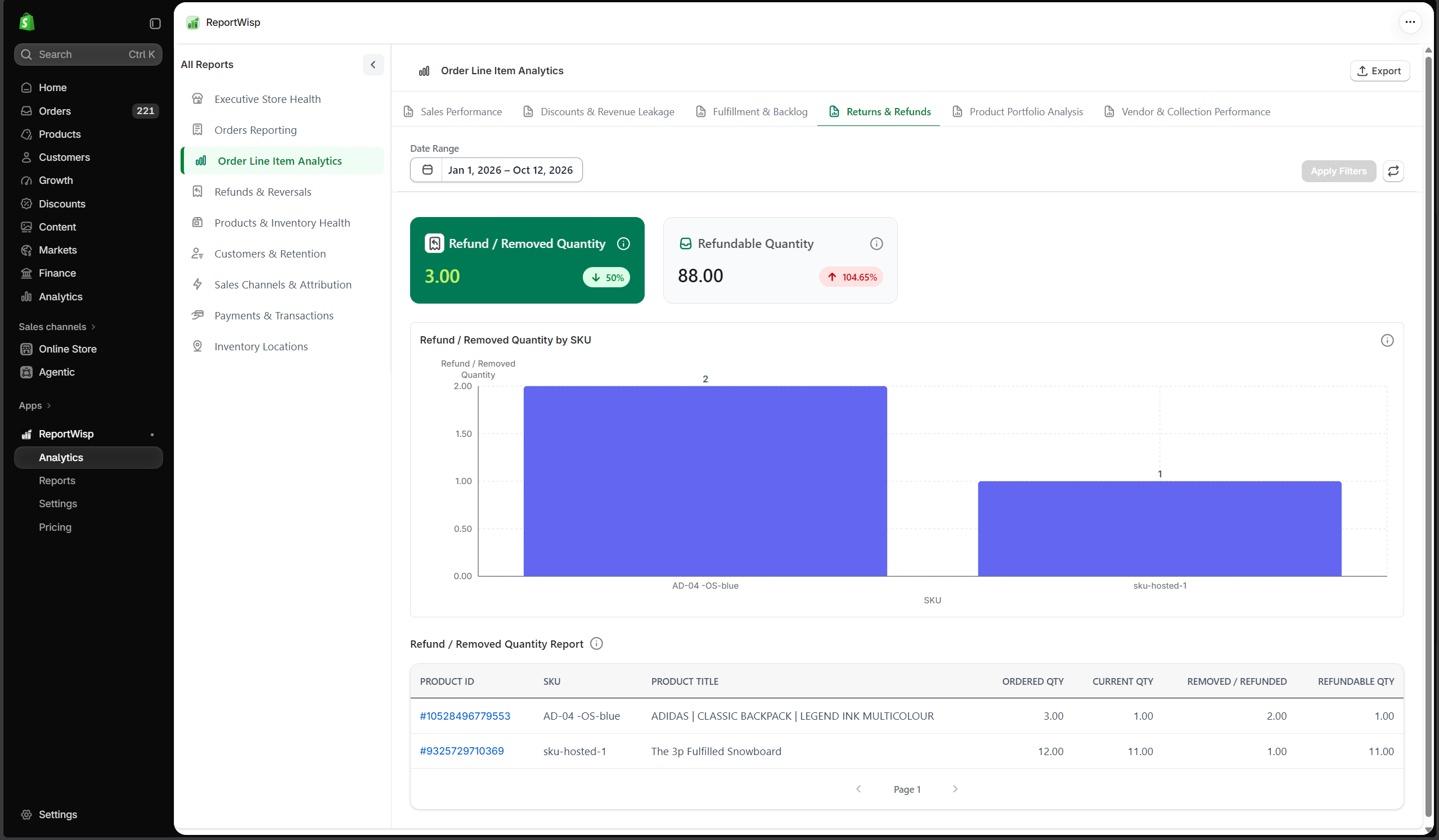
3.4 Returns & Refunds
| Report | Type | What it presents | Decision-making support |
|---|---|---|---|
| Refund / Removed Quantity | KPI | Quantity refunded or removed. | Helps identify product return or reversal activity. |
| Refundable Quantity | KPI | Quantity still eligible for refund. | Helps understand remaining refund exposure. |
| Refund / Removed Quantity by SKU | Chart | Refunded or removed quantity grouped by SKU. | Helps identify problematic products. |
| Refund / Removed Quantity Report | Table | Detailed item-level refund/removal records. | Helps investigate product issues and customer experience problems. |
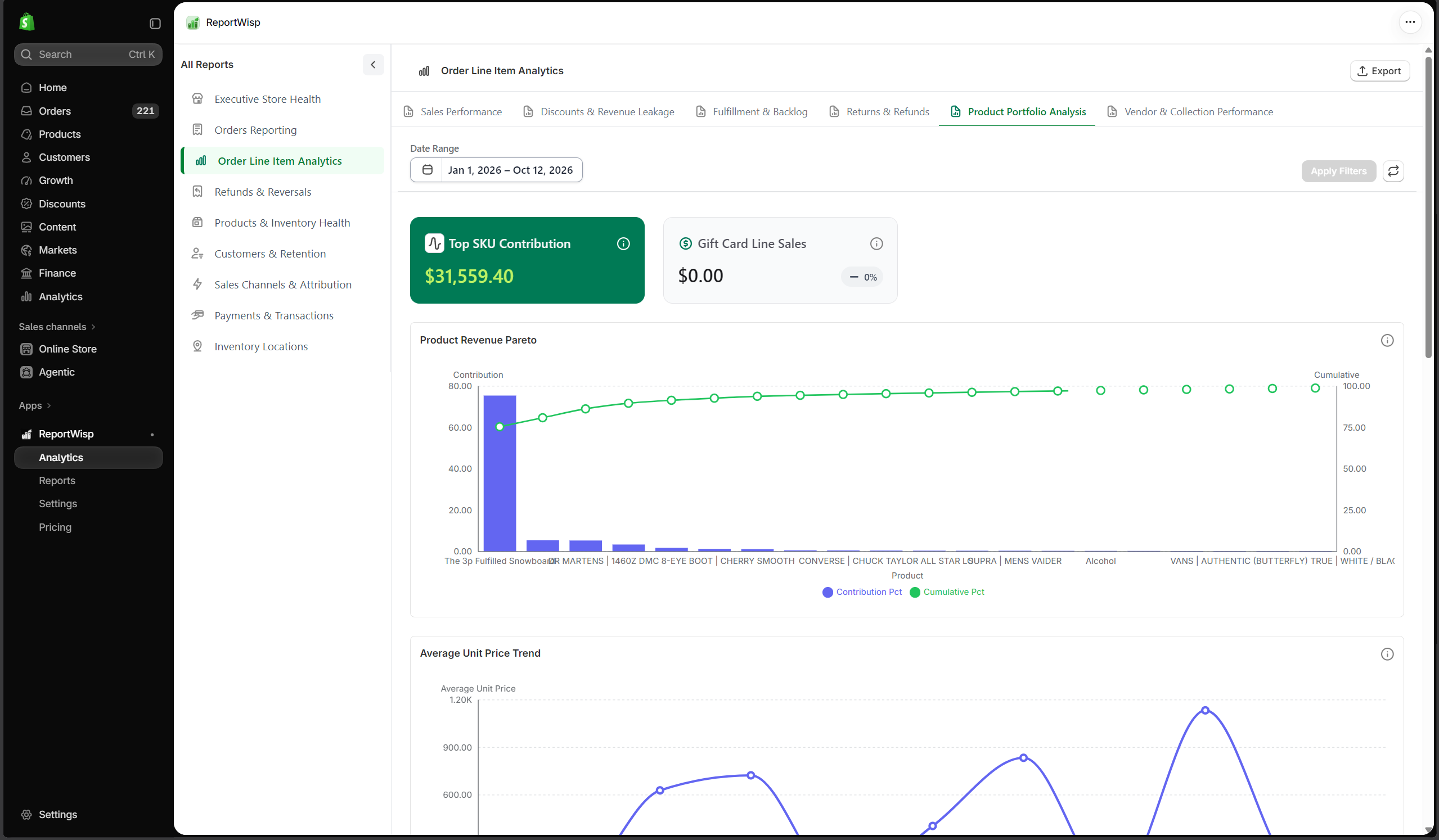
3.5 Product Portfolio Analysis
| Report | Type | What it presents | Decision-making support |
|---|---|---|---|
| Top SKU Contribution | KPI/Chart | Revenue contribution from top SKUs. | Helps understand product concentration risk. |
| Gift Card Line Sales | KPI/Chart | Gift card sales at line-item level. | Helps separate merchandise and gift card sales. |
| Product Revenue Pareto | Chart | Product revenue distribution. | Helps identify whether a small number of products drive most revenue. |
| Average Unit Price Trend | Chart | Unit price movement over time. | Helps review pricing or discount changes. |
| Sales by Category | Chart | Sales grouped by product category/type. | Helps identify strong and weak product categories. |
| Gross vs Net Sales by Product | Chart | Product gross sales compared with net sales. | Helps review discount and refund impact by product. |
| Collection Performance Report | Table | Collection-level performance details. | Helps review collection performance and planning. |
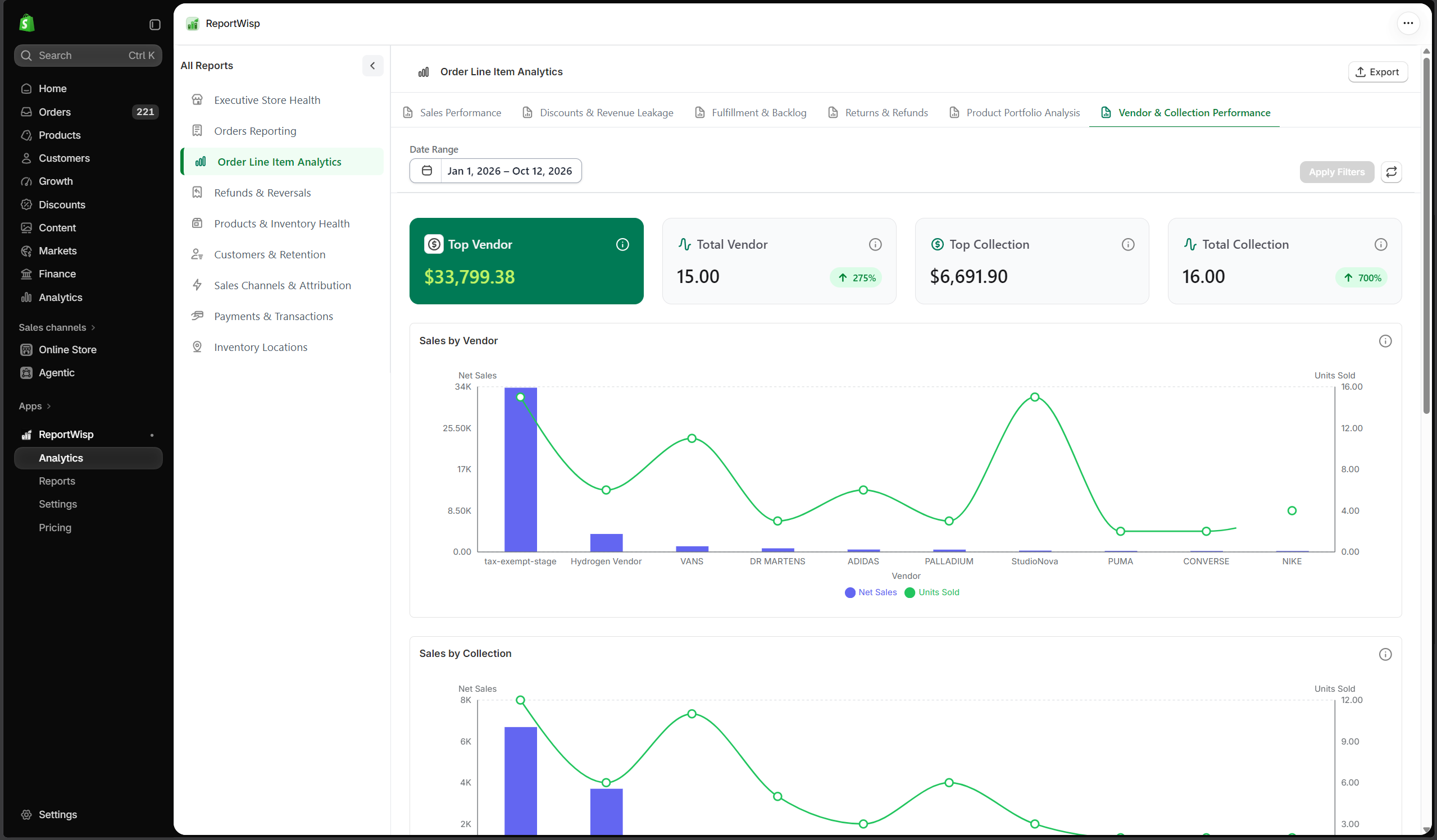
3.6 Vendor & Collection Performance
| Report | Type | What it presents | Decision-making support |
|---|---|---|---|
| Sales by Vendor | Chart | Sales grouped by vendor. | Helps identify vendor contribution. |
| Sales by Collection | Chart | Sales grouped by collection. | Helps compare merchandising groups. |
| Gift Card vs Merchandise Sales | Chart | Gift card sales compared with merchandise sales. | Helps separate different revenue types. |
| Vendor Sales Report | Table | Vendor-level sales details. | Helps support vendor review and purchasing decisions. |
Recommended use cases for Order Line Item Analytics
Use this report to:
- Identify best-selling products and SKUs
- Find slow-moving or underperforming products
- Review discount impact by SKU
- Identify fulfillment backlog by product
- Investigate refund-prone products
- Support merchandising and inventory planning
- Export SKU or product performance tables
4. Refunds & Reversals
What this report category is
Refunds & Reversals focuses on refund activity, revenue reversal, financial impact, and refund-related operational risk.
Refunds directly affect revenue quality, customer experience, finance reconciliation, and product performance. This report category helps merchants understand not just how much was refunded, but where refunds are coming from and why they may matter.
Who should use it
This report is useful for:
- Store owners
- Finance teams
- Customer support teams
- Operations teams
- Product teams
- Risk teams
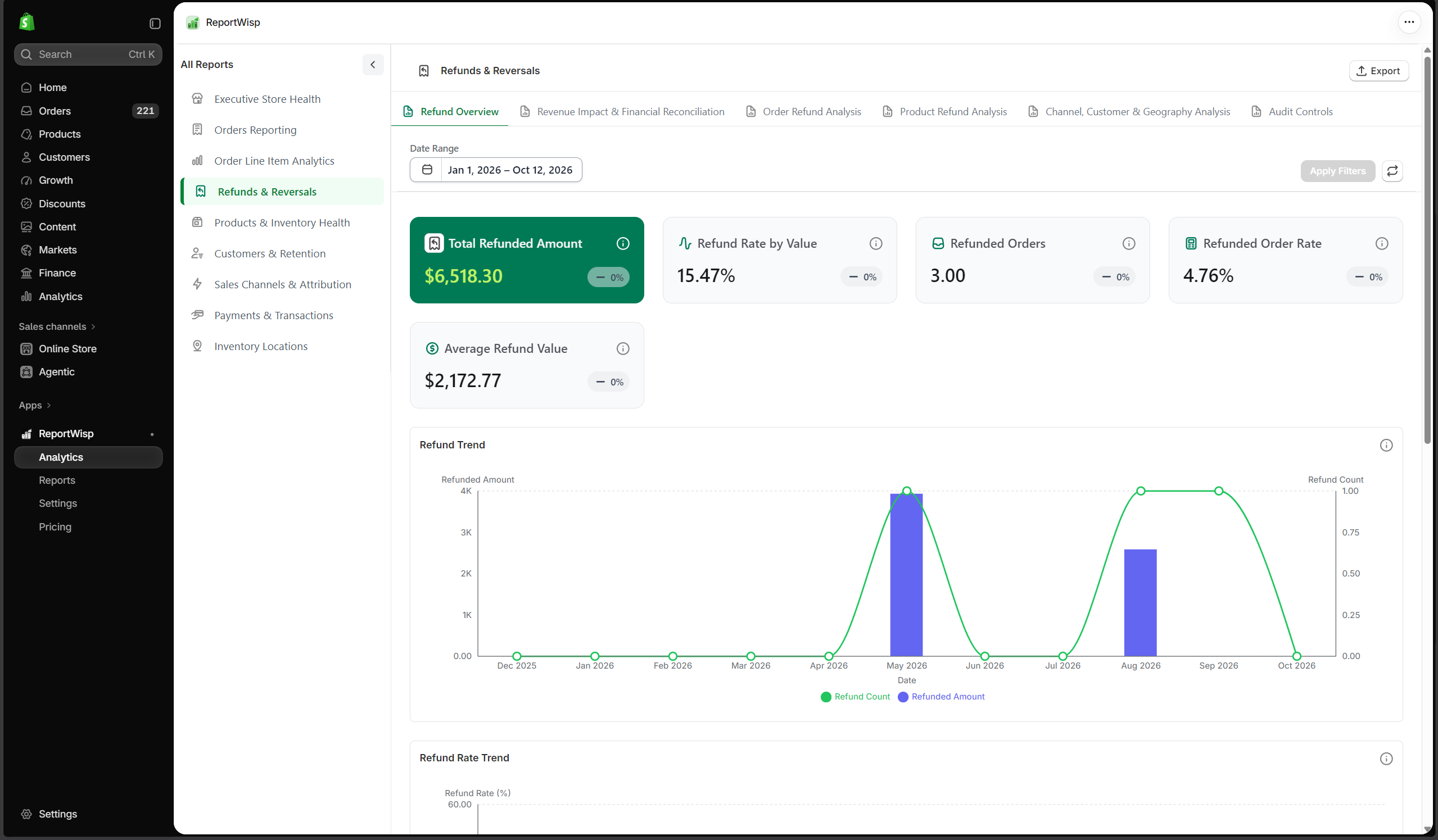
4.1 Refund Overview
| Report | Type | What it presents | Decision-making support |
|---|---|---|---|
| Total Refunded Amount | KPI | Total refunded value. | Helps measure refund impact on revenue. |
| Refund Rate by Value | KPI | Refunds as a percentage of sales. | Helps evaluate revenue quality. |
| Refunded Orders | KPI | Number of orders with refunds. | Helps measure refund frequency. |
| Refunded Order Rate | KPI | Percentage of orders refunded. | Helps compare refund volume against order volume. |
| Average Refund Value | KPI | Average value per refund. | Helps understand refund severity. |
| Refund Trend | Chart | Refund value over time. | Helps identify refund spikes or recurring issues. |
| Refund Rate Trend | Chart | Refund rate over time. | Helps monitor whether refund risk is increasing. |
| Refunds vs Sales | Chart | Refunds compared against sales. | Helps evaluate revenue loss relative to sales activity. |
| Refunded Orders Report | Table | Detailed refunded order records. | Helps investigate affected orders. |
4.2 Revenue Impact & Financial Reconciliation
| Report | Type | What it presents | Decision-making support |
|---|---|---|---|
| Refunded Shipping Amount | KPI | Shipping amount refunded. | Helps finance understand shipping-related reversals. |
| Refund Transaction Amount | KPI | Payment transaction value related to refunds. | Helps reconcile refunds against transactions. |
| Refunded Discount Value | KPI | Discount value involved in refunded orders/items. | Helps understand discount-related refund impact. |
| Refunded Shipping Trend | Chart | Shipping refund movement over time. | Helps identify shipping refund patterns. |
| Refund Transaction Reconciliation | Chart | Refunds compared with transaction records. | Helps identify reconciliation differences. |
| Refund Transaction Reconciliation Report | Table | Detailed refund transaction records. | Helps finance investigate refund/payment alignment. |
| Refund Shipping Report | Table | Detailed shipping refund records. | Helps review shipping refund activity. |
| Partial vs Full Refund Report | Table | Refund records grouped by partial or full refund. | Helps identify severity of refunds. |
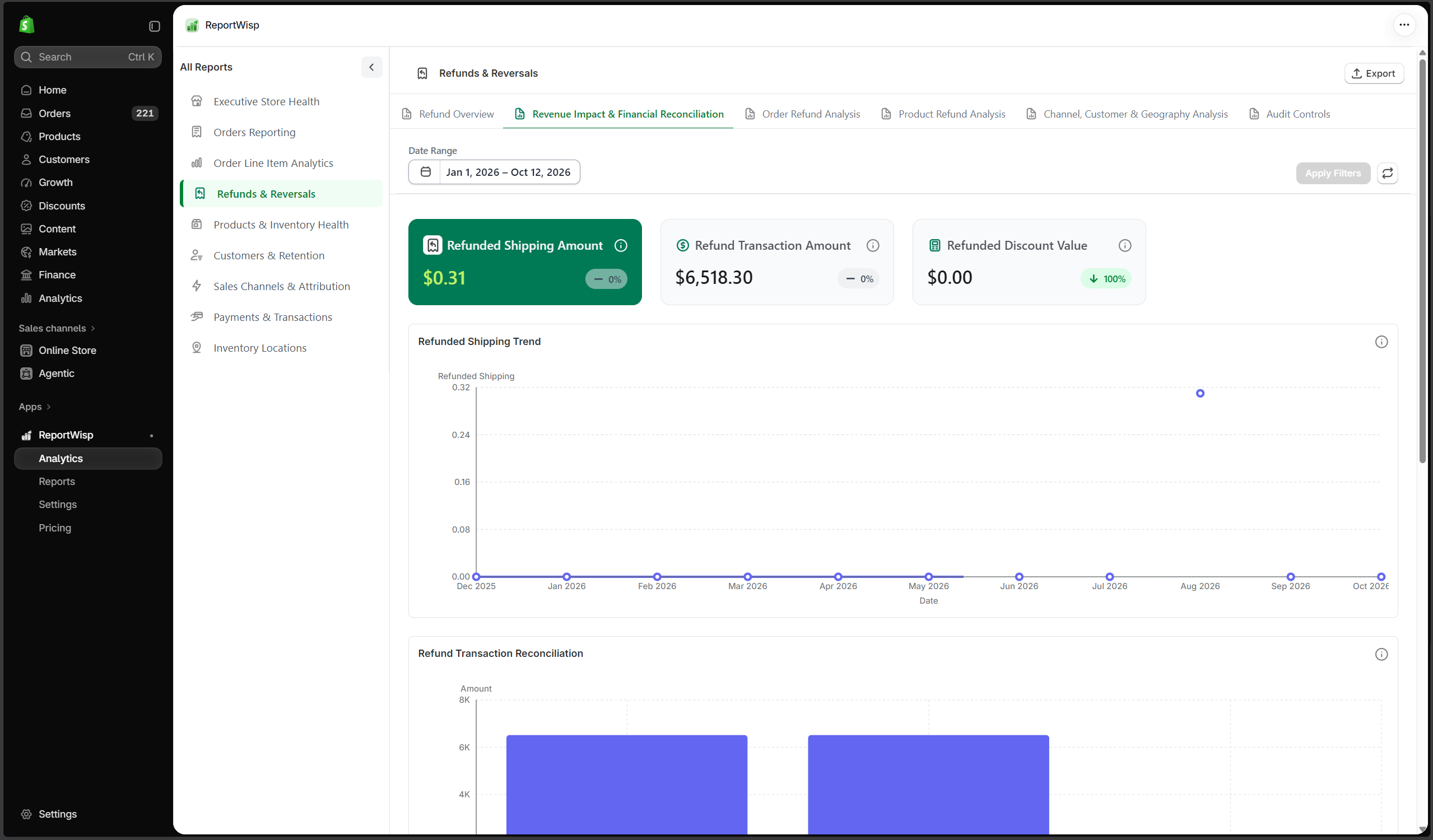
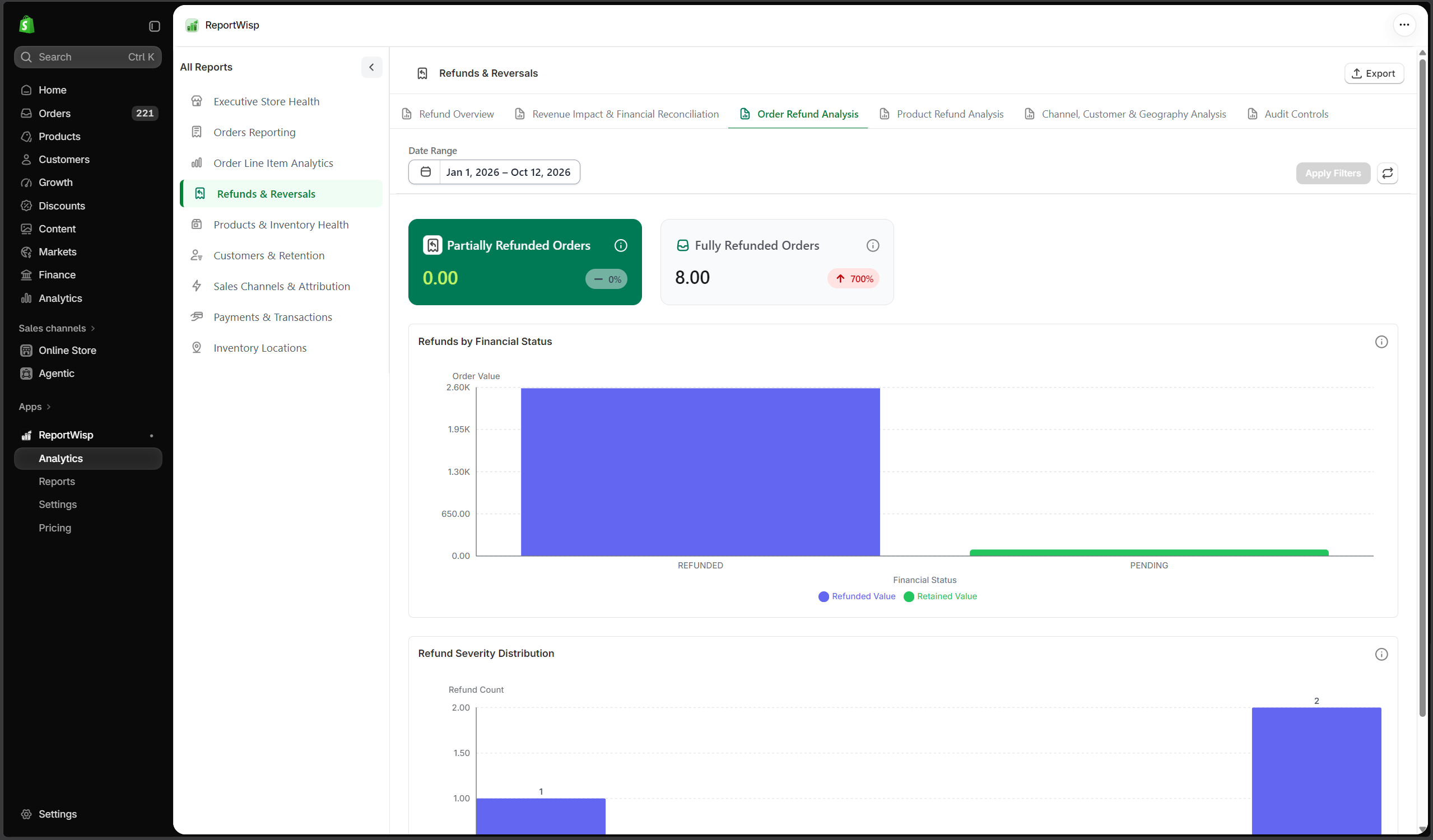
4.3 Order Refund Analysis
| Report | Type | What it presents | Decision-making support |
|---|---|---|---|
| Partially Refunded Orders | KPI/Table | Orders that were partially refunded. | Helps identify orders with partial revenue reversal. |
| Fully Refunded Orders | KPI/Table | Orders that were fully refunded. | Helps identify complete revenue loss. |
| Refunds by Financial Status | Chart | Refunds grouped by order financial status. | Helps understand refund relationship with payment status. |
| Refund Severity Distribution | Chart | Refunds grouped by severity. | Helps understand whether refunds are small adjustments or major reversals. |
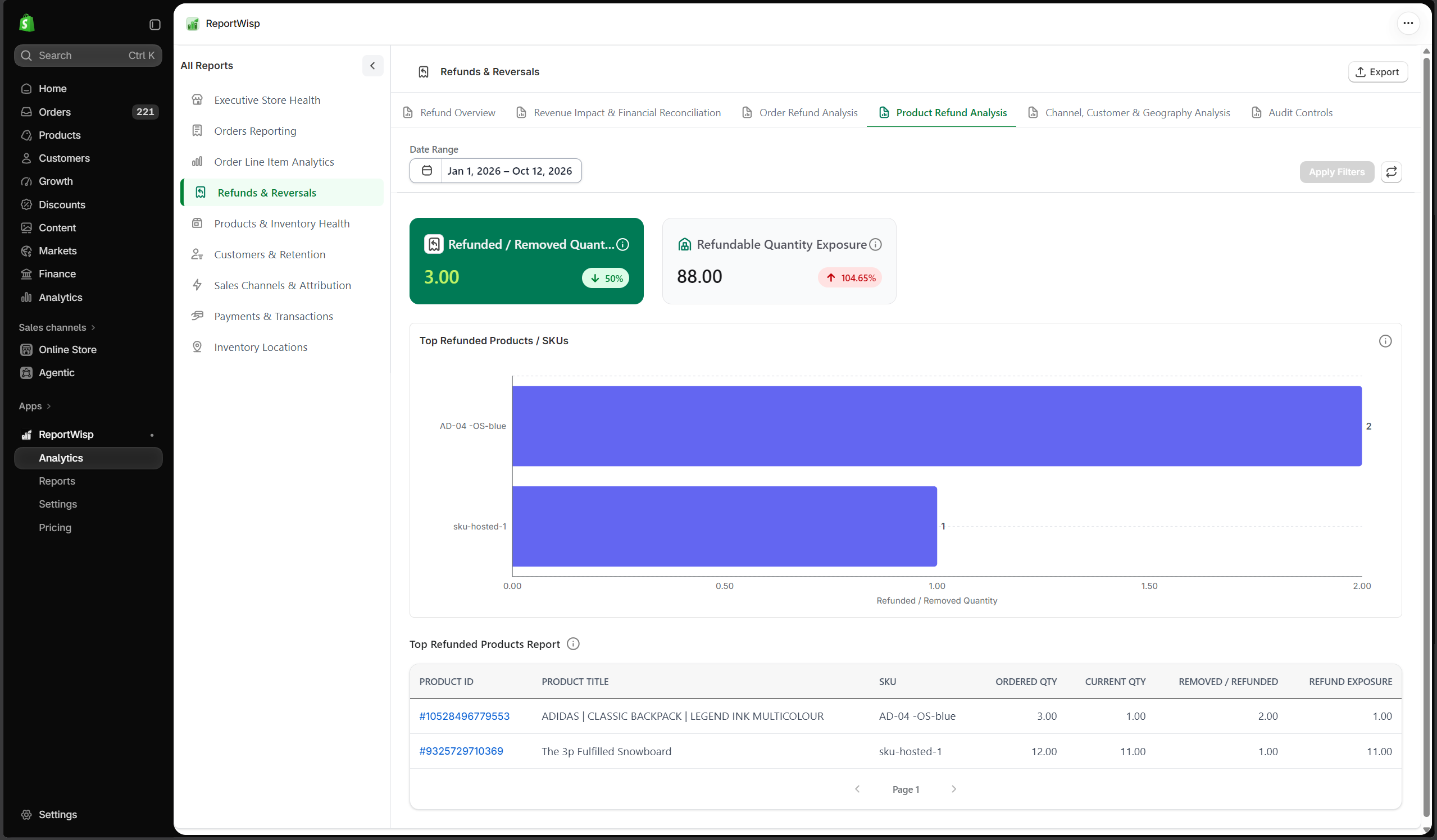
4.4 Product Refund Analysis
| Report | Type | What it presents | Decision-making support |
|---|---|---|---|
| Refunded / Removed Quantity | KPI | Quantity refunded or removed. | Helps identify item-level return activity. |
| Refundable Quantity Exposure | KPI | Quantity still exposed to possible refund. | Helps estimate remaining refund risk. |
| Top Refunded Products / SKUs | Chart | Products or SKUs with highest refund activity. | Helps identify product issues. |
| Top Refunded Products Report | Table | Detailed product refund records. | Helps product and support teams investigate recurring issues. |
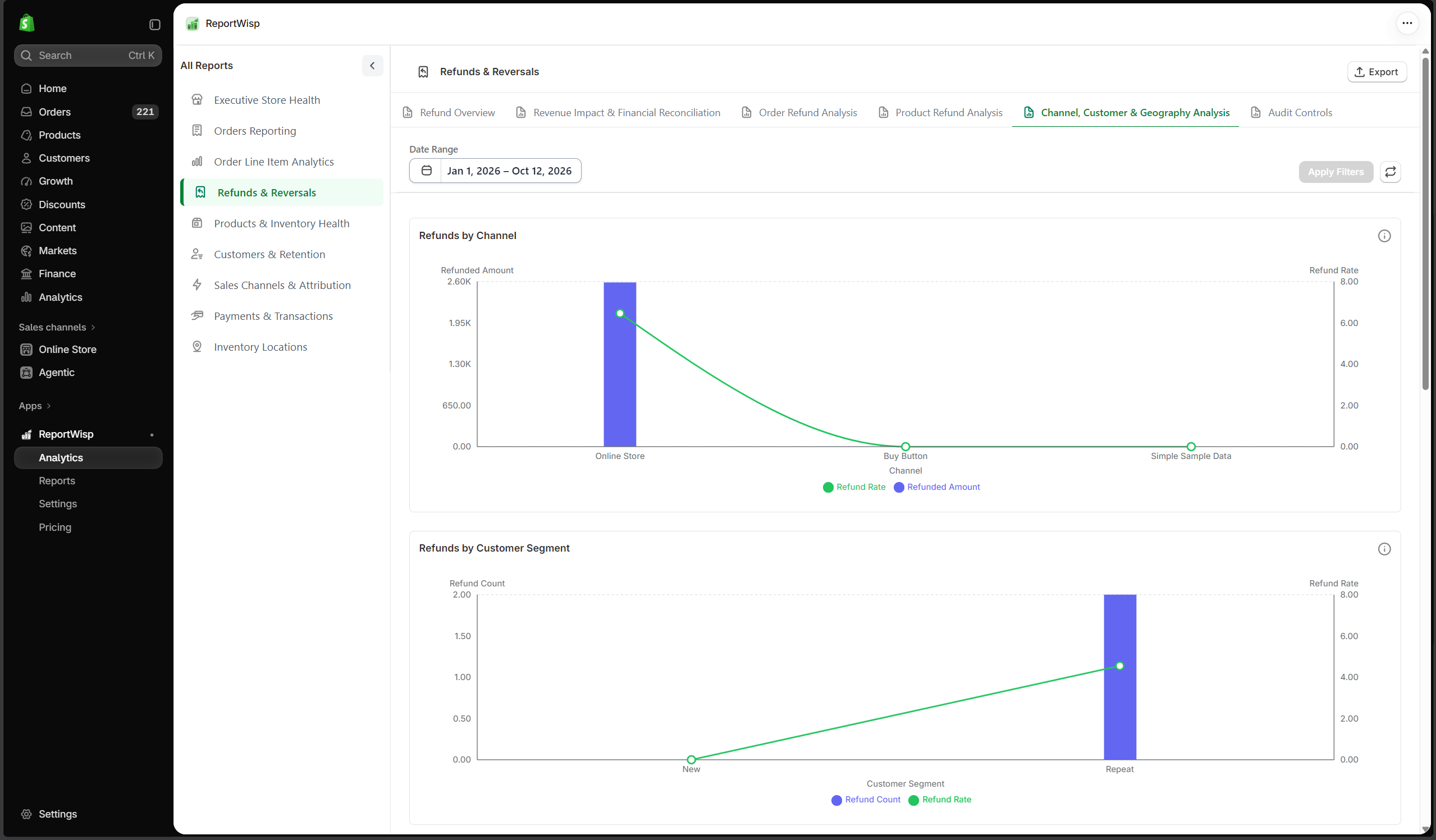
4.5 Channel, Customer & Geography Analysis
| Report | Type | What it presents | Decision-making support |
|---|---|---|---|
| Refunds by Channel | Chart | Refund activity grouped by channel. | Helps identify channels with higher refund risk. |
| Refunds by Customer Segment | Chart | Refunds grouped by customer segment. | Helps identify customer groups with refund concentration. |
| Refunds by Geography | Chart | Refunds grouped by location. | Helps identify regional refund patterns. |
| Refunds by Payment Gateway | Chart | Refunds grouped by gateway. | Helps review payment/refund behavior by gateway. |
| Channel Refund Report | Table | Detailed channel refund records. | Helps investigate channel quality. |
| Customer Refund Risk Report | Table | Customers with refund-related risk signals. | Helps support customer service and risk review. |
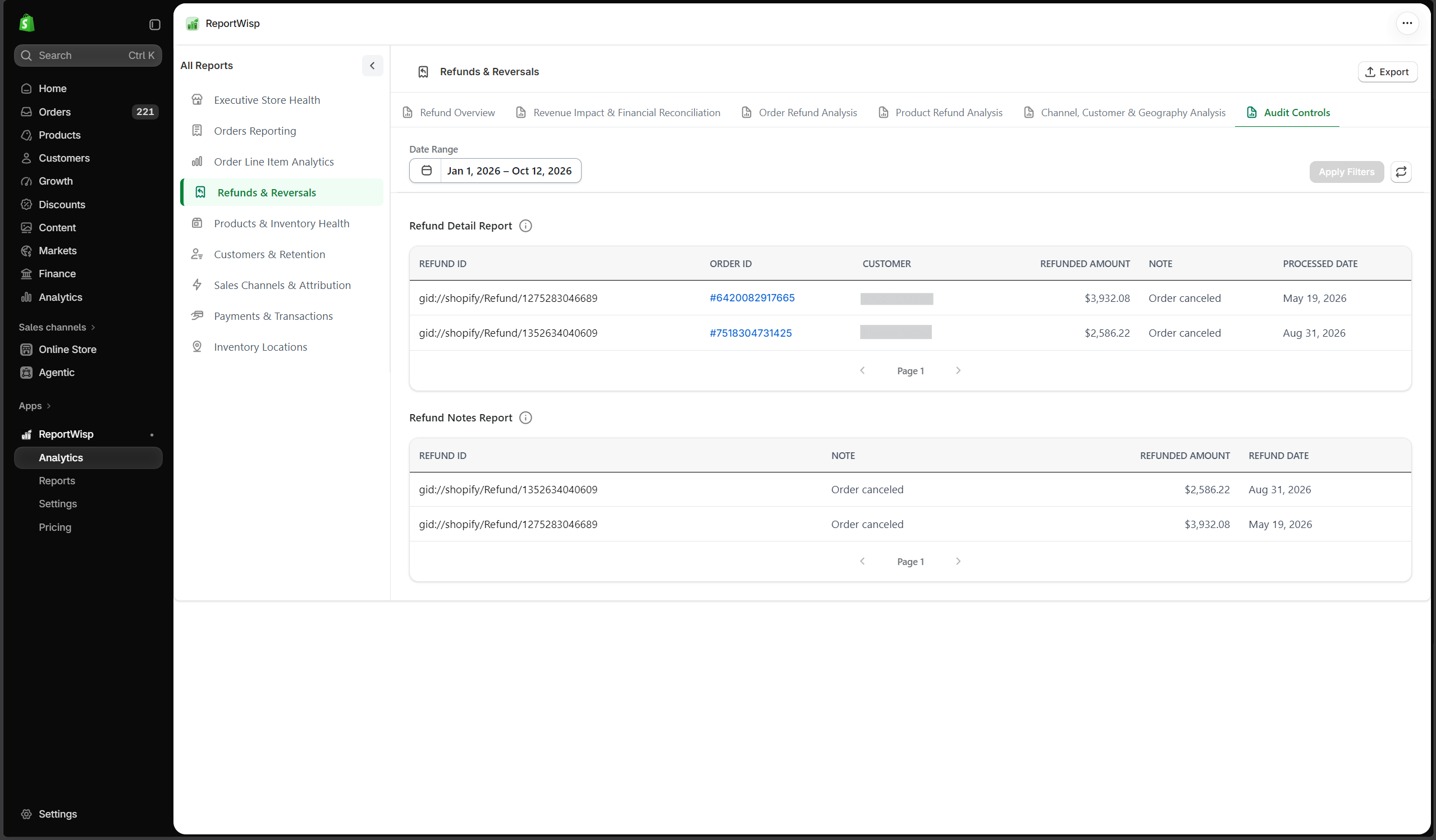
4.6 Audit Controls
| Report | Type | What it presents | Decision-making support |
|---|---|---|---|
| Refund Note Keyword Analysis | Chart/Table | Keywords found in refund notes. | Helps identify common refund reasons. |
| Refund Detail Report | Table | Detailed refund records. | Helps support audit and finance review. |
| Refund Notes Report | Table | Refund notes and related details. | Helps customer support and operations identify recurring issues. |
Recommended use cases for Refunds & Reversals
Use this report to:
- Monitor refund impact on revenue
- Identify refund-prone products
- Review refund trends
- Investigate partial and full refunds
- Support finance reconciliation
- Identify customer, channel, or geography refund risk
- Improve product descriptions, quality, fulfillment, or support processes
5. Products & Inventory Health
What this report category is
Products & Inventory Health focuses on product performance, stock health, inventory value, replenishment risk, and inventory-related operational decisions.
This report helps merchants connect product demand with stock availability.
Who should use it
This report is useful for:
- Store owners
- Inventory teams
- Merchandising teams
- Operations teams
- Purchasing teams
- Finance teams
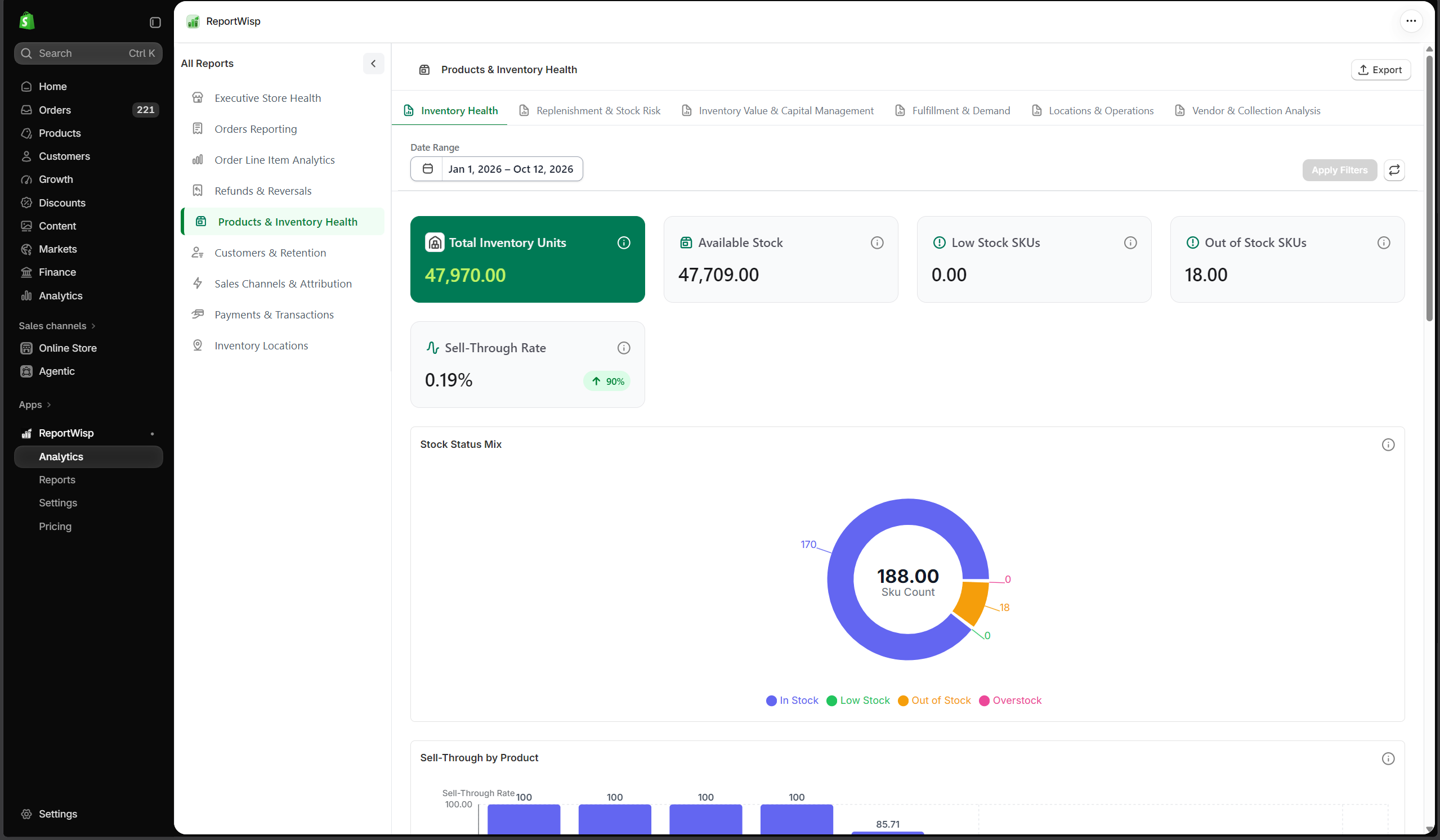
5.1 Inventory Health
| Report | Type | What it presents | Decision-making support |
|---|---|---|---|
| Total Inventory Units | KPI | Total inventory quantity. | Helps understand total stock position. |
| Available Stock | KPI | Stock available for sale. | Helps identify sellable inventory. |
| Low Stock SKUs | KPI | SKUs below stock threshold. | Helps prioritize replenishment. |
| Out of Stock SKUs | KPI | SKUs with no stock available. | Helps identify lost sales risk. |
| Sell-Through Rate | KPI | Rate at which inventory is selling. | Helps evaluate demand and product movement. |
| Stock Status Mix | Chart | Stock grouped by status. | Helps understand overall inventory health. |
| Sell-Through by Product | Chart | Sell-through performance by product. | Helps identify fast and slow movers. |
| Top Selling Products vs Available Stock | Chart | Sales performance compared with stock availability. | Helps identify stockout risk for best sellers. |
| Inventory Health Report | Table | Detailed inventory health records. | Helps inventory teams review product-level stock health. |
| Fast-Moving SKU Report | Table | Fast-moving SKUs with inventory details. | Helps prioritize replenishment. |
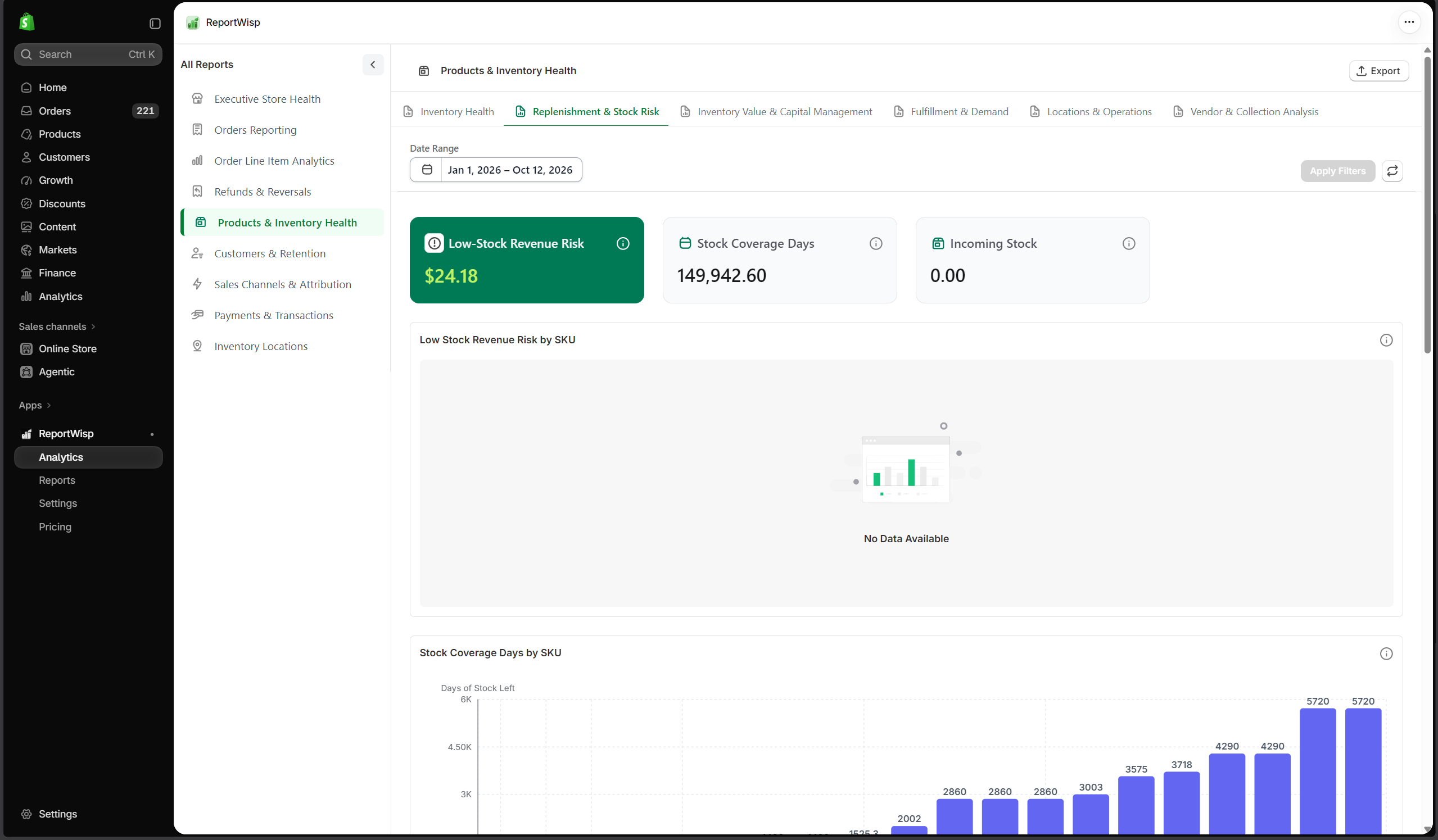
5.2 Replenishment & Stock Risk
| Report | Type | What it presents | Decision-making support |
|---|---|---|---|
| Low-Stock Revenue Risk | KPI | Revenue risk from low-stock items. | Helps estimate lost sales risk. |
| Stock Coverage Days | KPI | Estimated days of stock coverage. | Helps plan replenishment timing. |
| Incoming Stock | KPI | Stock expected to arrive. | Helps plan availability and purchase decisions. |
| Low Stock Revenue Risk by SKU | Chart | Revenue risk grouped by SKU. | Helps prioritize the most important replenishment items. |
| Stock Coverage Days by SKU | Chart | Stock coverage by SKU. | Helps identify products close to stockout. |
| Inventory Movement Trend | Chart | Inventory movement over time. | Helps understand stock flow. |
| Low Stock Report | Table | Detailed low-stock item list. | Helps operations create replenishment tasks. |
| Out of Stock Report | Table | Detailed out-of-stock item list. | Helps identify lost sales or catalog issues. |
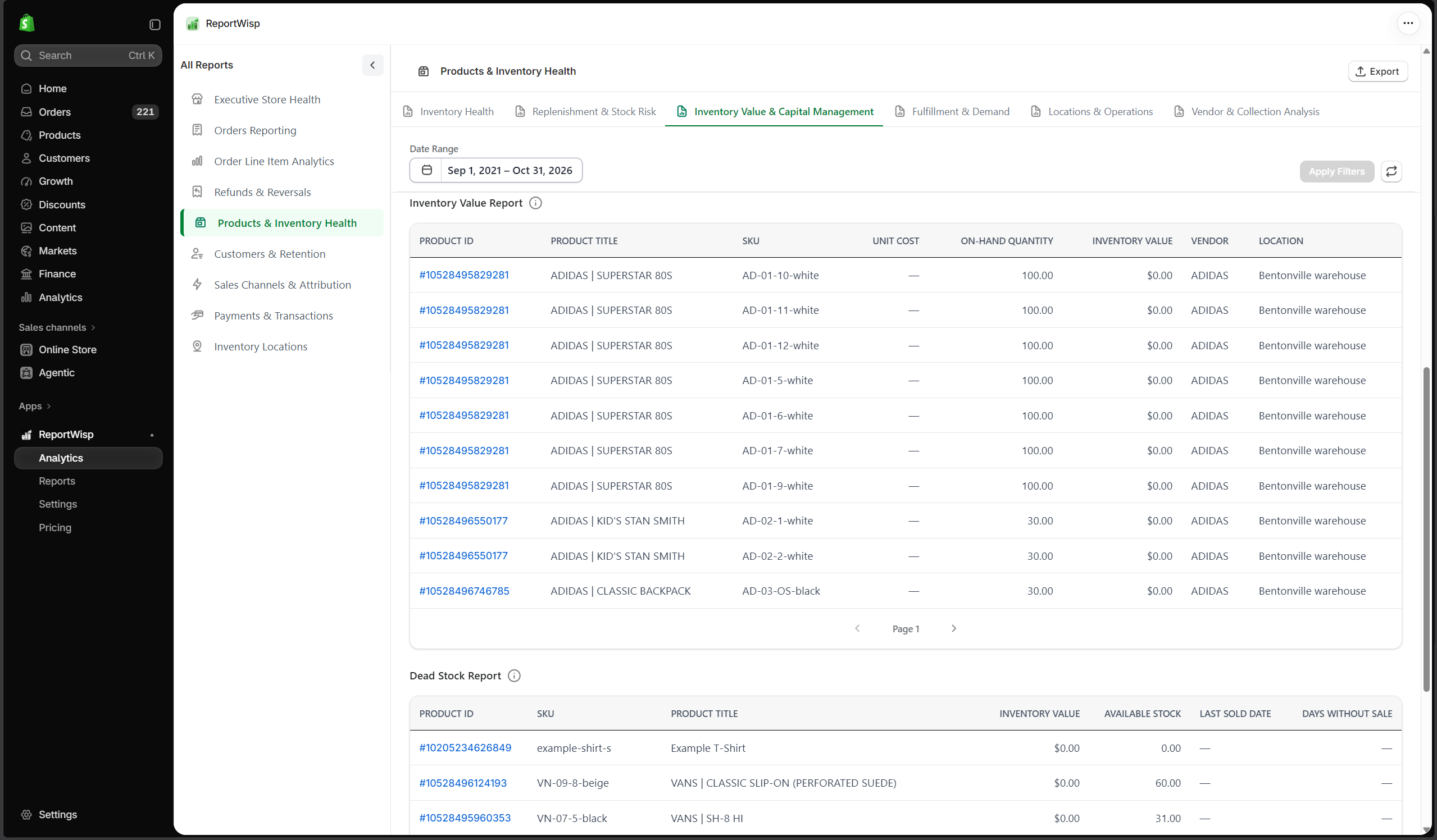
5.3 Inventory Value & Capital Management
| Report | Type | What it presents | Decision-making support |
|---|---|---|---|
| Inventory Value | KPI | Estimated value of inventory. | Helps finance understand capital tied in stock. |
| Dead Stock Value | KPI | Value of inventory not moving. | Helps identify cash tied in slow-moving products. |
| Damaged Stock Value | KPI | Value of damaged or non-sellable stock. | Helps estimate operational loss. |
| Inventory Value by Product | Chart | Inventory value grouped by product. | Helps identify high-value stock concentration. |
| Dead Stock by Product | Chart | Dead stock grouped by product. | Helps plan clearance or inventory reduction. |
| Inventory Value Report | Table | Detailed inventory value records. | Helps finance and inventory teams review stock value. |
| Dead Stock Report | Table | Detailed dead stock records. | Helps plan liquidation, discounting, or purchasing changes. |
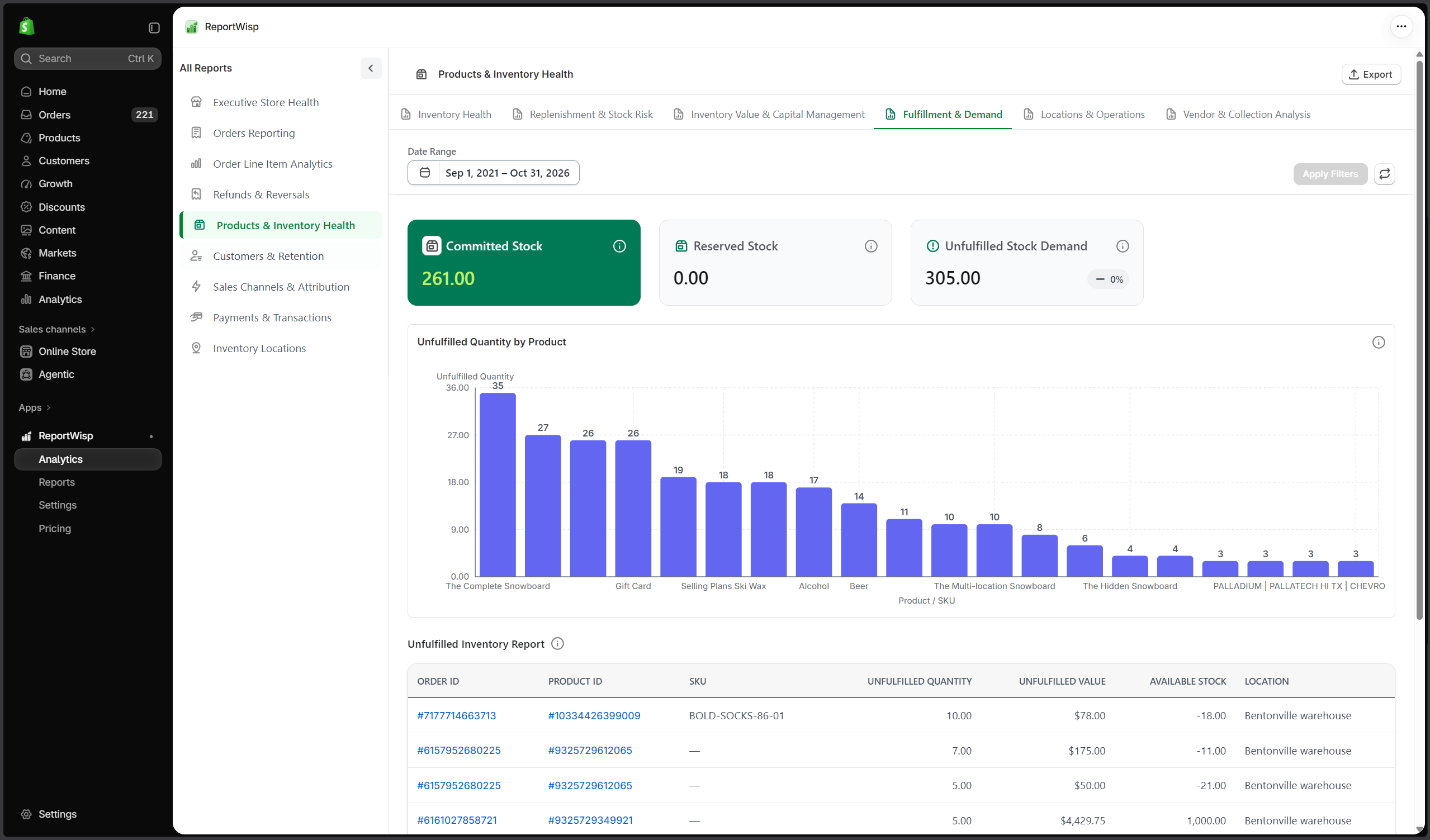
5.4 Fulfillment & Demand
| Report | Type | What it presents | Decision-making support |
|---|---|---|---|
| Committed Stock | KPI | Stock committed to orders. | Helps understand inventory already allocated. |
| Reserved Stock | KPI | Stock reserved and not freely available. | Helps identify unavailable inventory. |
| Unfulfilled Stock Demand | KPI | Demand from unfulfilled orders. | Helps connect fulfillment backlog with stock availability. |
| Unfulfilled Quantity by Product | Chart | Unfulfilled quantity grouped by product. | Helps prioritize fulfillment and replenishment. |
| Unfulfilled Inventory Report | Table | Detailed unfulfilled inventory records. | Helps operations manage backlog and stock movement. |
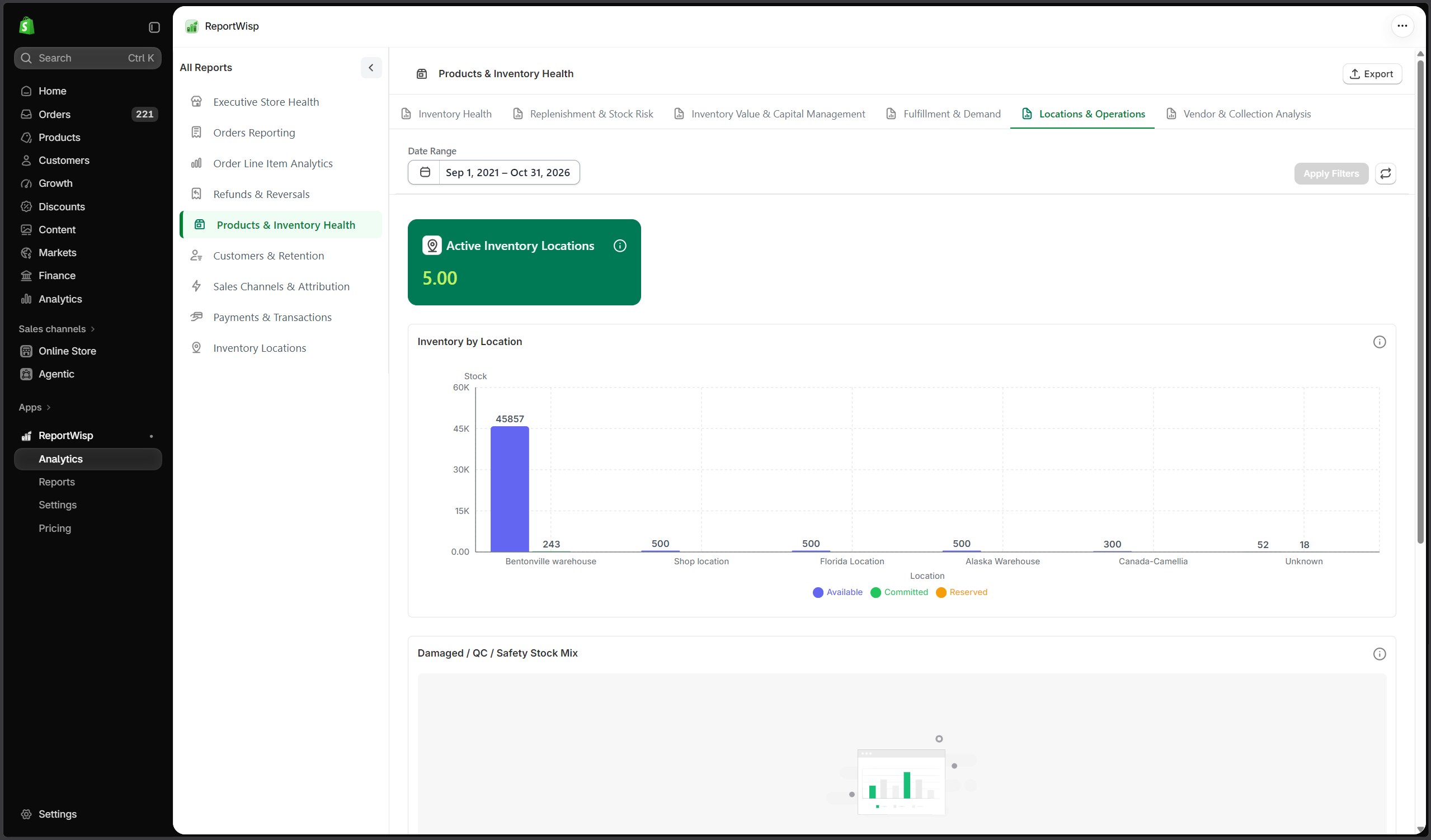
5.5 Locations & Operations
| Report | Type | What it presents | Decision-making support |
|---|---|---|---|
| Active Inventory Locations | KPI | Number of locations holding inventory. | Helps understand location coverage. |
| Inventory by Location | Chart | Inventory quantity by location. | Helps identify stock distribution. |
| Damaged / QC / Safety Stock Mix | Chart | Inventory grouped by special stock status. | Helps review non-standard stock availability. |
| Location Stock Report | Table | Detailed location-level stock records. | Helps operations manage location-level inventory. |
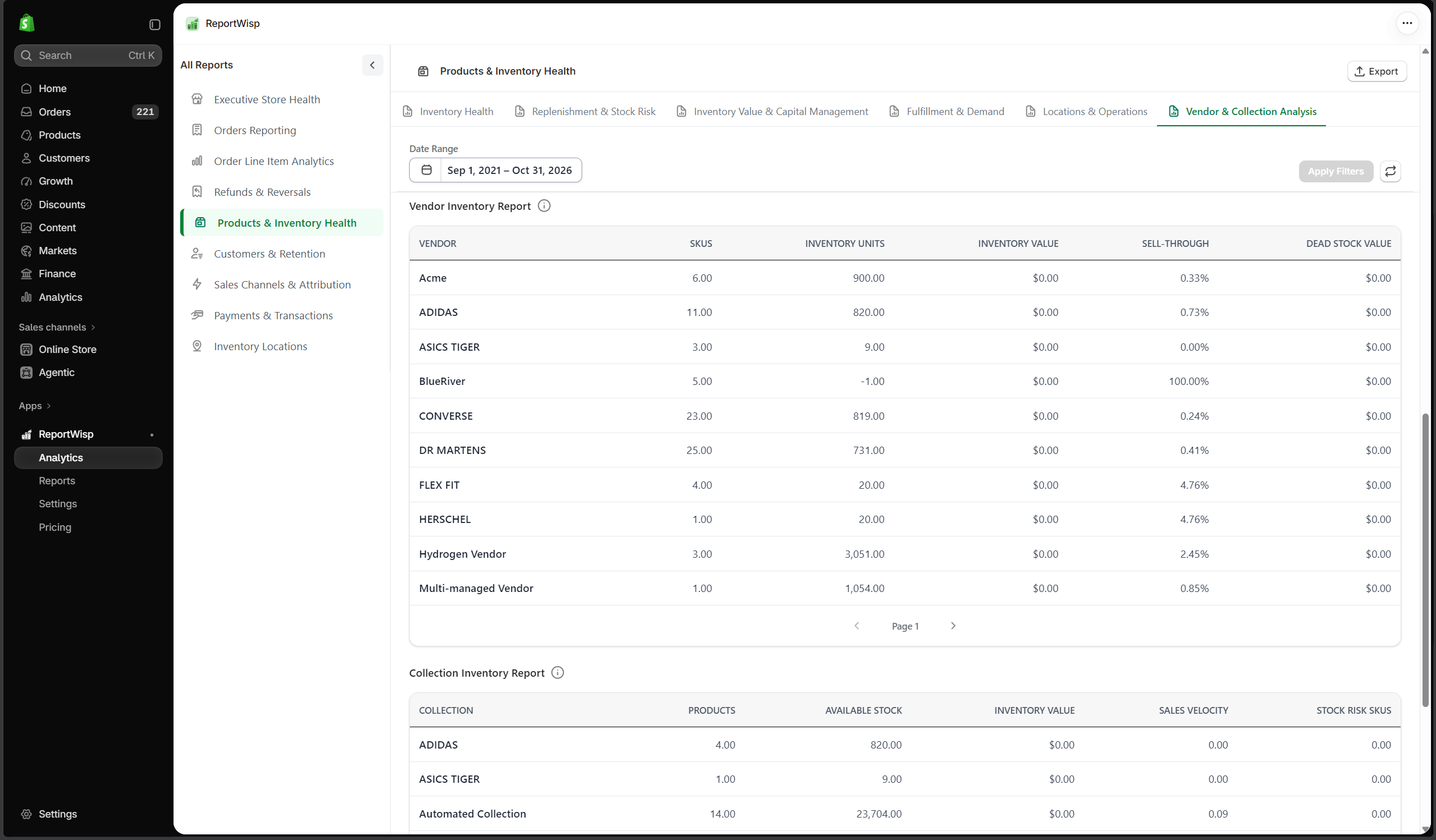
5.6 Vendor & Collection Analysis
| Report | Type | What it presents | Decision-making support |
|---|---|---|---|
| Inventory Value by Vendor | Chart | Inventory value grouped by vendor. | Helps review supplier/vendor stock concentration. |
| Inventory Value by Collection | Chart | Inventory value grouped by collection. | Helps review merchandising investment. |
| Origin Country Stock Mix | Chart | Stock grouped by origin country where available. | Helps review sourcing and inventory composition. |
| Vendor Inventory Report | Table | Vendor-level inventory records. | Helps purchasing and vendor review. |
| Collection Inventory Report | Table | Collection-level inventory records. | Helps merchandising teams review collection health. |
Recommended use cases for Products & Inventory Health
Use this report to:
- Identify best-selling products with low stock
- Find slow-moving or dead stock
- Review inventory value
- Prioritize replenishment
- Monitor stock coverage
- Review inventory by vendor or collection
- Reduce stockout risk
- Support purchasing and merchandising decisions
6. Customers & Retention
What this report category is
Customers & Retention focuses on customer growth, customer value, repeat purchases, customer segments, inactive customers, customer geography, and customer-related risk.
This report helps merchants understand whether the store is building long-term customer value or relying mainly on new customer acquisition.
Who should use it
This report is useful for:
- Store owners
- Marketing teams
- Customer success teams
- Retention teams
- Customer support teams
- Leadership teams
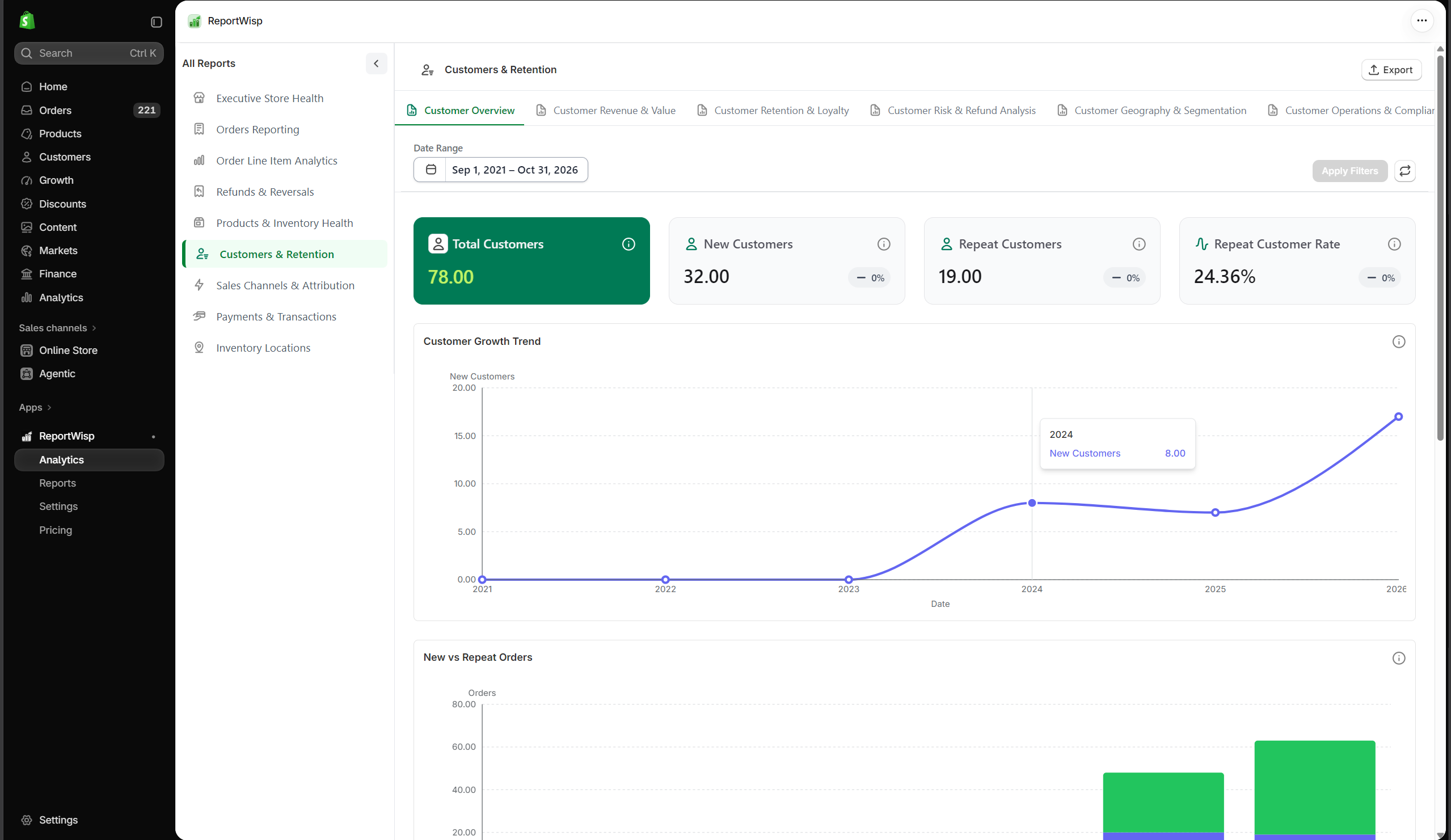
6.1 Customer Overview
| Report | Type | What it presents | Decision-making support |
|---|---|---|---|
| Total Customers | KPI | Total customer count. | Helps understand customer base size. |
| New Customers | KPI | Customers acquired in the selected period. | Helps measure acquisition. |
| Repeat Customers | KPI | Customers who purchased again. | Helps measure retention. |
| Repeat Customer Rate | KPI | Percentage of customers who returned. | Helps evaluate loyalty. |
| Customer Growth Trend | Chart | Customer count growth over time. | Helps understand acquisition pattern. |
| New vs Repeat Orders | Chart | Orders split between new and repeat customers. | Helps understand demand source. |
| Customer Detail Report | Table | Detailed customer records. | Helps review customer-level data. |
| New vs Repeat Customer Report | Table | New and repeat customer breakdown. | Helps support acquisition and retention analysis. |
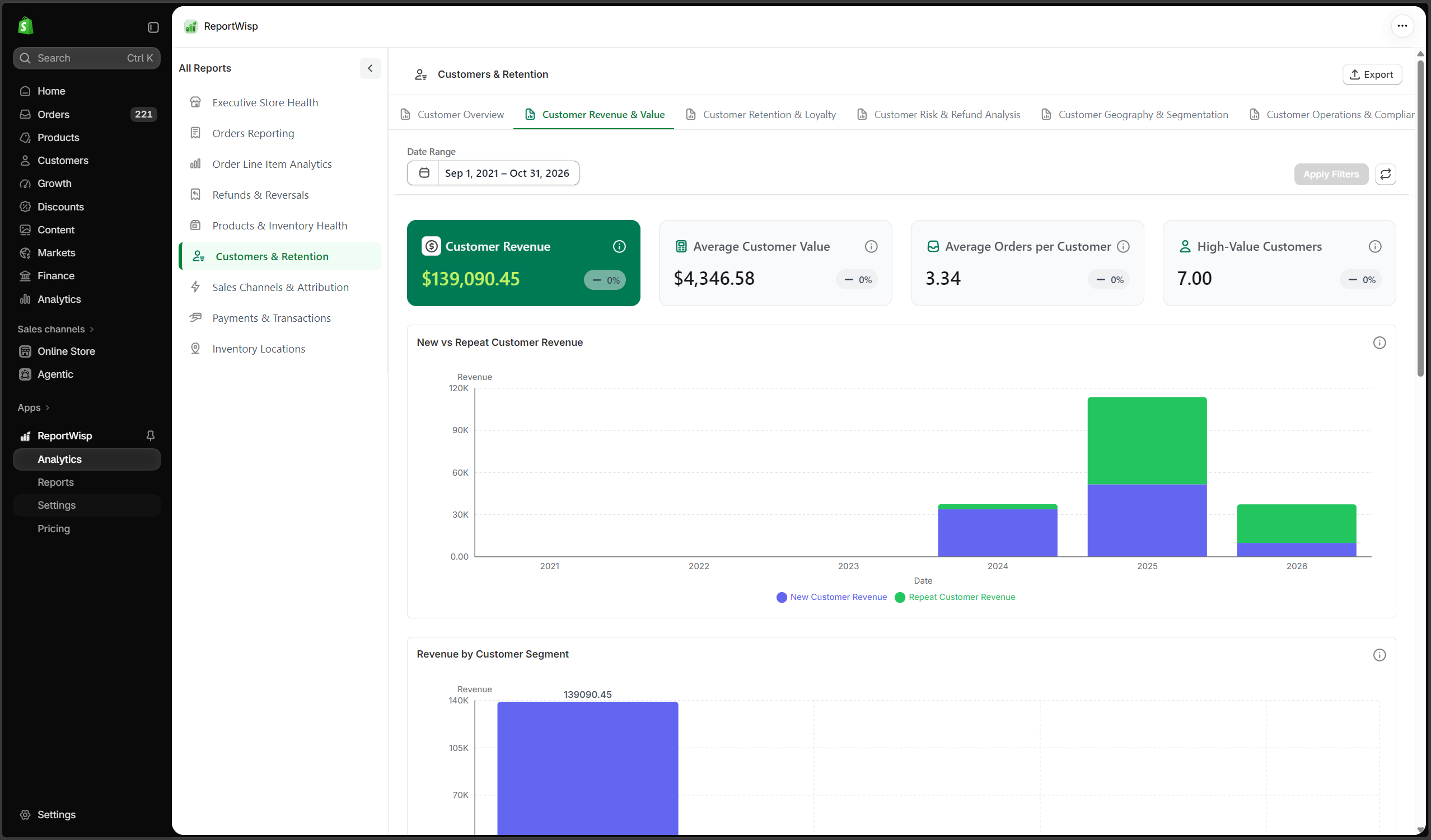
6.2 Customer Revenue & Value
| Report | Type | What it presents | Decision-making support |
|---|---|---|---|
| Customer Revenue | KPI | Revenue generated by customers. | Helps understand customer value. |
| Average Customer Value | KPI | Average revenue per customer. | Helps evaluate customer quality. |
| Average Orders per Customer | KPI | Average order count per customer. | Helps measure engagement. |
| High-Value Customers | KPI/Table | Customers with high revenue contribution. | Helps identify VIP or priority customers. |
| New vs Repeat Customer Revenue | Chart | Revenue split by new and repeat customers. | Helps compare acquisition and retention value. |
| Revenue by Customer Segment | Chart | Revenue grouped by customer segment. | Helps evaluate segment performance. |
| Top Customers by Revenue | Chart/Table | Highest revenue customers. | Helps identify important accounts or buyers. |
| Customer Value Distribution | Chart | Customer distribution by value range. | Helps understand customer concentration. |
| High-Value Customer Report | Table | Detailed high-value customer records. | Helps support retention, outreach, or account management. |
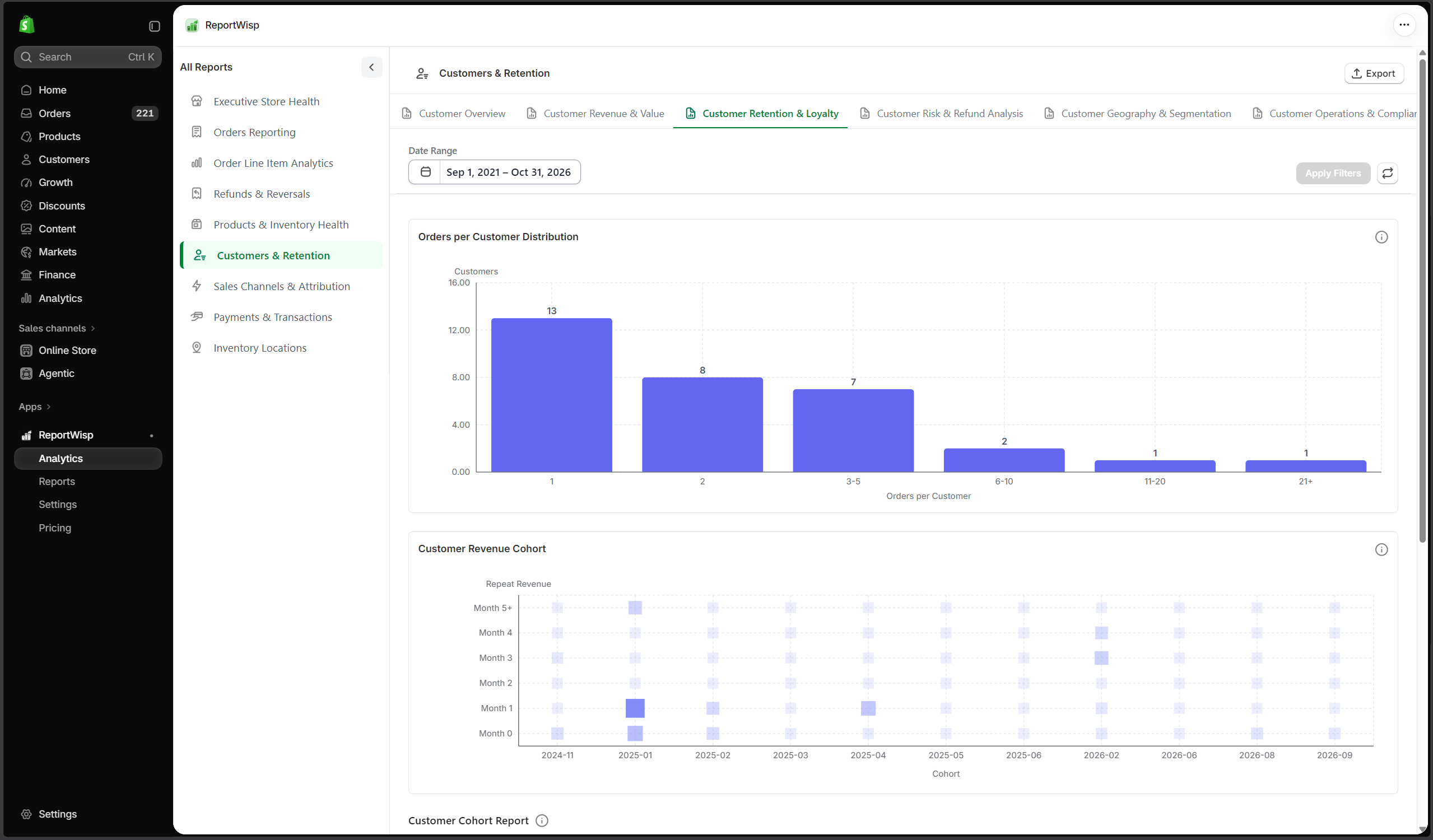
6.3 Customer Retention & Loyalty
| Report | Type | What it presents | Decision-making support |
|---|---|---|---|
| Orders per Customer Distribution | Chart | Customers grouped by number of orders. | Helps understand repeat purchase behavior. |
| Customer Revenue Cohort | Chart | Revenue by customer cohort. | Helps analyze retention over time. |
| Customer Cohort Report | Table | Cohort-level customer data. | Helps support retention strategy and lifecycle planning. |
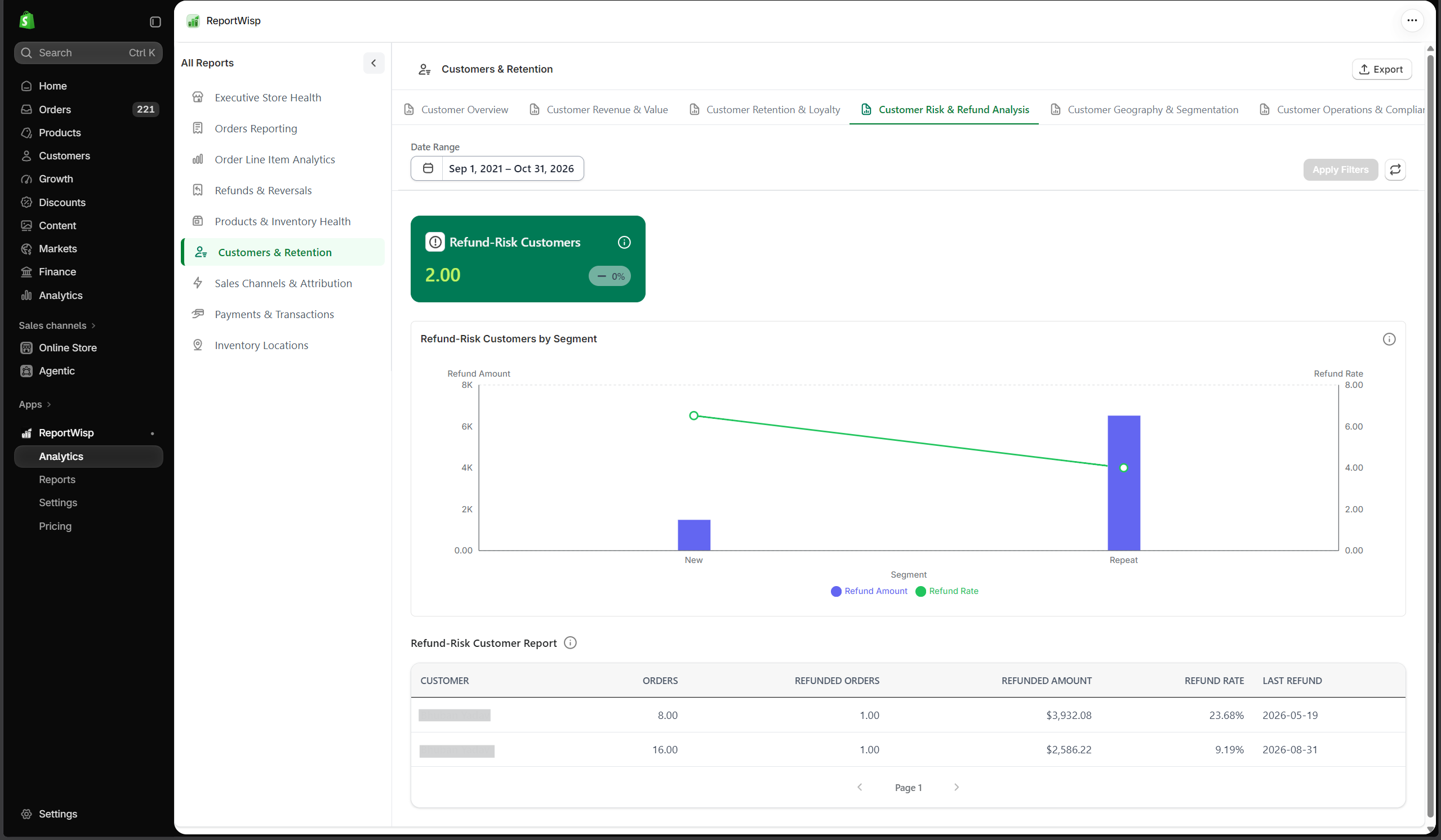
6.4 Customer Risk & Refund Analysis
| Report | Type | What it presents | Decision-making support |
|---|---|---|---|
| Refund-Risk Customers | KPI/Table | Customers with higher refund activity. | Helps identify customer-level refund risk. |
| Refund-Risk Customers by Segment | Chart | Refund-risk customers grouped by segment. | Helps understand where customer risk is concentrated. |
| Refund-Risk Customer Report | Table | Detailed refund-risk customer records. | Helps support customer support and risk review. |
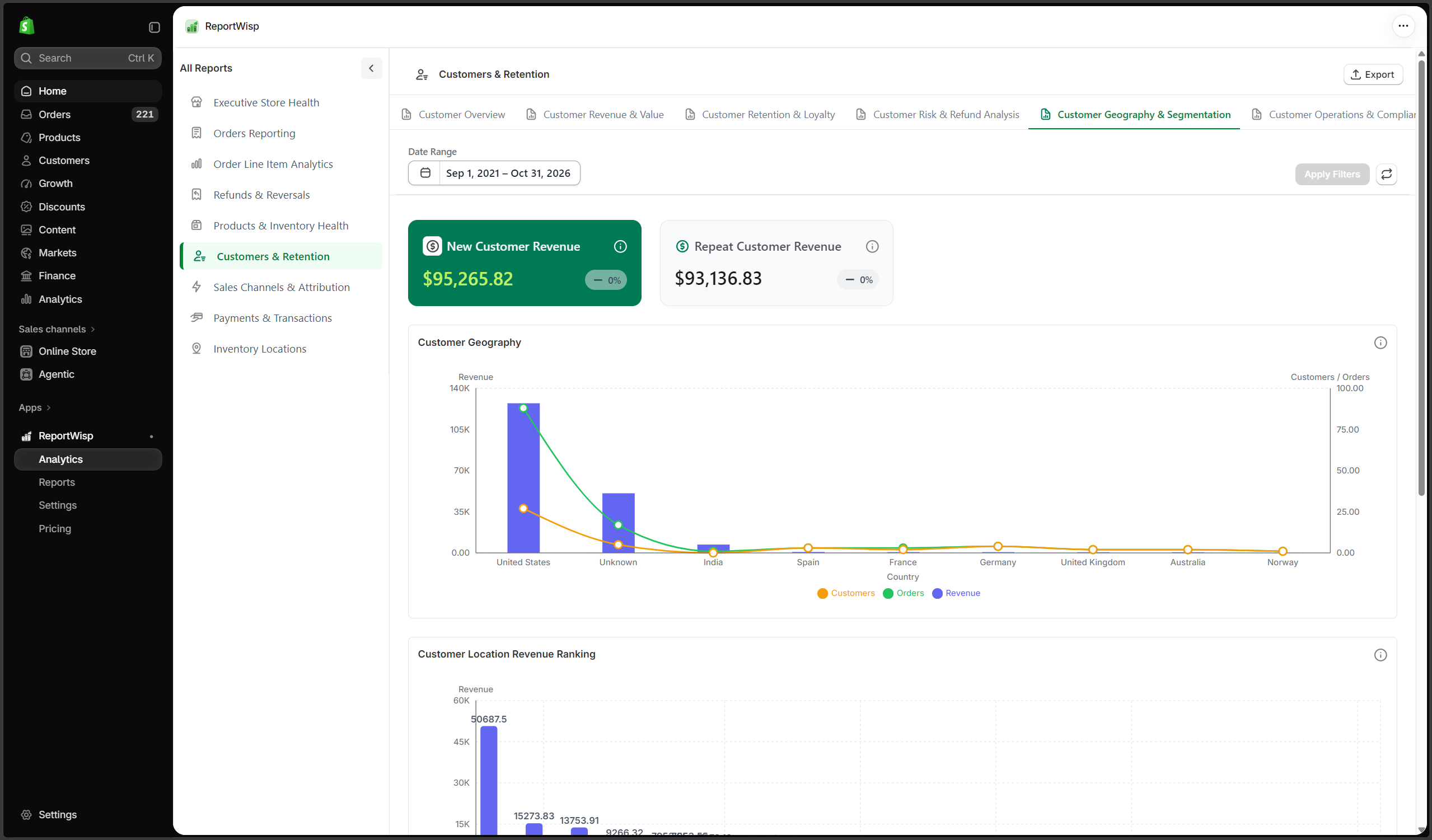
6.5 Customer Geography & Segmentation
| Report | Type | What it presents | Decision-making support |
|---|---|---|---|
| New Customer Revenue | KPI | Revenue from new customers. | Helps evaluate acquisition revenue. |
| Repeat Customer Revenue | KPI | Revenue from repeat customers. | Helps evaluate retention revenue. |
| Customer Geography | Chart | Customers grouped by geography. | Helps understand customer location distribution. |
| Customer Location Revenue Ranking | Chart | Revenue ranked by customer location. | Helps identify strong markets. |
| Customer Geography Report | Table | Detailed customer geography records. | Helps support regional planning. |
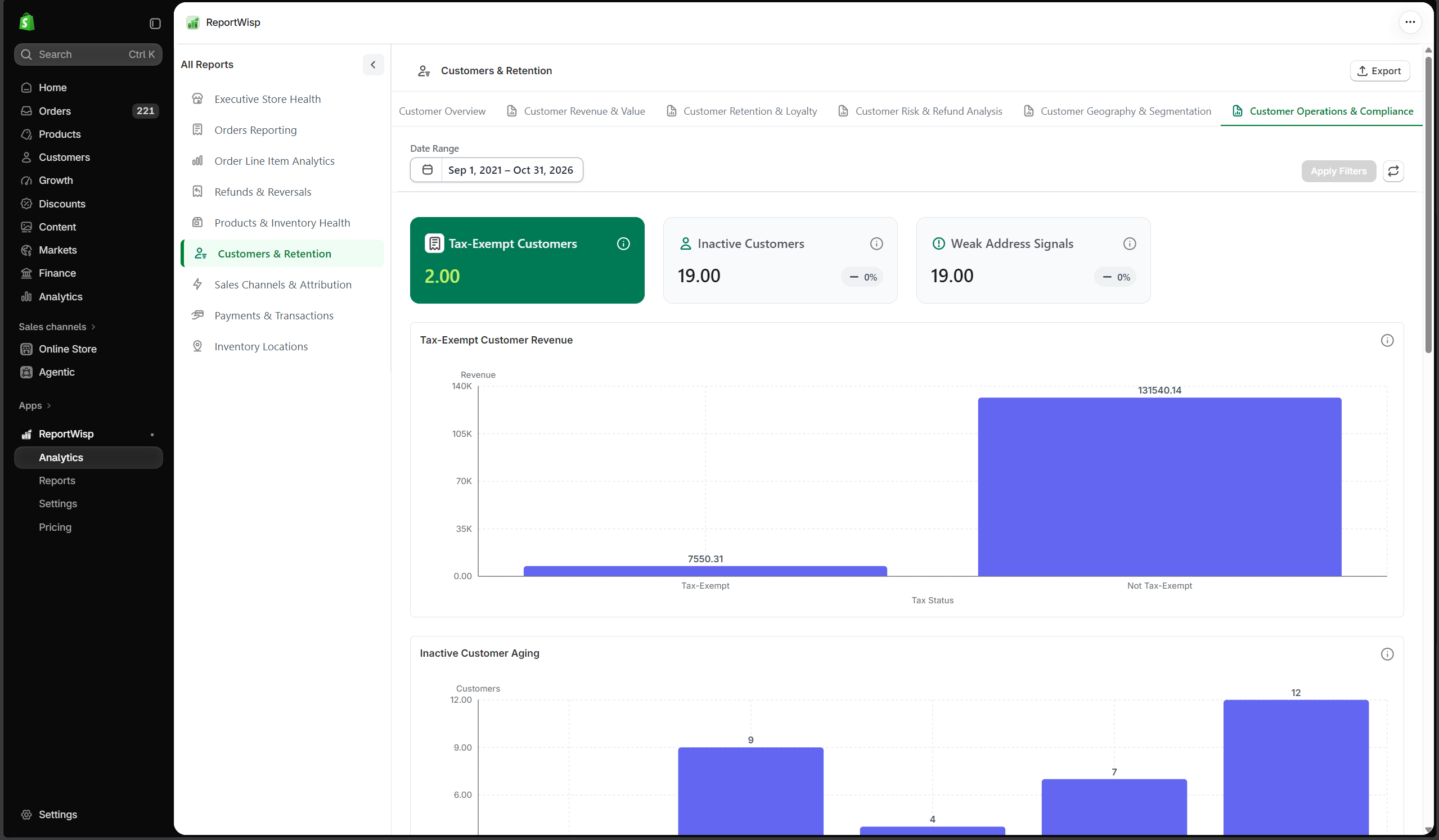
6.6 Customer Operations & Compliance
| Report | Type | What it presents | Decision-making support |
|---|---|---|---|
| Tax-Exempt Customers | KPI/Table | Customers marked as tax-exempt. | Helps review tax-exempt customer base. |
| Inactive Customers | KPI/Table | Customers without recent purchases. | Helps support win-back campaigns. |
| Weak Address Signals | KPI/Table | Customer records with incomplete or weak address data. | Helps improve customer data quality. |
| Tax-Exempt Customer Revenue | Chart/Table | Revenue from tax-exempt customers. | Helps finance and B2B teams review customer revenue. |
| Inactive Customer Aging | Chart | Inactive customers grouped by time since last purchase. | Helps prioritize reactivation. |
| Inactive Customer Report | Table | Detailed inactive customer records. | Helps support retention campaigns. |
| Tax-Exempt Customer Report | Table | Detailed tax-exempt customer records. | Helps support finance and compliance review. |
| Address Quality Report | Table | Customer address quality details. | Helps improve customer data quality. |
Recommended use cases for Customers & Retention
Use this report to:
- Understand customer growth
- Review new vs repeat customer behavior
- Identify high-value customers
- Monitor inactive customers
- Improve retention planning
- Review refund-risk customers
- Analyze customer geography
- Support customer segmentation and marketing decisions
7. Sales Channels & Attribution
What this report category is
Sales Channels & Attribution helps merchants understand where orders and revenue are coming from.
It connects sales performance with channels, campaign tracking, referral sources, attribution quality, customer quality, fulfillment risk, and geography.
Who should use it
This report is useful for:
- Store owners
- Marketing teams
- Growth teams
- Finance teams
- Operations teams
- Leadership teams
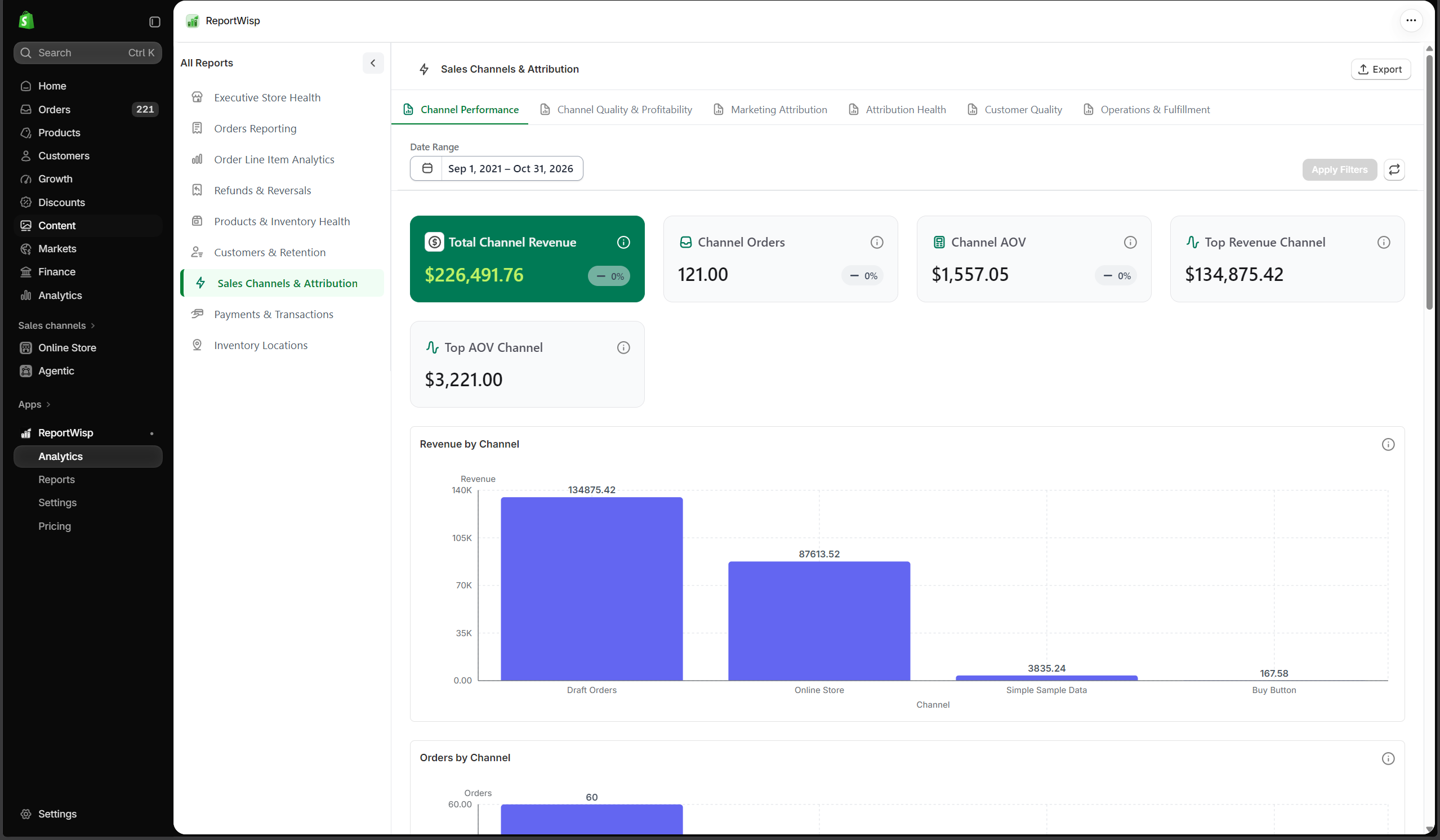
7.1 Channel Performance
| Report | Type | What it presents | Decision-making support |
|---|---|---|---|
| Total Channel Revenue | KPI | Revenue generated through channels. | Helps evaluate total channel contribution. |
| Channel Orders | KPI | Order count by channel. | Helps compare channel order volume. |
| Channel AOV | KPI | Average order value by channel. | Helps compare customer spend by channel. |
| Top Revenue Channel | KPI | Channel with highest revenue. | Helps identify strongest sales source. |
| Top AOV Channel | KPI | Channel with highest average order value. | Helps identify quality traffic sources. |
| Revenue by Channel | Chart | Revenue grouped by channel. | Helps compare channel performance. |
| Orders by Channel | Chart | Orders grouped by channel. | Helps compare channel demand. |
| Channel AOV Comparison | Chart | AOV compared across channels. | Helps evaluate channel quality. |
| Channel Revenue Trend | Chart | Channel revenue over time. | Helps monitor channel growth or decline. |
| Channel Performance Report | Table | Detailed channel performance records. | Helps marketing and leadership review channel output. |
| Channel Order Detail Report | Table | Order-level details by channel. | Helps investigate channel performance. |
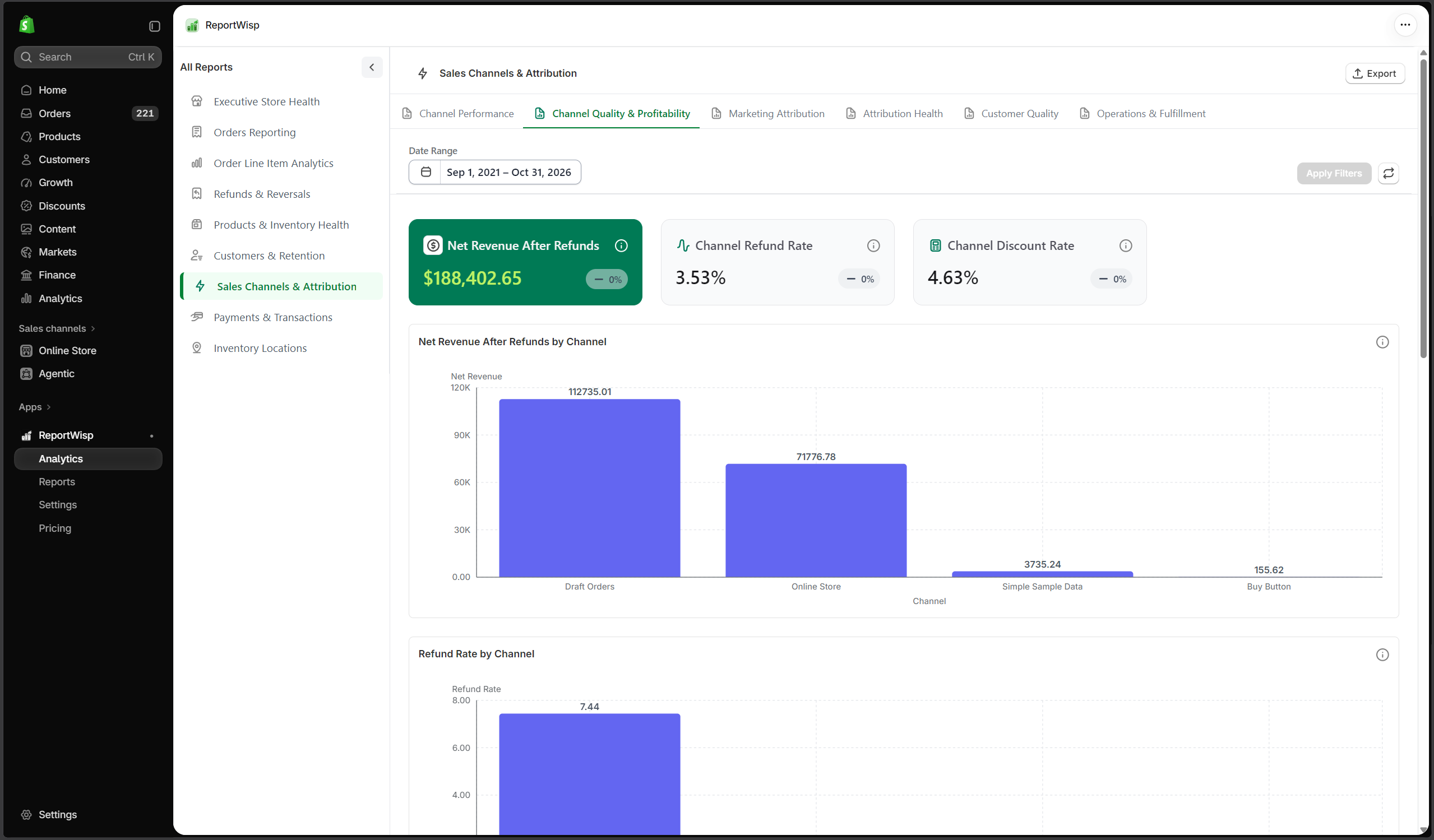
7.2 Channel Quality & Profitability
| Report | Type | What it presents | Decision-making support |
|---|---|---|---|
| Net Revenue After Refunds | KPI | Channel revenue after refunds. | Helps understand true revenue quality. |
| Channel Refund Rate | KPI | Refund rate by channel. | Helps identify risky or low-quality channels. |
| Channel Discount Rate | KPI | Discount rate by channel. | Helps identify channels dependent on discounts. |
| Channel Quality Matrix | Chart | Channel comparison across quality signals. | Helps compare revenue, refund, and discount impact together. |
| Net Revenue After Refunds by Channel | Chart | Net revenue after refunds grouped by channel. | Helps identify high-quality revenue sources. |
| Refund Rate by Channel | Chart | Refund rate compared by channel. | Helps detect channels creating refund risk. |
| Discount Rate by Channel | Chart | Discount rate compared by channel. | Helps review promotion dependency. |
| Channel Quality Report | Table | Detailed channel quality records. | Helps support marketing budget and channel decisions. |
| Channel Refund Report | Table | Refund details by channel. | Helps investigate refund-heavy channels. |
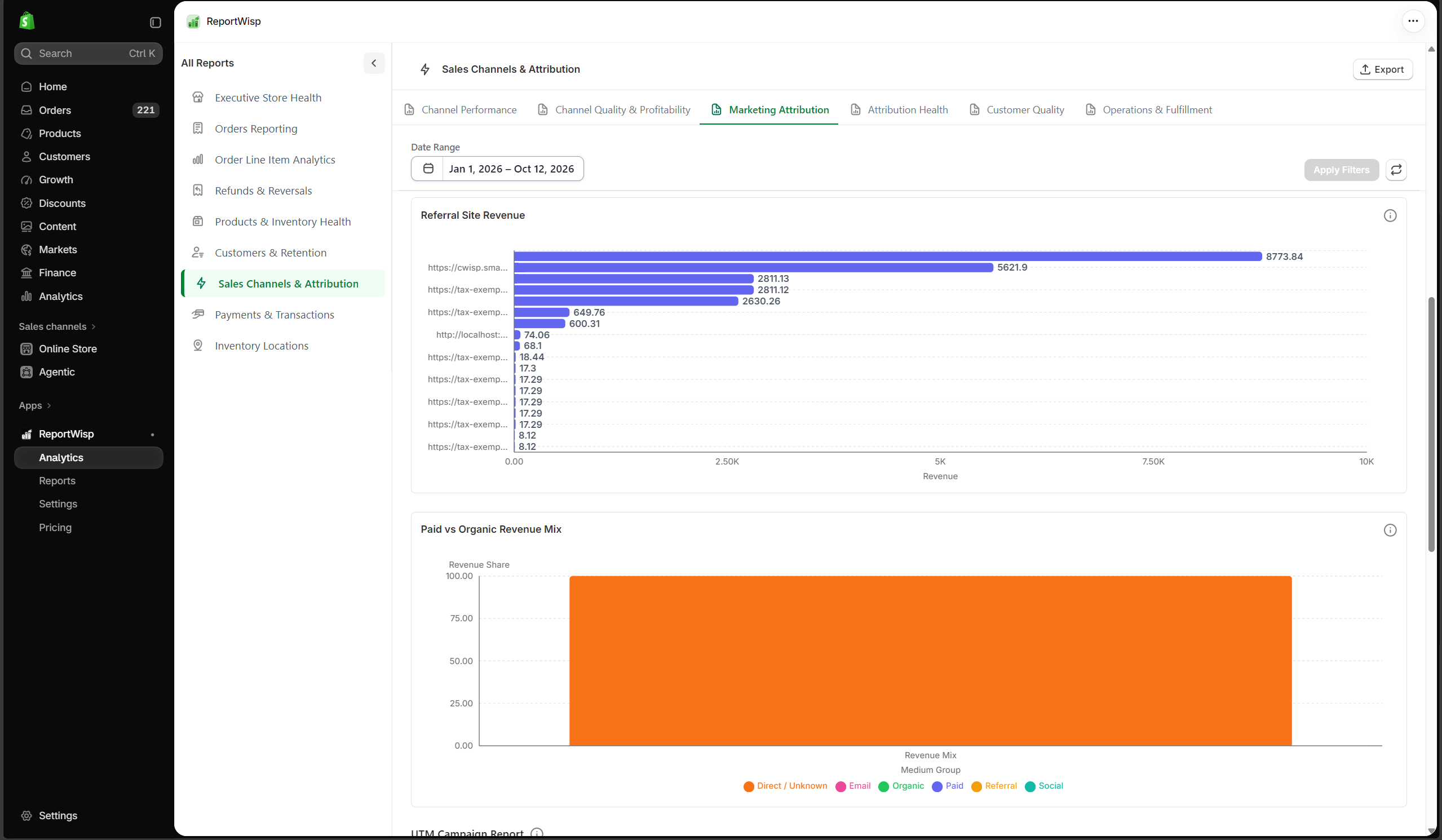
7.3 Marketing Attribution
| Report | Type | What it presents | Decision-making support |
|---|---|---|---|
| UTM Revenue | KPI | Revenue tracked through UTM parameters. | Helps measure campaign-attributed revenue. |
| UTM AOV | KPI | Average order value from UTM-tracked traffic. | Helps understand campaign traffic quality. |
| Referral Revenue | KPI | Revenue from referring sites. | Helps measure referral contribution. |
| Paid Revenue Share | KPI | Share of revenue from paid sources where available. | Helps evaluate acquisition mix. |
| UTM Campaign Revenue | Chart | Revenue grouped by UTM campaign. | Helps compare campaign performance. |
| UTM Source / Medium Performance | Chart | Revenue grouped by UTM source and medium. | Helps evaluate channel/source quality. |
| Referral Site Revenue | Chart | Revenue grouped by referring site. | Helps identify valuable referral sources. |
| Paid vs Organic Revenue Mix | Chart | Revenue split between paid and organic sources where available. | Helps review acquisition balance. |
| UTM Campaign Report | Table | Campaign-level attribution records. | Helps marketing teams review campaign data. |
| Referral Site Report | Table | Referral source records. | Helps evaluate partnerships, referrals, and organic sources. |
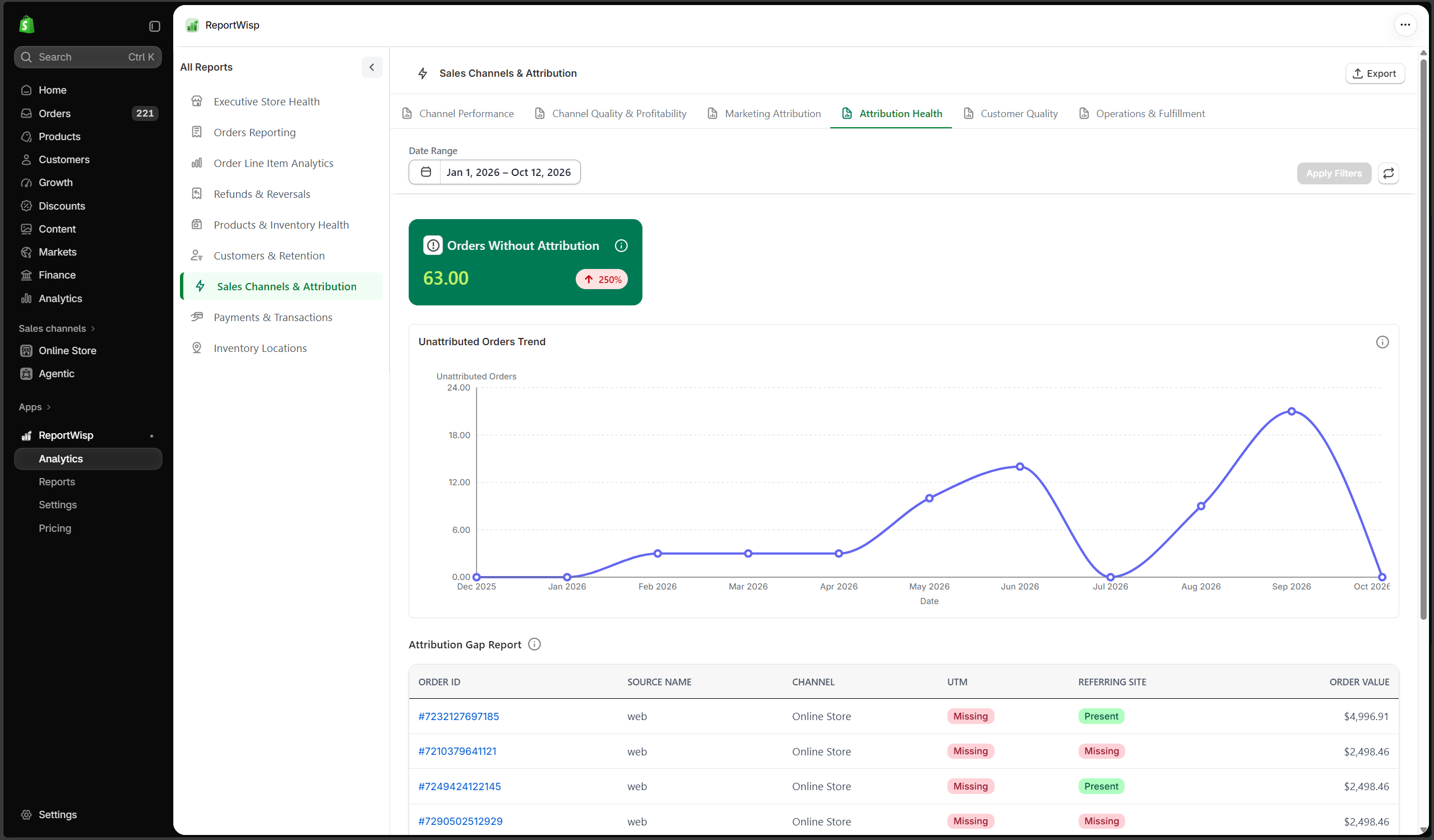
7.4 Attribution Health
| Report | Type | What it presents | Decision-making support |
|---|---|---|---|
| Orders Without Attribution | KPI | Orders without clear source or campaign data. | Helps measure attribution gaps. |
| Unattributed Orders Trend | Chart | Unattributed orders over time. | Helps identify tracking issues. |
| Attribution Gap Report | Table | Orders or sources with missing attribution details. | Helps improve campaign tracking and UTM practices. |
7.5 Customer Quality
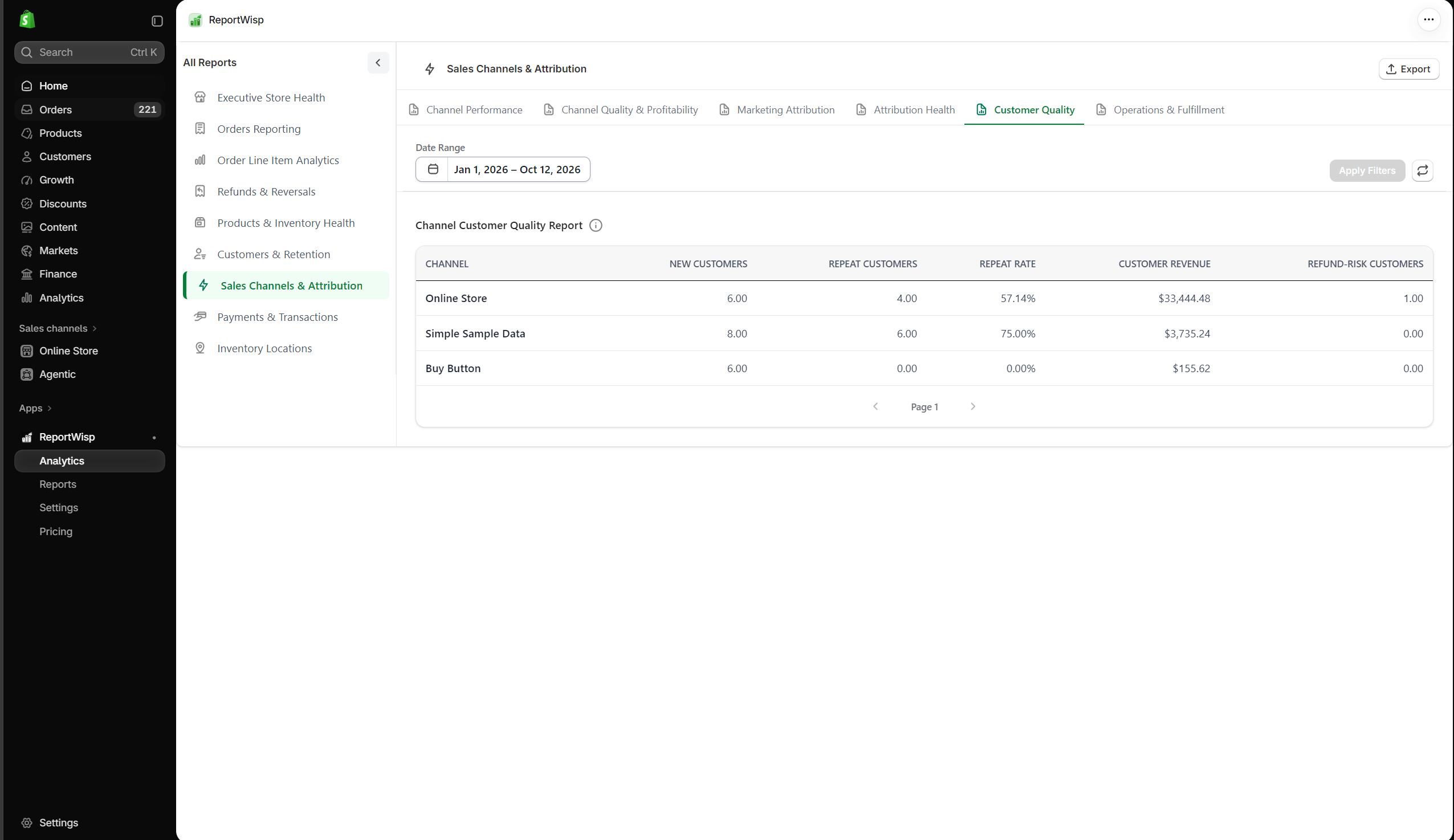
| Report | Type | What it presents | Decision-making support |
|---|---|---|---|
| Channel Customer Quality Report | Table | Customer quality signals by channel. | Helps compare channels based on customer value and behavior. |
7.6 Operations & Fulfillment
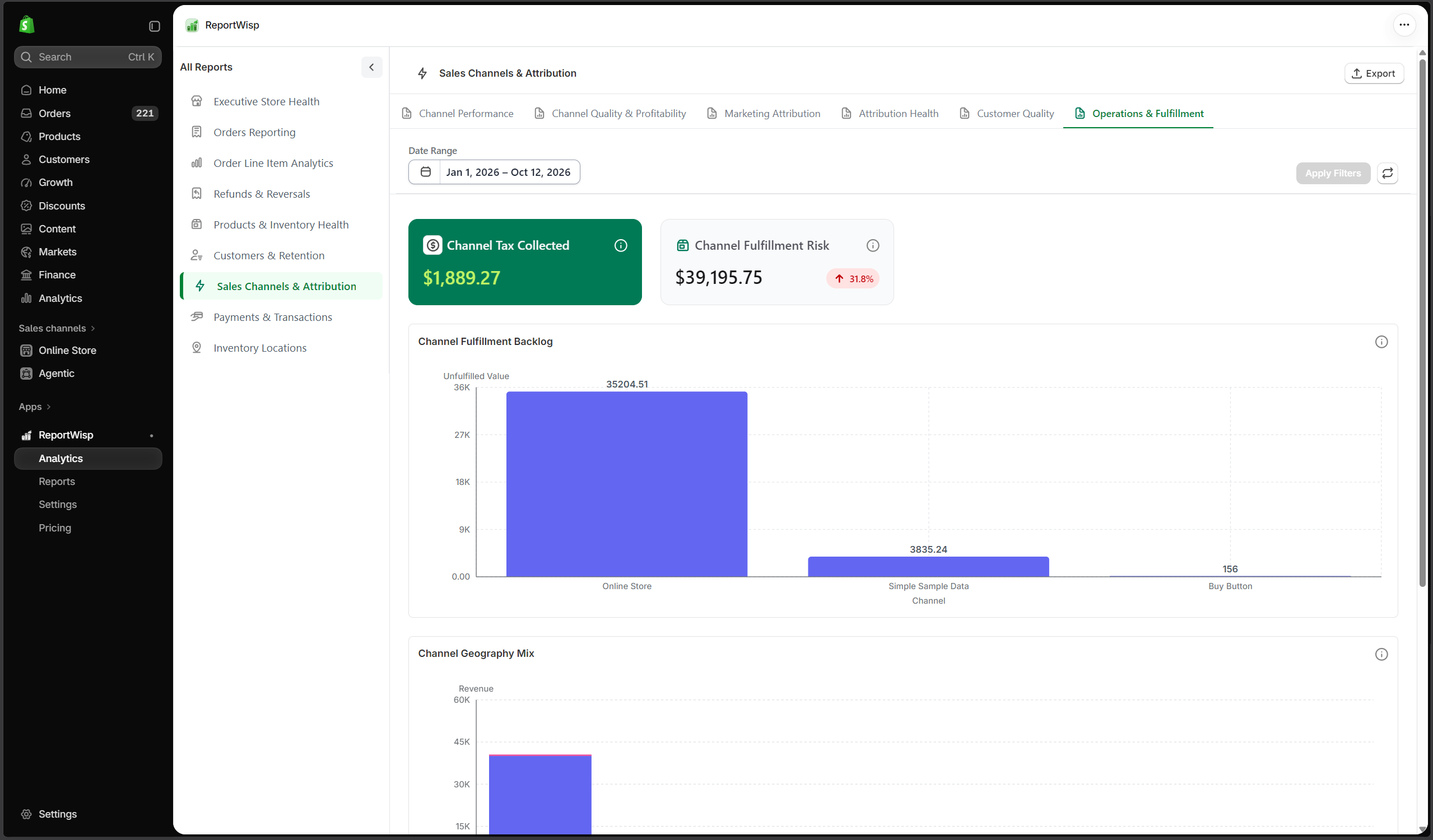
| Report | Type | What it presents | Decision-making support |
|---|---|---|---|
| Channel Tax Collected | KPI/Table | Tax collected by channel. | Helps finance review tax activity by source. |
| Channel Fulfillment Risk | KPI/Chart | Fulfillment risk grouped by channel. | Helps operations identify channel-specific backlog. |
| Channel Fulfillment Backlog | Chart/Table | Unfulfilled orders or value by channel. | Helps prioritize fulfillment. |
| Channel Geography Mix | Chart | Geographic mix by channel. | Helps understand regional channel performance. |
| Channel Fulfillment Report | Table | Fulfillment details by channel. | Helps operations review channel-level order processing. |
Recommended use cases for Sales Channels & Attribution
Use this report to:
- Compare channel performance
- Review campaign-attributed revenue
- Identify high-quality and low-quality traffic sources
- Monitor unattributed orders
- Improve UTM tracking
- Review channel refund and discount rates
- Support marketing budget decisions
- Understand channel-level fulfillment risk
8. Payments & Transactions
What this report category is
Payments & Transactions helps merchants understand payment activity, payment gateways, transaction status, transaction fees, refunds, payment reconciliation, authorization risk, manual payments, card brands, and POS payment activity.
This report helps finance and operations teams understand how money moves through the store.
Who should use it
This report is useful for:
- Finance teams
- Accounting teams
- Store owners
- Operations teams
- Risk teams
- POS/retail teams
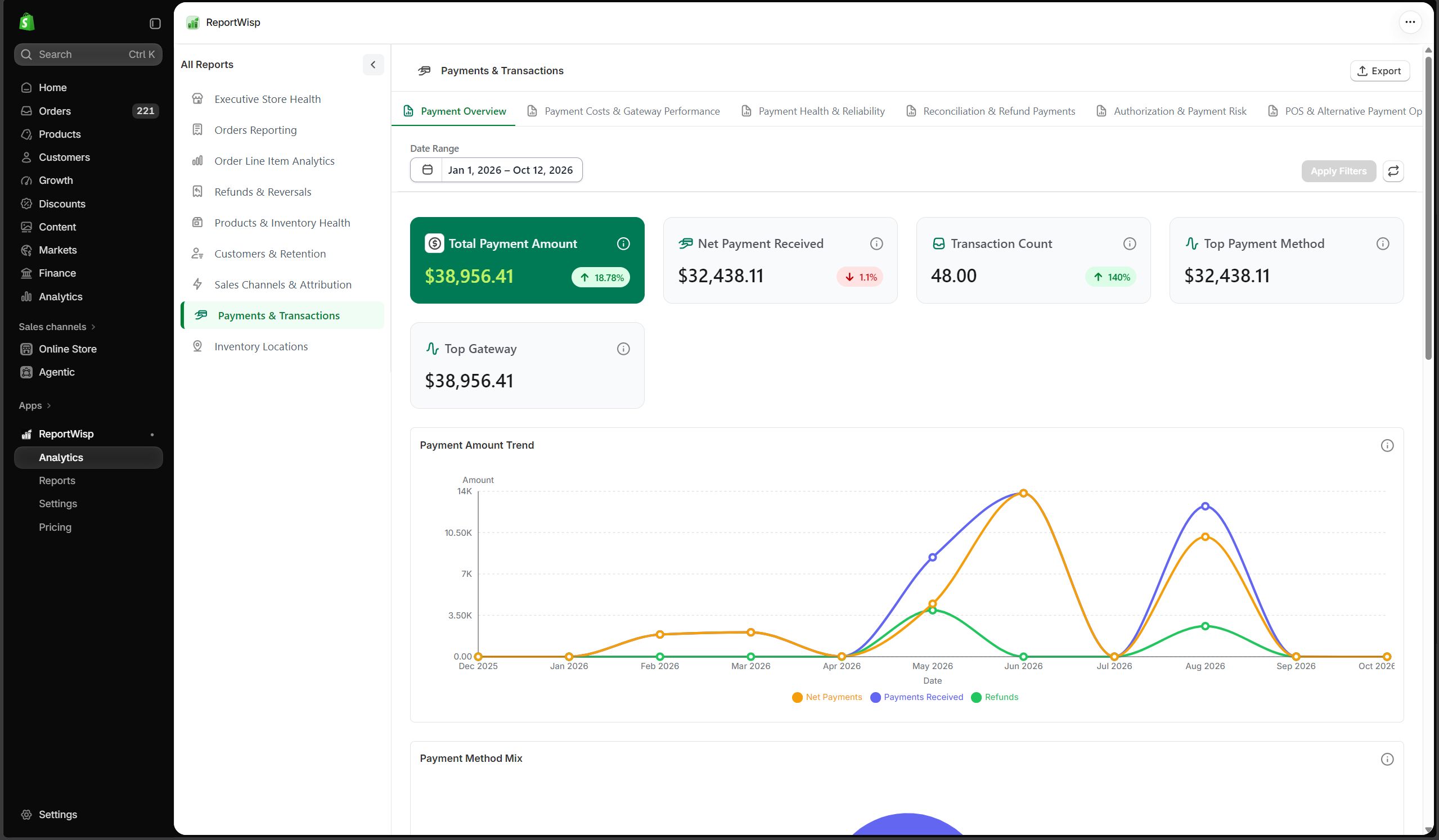
8.1 Payment Overview
| Report | Type | What it presents | Decision-making support |
|---|---|---|---|
| Total Payment Amount | KPI | Total payment amount processed. | Helps review payment volume. |
| Net Payment Received | KPI | Net payment amount after relevant adjustments. | Helps understand actual payment value. |
| Transaction Count | KPI | Number of transactions. | Helps measure payment activity. |
| Top Payment Method | KPI | Most used payment method. | Helps understand customer payment preference. |
| Top Gateway | KPI | Most used payment gateway. | Helps identify gateway dependency. |
| Payment Amount Trend | Chart | Payment amount over time. | Helps monitor payment movement. |
| Payment Method Mix | Chart | Payment activity by method. | Helps compare payment preferences. |
| Gateway Performance | Chart | Payment activity by gateway. | Helps evaluate gateway contribution. |
| Transaction Detail Report | Table | Detailed transaction records. | Helps finance investigate payments. |
| Payment Method Report | Table | Payment method breakdown. | Helps review payment mix. |
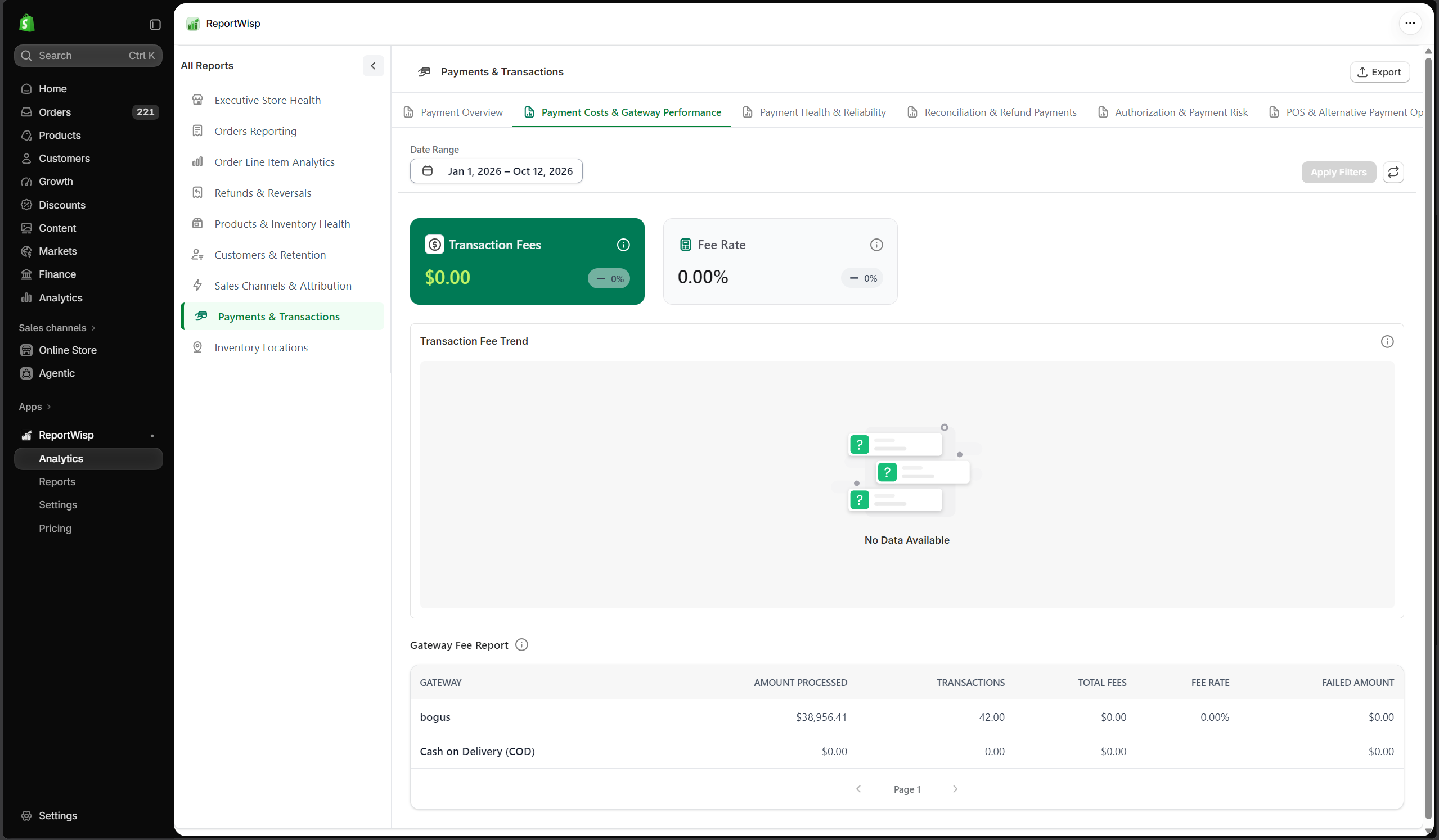
8.2 Payment Costs & Gateway Performance
| Report | Type | What it presents | Decision-making support |
|---|---|---|---|
| Transaction Fees | KPI | Total transaction fees. | Helps understand payment cost. |
| Fee Rate | KPI | Fees as a percentage of payment volume. | Helps measure cost efficiency. |
| Transaction Fee Trend | Chart | Fee movement over time. | Helps monitor payment cost changes. |
| Gateway Fee Report | Table | Fees grouped by gateway. | Helps compare gateway cost impact. |
8.3 Payment Health & Reliability
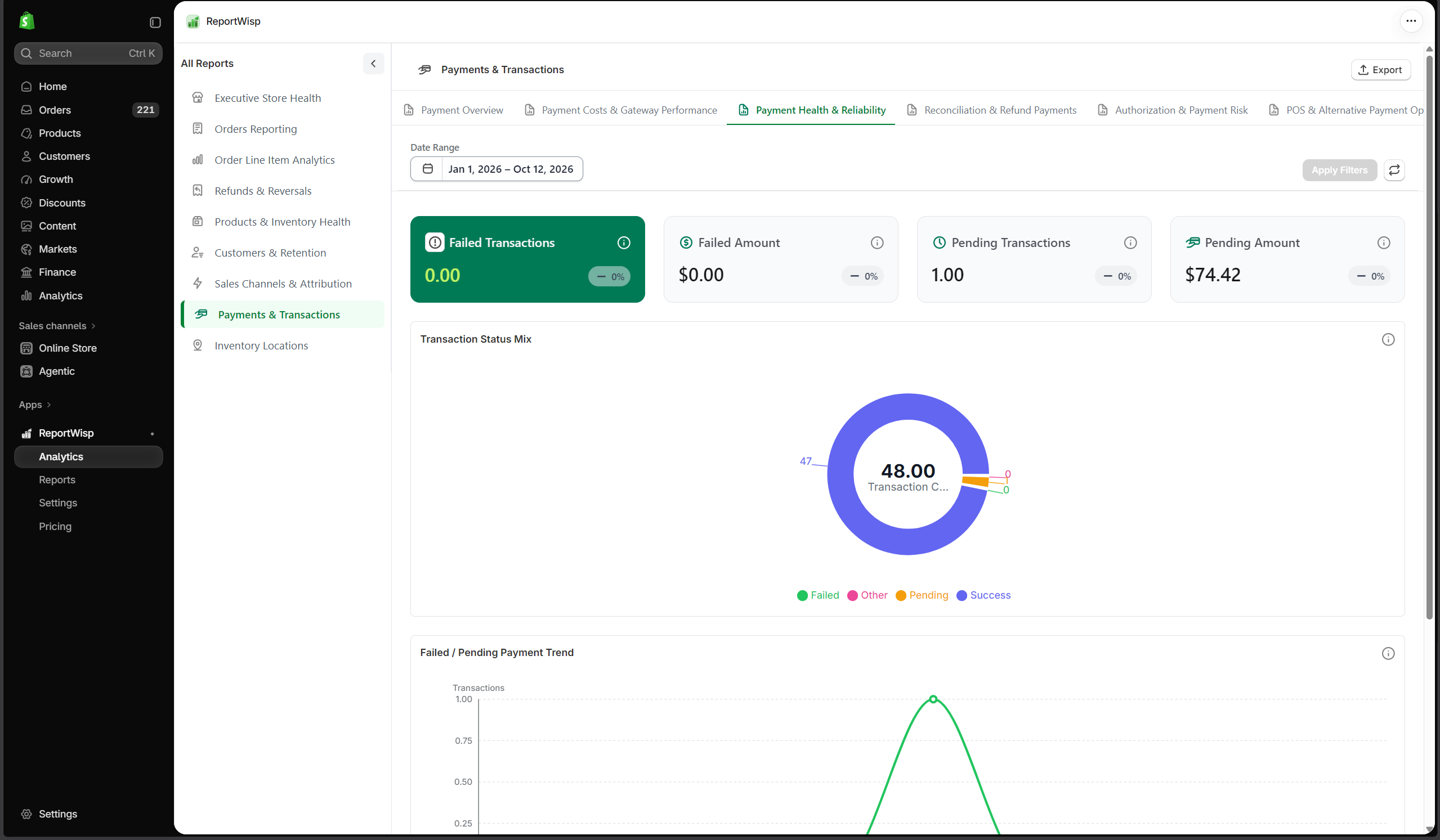
| Report | Type | What it presents | Decision-making support |
|---|---|---|---|
| Failed Transactions | KPI | Count of failed transactions. | Helps identify payment reliability issues. |
| Failed Amount | KPI | Payment value connected to failed transactions. | Helps estimate lost payment opportunity. |
| Pending Transactions | KPI | Count of pending transactions. | Helps identify payments needing attention. |
| Pending Amount | KPI | Value of pending transactions. | Helps monitor delayed payment activity. |
| Transaction Status Mix | Chart | Transactions grouped by status. | Helps review overall payment health. |
| Failed / Pending Payment Trend | Chart | Failed and pending transactions over time. | Helps identify recurring payment issues. |
| Failed / Pending Transactions Report | Table | Detailed failed and pending records. | Helps finance and support teams investigate payment issues. |
8.4 Reconciliation & Refund Payments
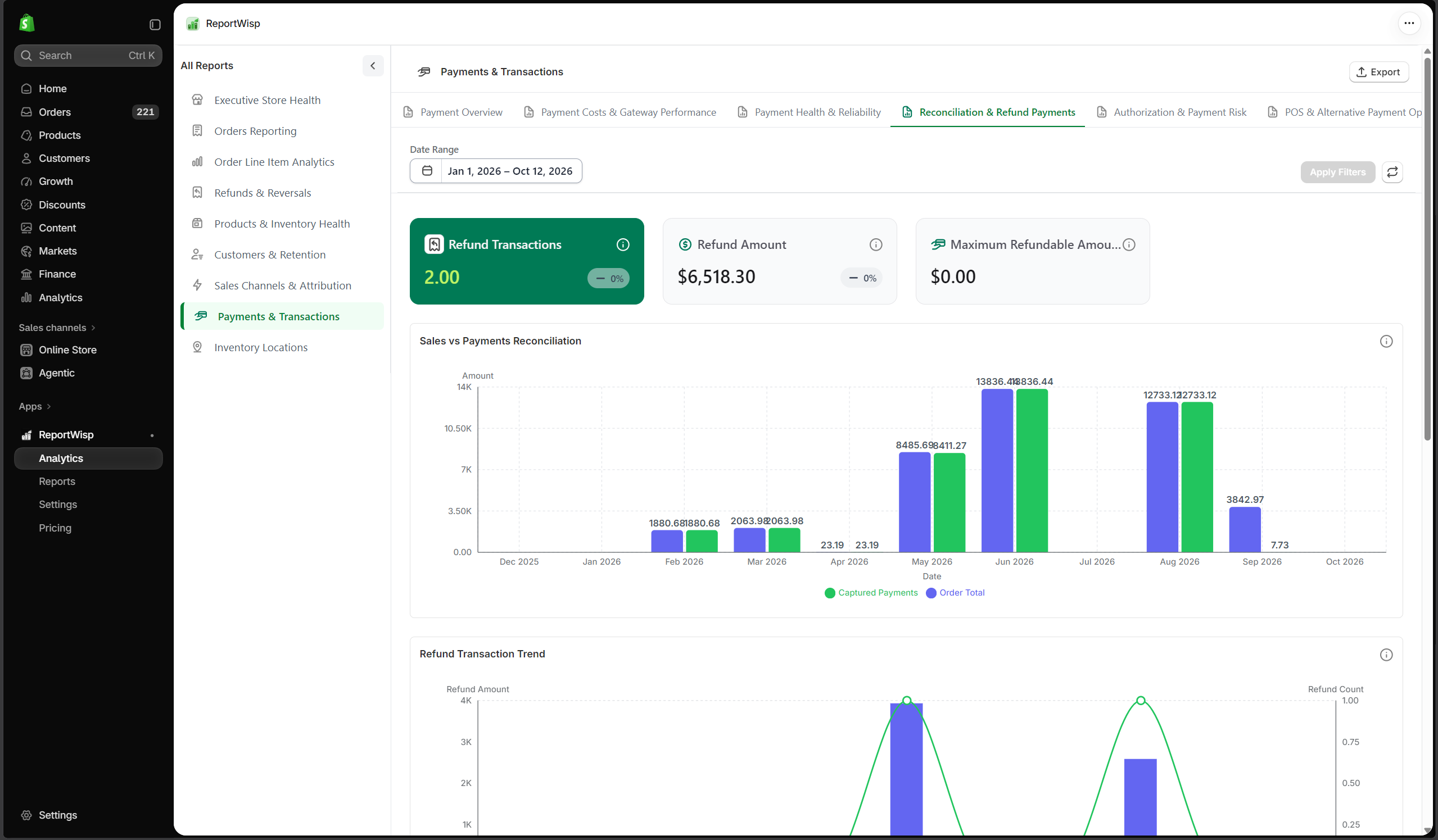
| Report | Type | What it presents | Decision-making support |
|---|---|---|---|
| Refund Transactions | KPI | Number of refund transactions. | Helps understand refund payment activity. |
| Refund Amount | KPI | Total amount refunded through transactions. | Helps finance review refund impact. |
| Maximum Refundable Amount | KPI | Remaining amount eligible for refund. | Helps estimate refund exposure. |
| Sales vs Payments Reconciliation | Chart | Sales compared with payment activity. | Helps identify reconciliation differences. |
| Refund Transaction Trend | Chart | Refund transaction activity over time. | Helps monitor refund payment movement. |
| Order Payment Reconciliation Report | Table | Order and payment comparison records. | Helps finance review order-payment alignment. |
| Refund Transaction Report | Table | Detailed refund transaction records. | Helps investigate refund transactions. |
8.5 Authorization & Payment Risk
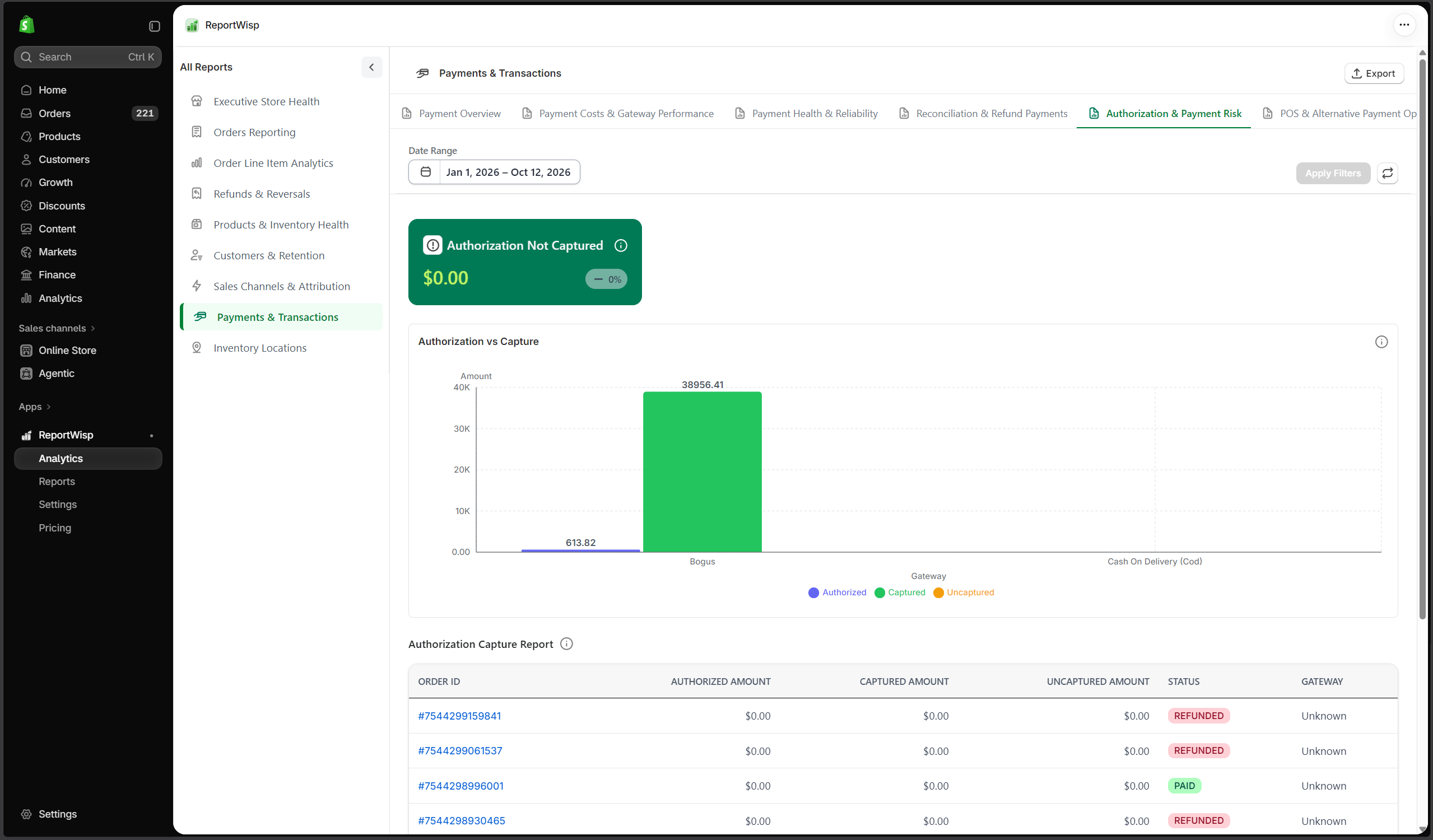
| Report | Type | What it presents | Decision-making support |
|---|---|---|---|
| Authorization Not Captured | KPI/Table | Authorized payments not captured. | Helps identify revenue capture risk. |
| Authorization vs Capture | Chart | Authorized amount compared with captured amount. | Helps monitor capture performance. |
| Authorization Capture Report | Table | Detailed authorization and capture records. | Helps finance investigate uncaptured payments. |
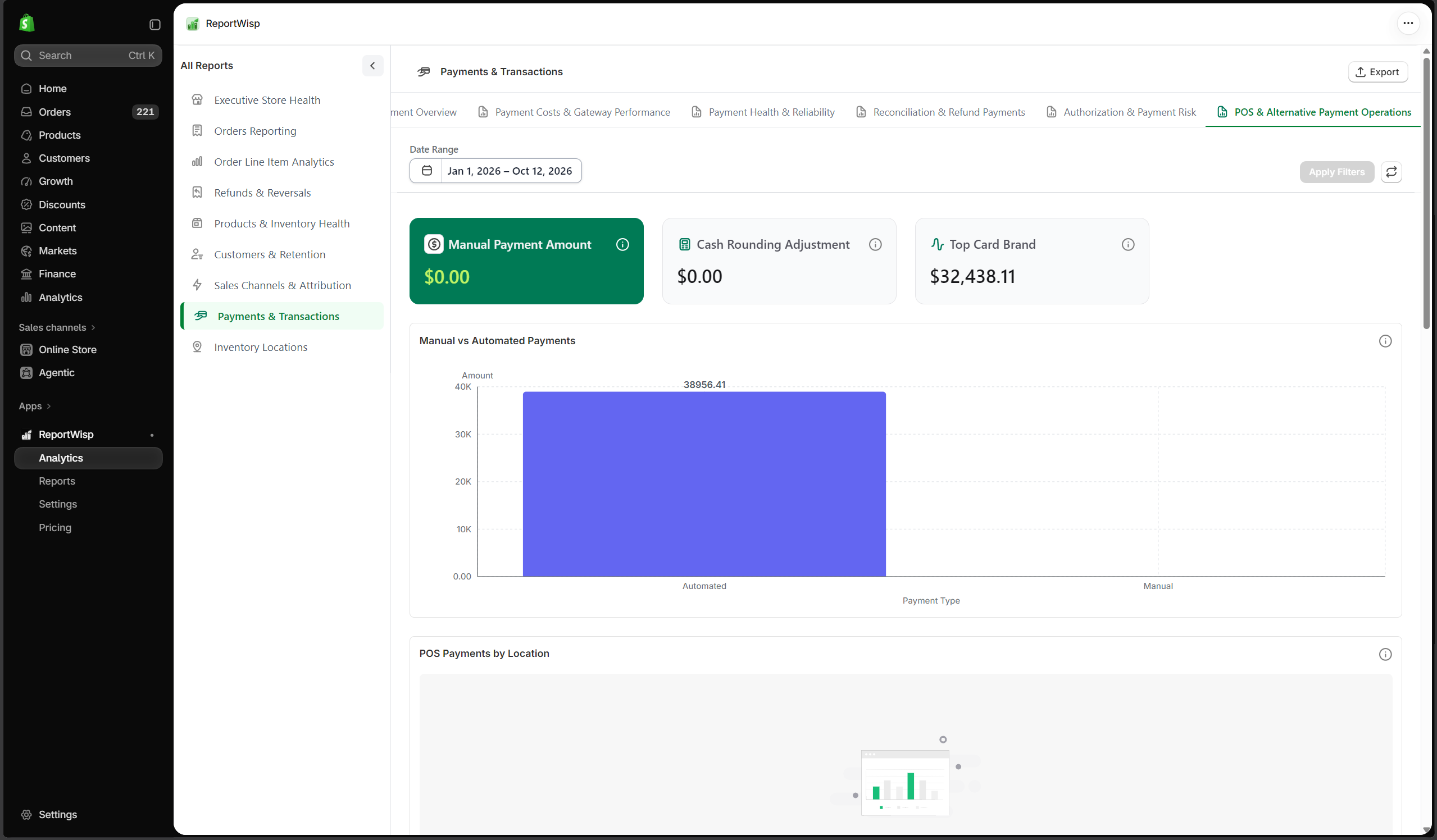
8.6 POS & Alternative Payment Operations
| Report | Type | What it presents | Decision-making support |
|---|---|---|---|
| Manual Payment Amount | KPI | Payment value from manual methods. | Helps review non-automated payment activity. |
| Cash Rounding Adjustment | KPI | Cash rounding adjustments where available. | Helps review POS or cash payment differences. |
| Top Card Brand | KPI | Most used card brand. | Helps understand card usage. |
| Manual vs Automated Payments | Chart | Manual payments compared with automated payments. | Helps identify operational payment patterns. |
| POS Payments by Location | Chart | POS payment activity by location. | Helps compare retail payment performance. |
| Card Brand Mix | Chart | Transactions grouped by card brand. | Helps understand card payment mix. |
| Cash Rounding Adjustments Trend | Chart | Cash rounding changes over time. | Helps monitor cash handling adjustments. |
| Manual Payment Report | Table | Detailed manual payment records. | Helps finance review manual payments. |
| POS Payment Report | Table | Detailed POS payment records. | Helps retail teams review POS payment activity. |
| Card Brand Report | Table | Card brand transaction records. | Helps analyze card payment usage. |
Recommended use cases for Payments & Transactions
Use this report to:
- Review successful, failed, and pending payments
- Monitor gateway performance
- Understand transaction fee impact
- Investigate payment issues
- Compare sales and payment records
- Review refund transactions
- Monitor authorization and capture risk
- Support finance and accounting workflows
9. Payout Reconciliation
What this report category is
Payout Reconciliation helps merchants understand payout movement, payout accuracy, deductions, pending payouts, delayed payouts, multi-currency balances, and cash flow audit needs.
This category is especially useful for finance and accounting teams that need to compare store sales, transactions, refunds, fees, adjustments, and actual payout records.
Important note
Payout Reconciliation is planned as a Growth-level report category. Availability and detail may depend on Shopify Payments, payment account permissions, payout data availability, and ReportWisp release status.
Who should use it
This report is useful for:
- Finance teams
- Accounting teams
- Store owners
- Operations teams
- Leadership teams
9.1 Payout Overview
This tab helps merchants understand payout totals, payout status, payout timing, and payout movement. Use it to answer:
- How much has been paid out?
- Which payouts are pending?
- Which payouts are delayed?
- What is the payout status for the selected period?
9.2 Reconciliation & Payout Accuracy
This tab helps compare payout records against payments, refunds, fees, and adjustments. Use it to answer:
- Do payouts match expected values?
- Are there differences between sales, transactions, and payouts?
- Which payouts need finance review?
9.3 Deductions & Cash Leakage
This tab helps merchants understand deductions that reduce cash received. Use it to review:
- Fees
- Refund deductions
- Adjustments
- Dispute-related reductions
- Other payout deductions where available
9.4 Pending & Delayed Payouts
This tab helps identify payout timing issues. Use it to answer:
- Which payouts are still pending?
- Which payouts are delayed?
- How much cash is expected but not yet received?
9.5 Multi-Currency & Balance Management
This tab helps merchants review payout and balance activity where multiple currencies are involved. Use it to understand:
- Payout currency
- Store currency
- Presentment currency
- Currency-related differences
- Balance movement where available
9.6 Cash Flow Movements & Audit
This tab supports finance review and internal audit. Use it to:
- Review payout history
- Investigate cash movement
- Export payout-related tables where available
- Support accounting checks
Recommended use cases for Payout Reconciliation
Use this report to:
- Support finance reconciliation
- Review payout accuracy
- Track pending and delayed payouts
- Understand deductions and fees
- Compare payouts against payments and refunds
- Support cash flow review
- Prepare finance and accounting records
10. Inventory Locations
What this report category is
Inventory Locations focuses on stock distribution, location-level inventory health, replenishment risk, fulfillment risk, inventory value, inactive locations, and special operational stock.
This report is useful for stores that manage inventory across multiple locations.
Who should use it
This report is useful for:
- Inventory teams
- Operations teams
- Fulfillment teams
- Store managers
- Finance teams
- Retail teams
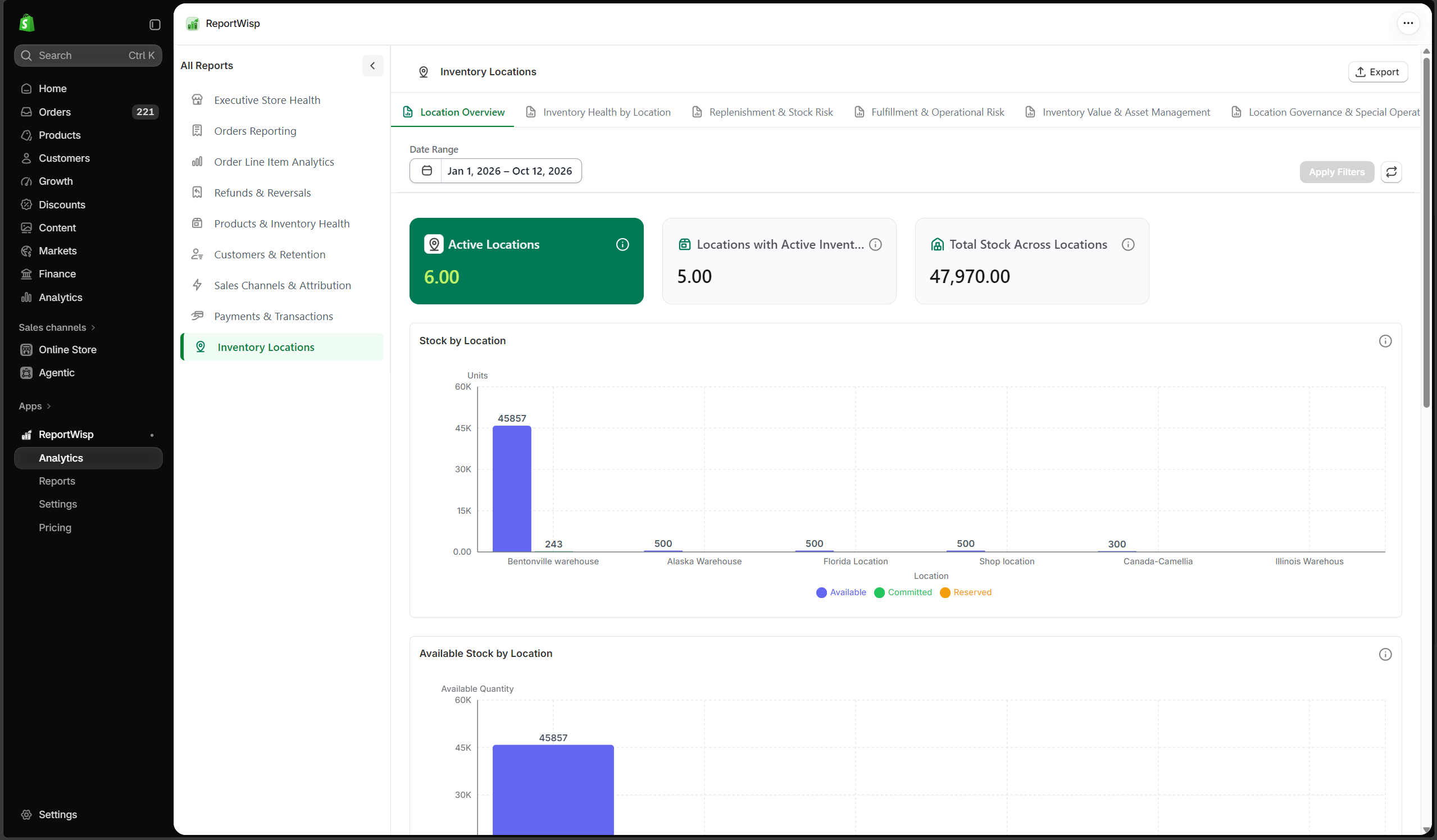
10.1 Location Overview
| Report | Type | What it presents | Decision-making support |
|---|---|---|---|
| Active Locations | KPI | Number of active store locations. | Helps understand location coverage. |
| Locations with Active Inventory | KPI | Locations currently holding inventory. | Helps identify active stock points. |
| Total Stock Across Locations | KPI | Total inventory quantity across locations. | Helps understand total stock availability. |
| Stock by Location | Chart | Stock quantity grouped by location. | Helps identify where inventory is concentrated. |
| Available Stock by Location | Chart | Available stock grouped by location. | Helps compare sellable stock across locations. |
| Location Inventory Summary | Table | Summary of inventory by location. | Helps operations review location-level stock. |
| SKU by Location Report | Table | SKU-level inventory by location. | Helps manage stock transfer and fulfillment planning. |
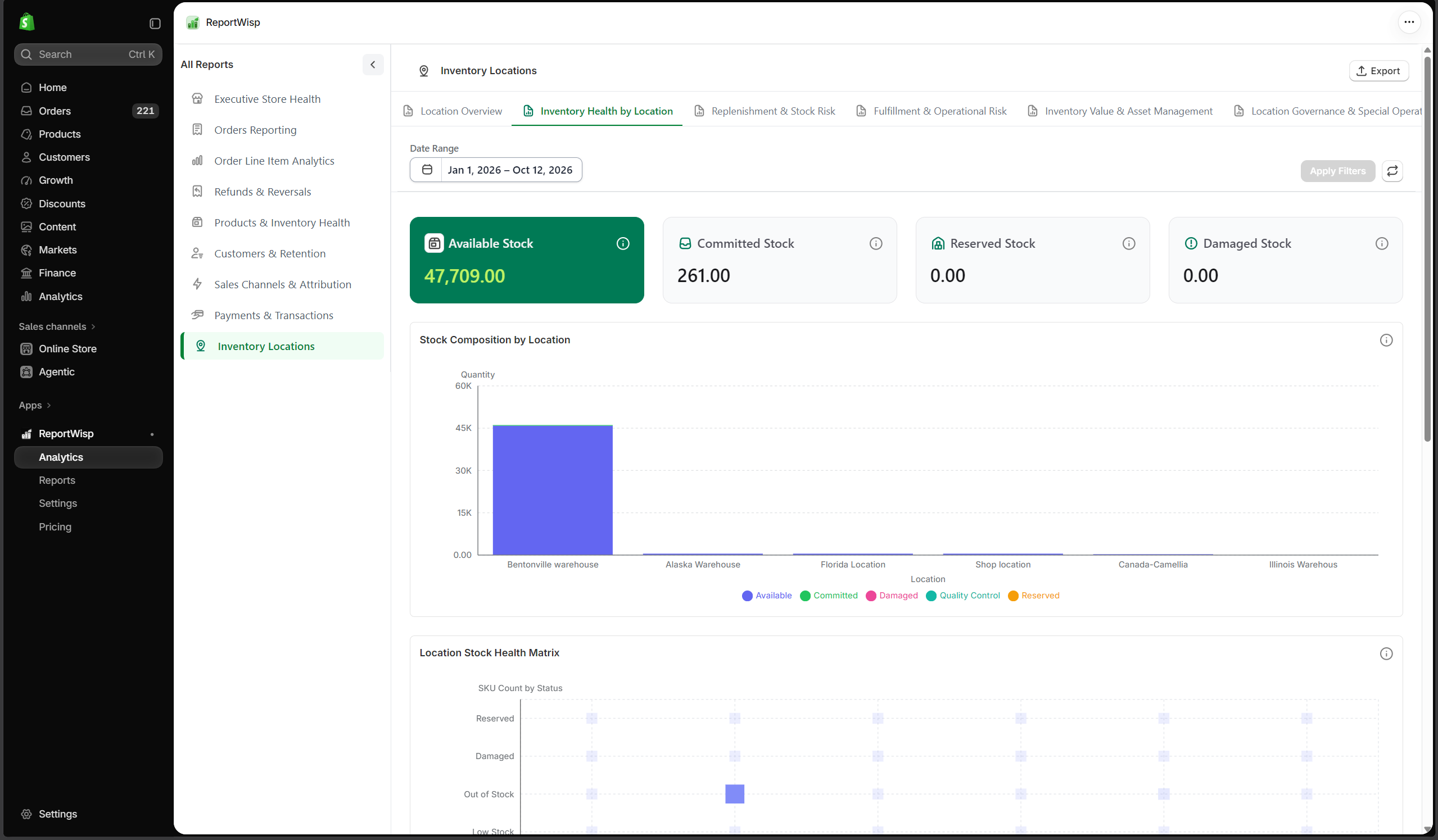
10.2 Inventory Health by Location
| Report | Type | What it presents | Decision-making support |
|---|---|---|---|
| Available Stock | KPI | Sellable stock available by location. | Helps review availability. |
| Committed Stock | KPI | Stock committed to orders. | Helps understand allocated inventory. |
| Reserved Stock | KPI | Stock reserved and unavailable for sale. | Helps understand unavailable inventory. |
| Damaged Stock | KPI | Damaged stock where available. | Helps identify non-sellable inventory. |
| Stock Composition by Location | Chart | Stock grouped by availability type. | Helps understand location-level stock health. |
| Location Stock Health Matrix | Chart/Table | Health comparison across locations. | Helps identify locations needing attention. |
| Damaged Stock by Location | Chart | Damaged stock grouped by location. | Helps prioritize QC or operational review. |
| Damaged / QC Stock Report | Table | Detailed damaged or QC stock records. | Helps operations investigate non-sellable stock. |
10.3 Replenishment & Stock Risk
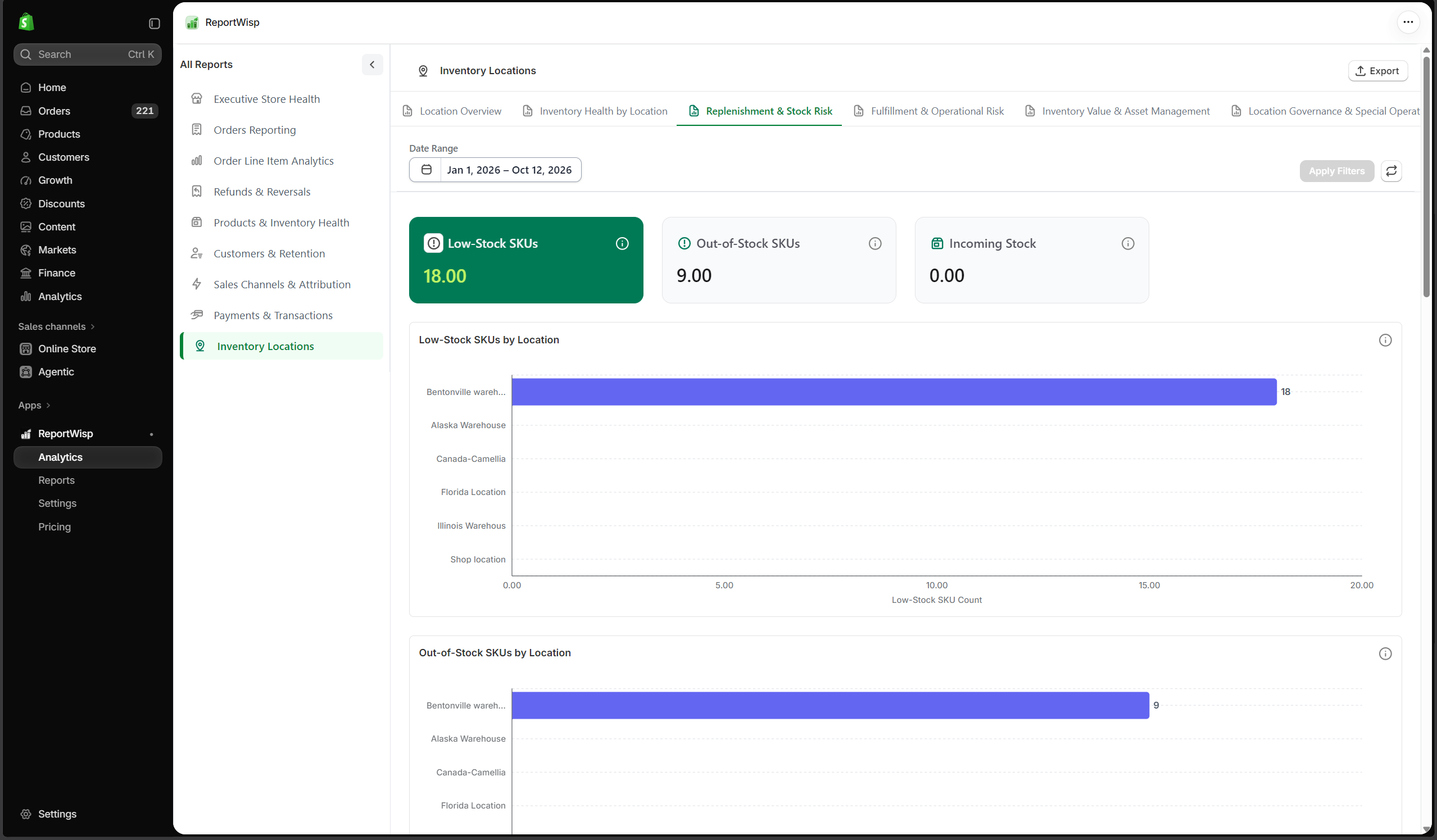
| Report | Type | What it presents | Decision-making support |
|---|---|---|---|
| Low-Stock SKUs | KPI | SKUs with low stock by location. | Helps prioritize replenishment. |
| Out-of-Stock SKUs | KPI | SKUs with no stock by location. | Helps identify stockout risk. |
| Incoming Stock | KPI | Incoming stock by location where available. | Helps plan replenishment. |
| Low-Stock SKUs by Location | Chart | Low-stock SKUs grouped by location. | Helps identify locations needing stock. |
| Out-of-Stock SKUs by Location | Chart | Out-of-stock SKUs grouped by location. | Helps identify urgent replenishment needs. |
| Incoming vs Available Stock | Chart | Incoming stock compared with available stock. | Helps plan future availability. |
| Low Stock by Location Report | Table | Detailed low-stock location records. | Helps operations create replenishment tasks. |
| Out-of-Stock by Location Report | Table | Detailed out-of-stock location records. | Helps identify sales risk. |
| Incoming Stock Report | Table | Detailed incoming stock records. | Helps purchasing and operations plan ahead. |
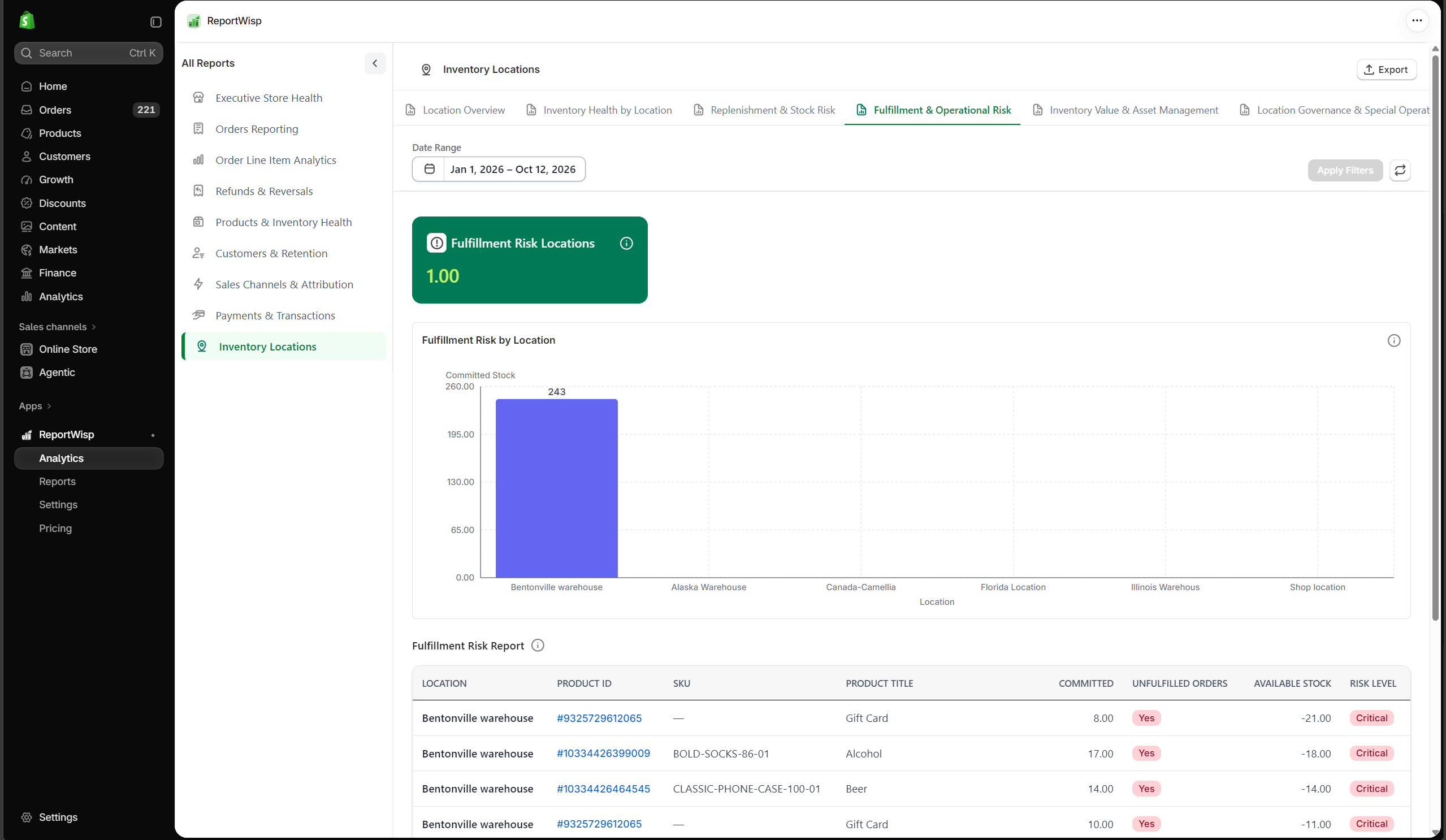
10.4 Fulfillment & Operational Risk
| Report | Type | What it presents | Decision-making support |
|---|---|---|---|
| Fulfillment Risk Locations | KPI/Table | Locations with fulfillment-related risk. | Helps identify locations that may affect order fulfillment. |
| Fulfillment Risk by Location | Chart | Fulfillment risk grouped by location. | Helps compare location-level operational risk. |
| Fulfillment Risk Report | Table | Detailed fulfillment risk records. | Helps operations prioritize action. |
10.5 Inventory Value & Asset Management
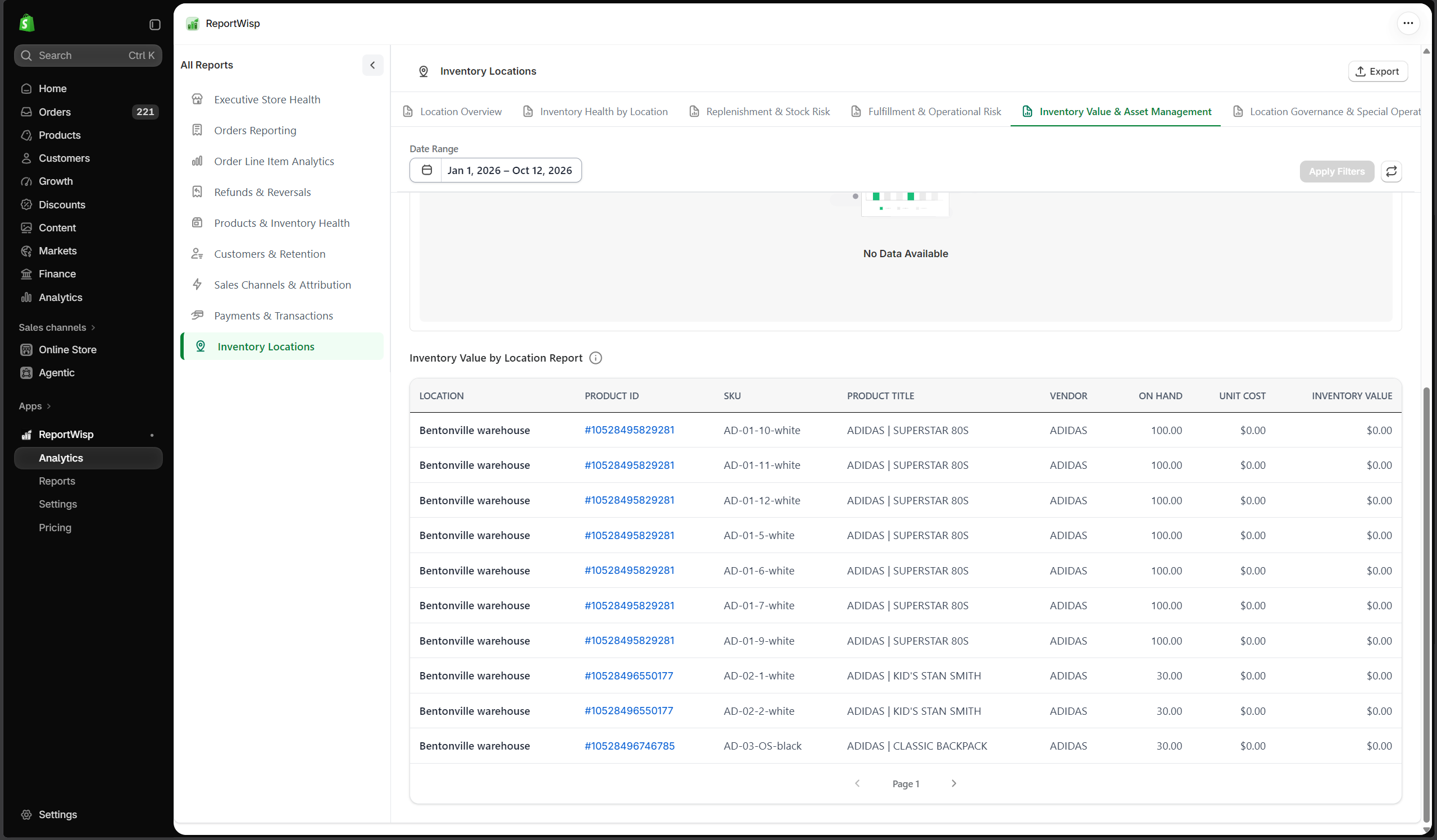
| Report | Type | What it presents | Decision-making support |
|---|---|---|---|
| Inventory Value | KPI | Inventory value across locations. | Helps finance understand stock asset value. |
| Non-Sellable Stock | KPI | Stock that cannot currently be sold. | Helps estimate inventory loss or blocked capital. |
| Inventory Value by Location | Chart | Inventory value grouped by location. | Helps identify where capital is concentrated. |
| Stock by City / Region | Chart | Stock grouped by city or region. | Helps understand geographic inventory distribution. |
| Inventory Value by Location Report | Table | Detailed inventory value records by location. | Helps support finance and operations review. |
10.6 Location Governance & Special Operations
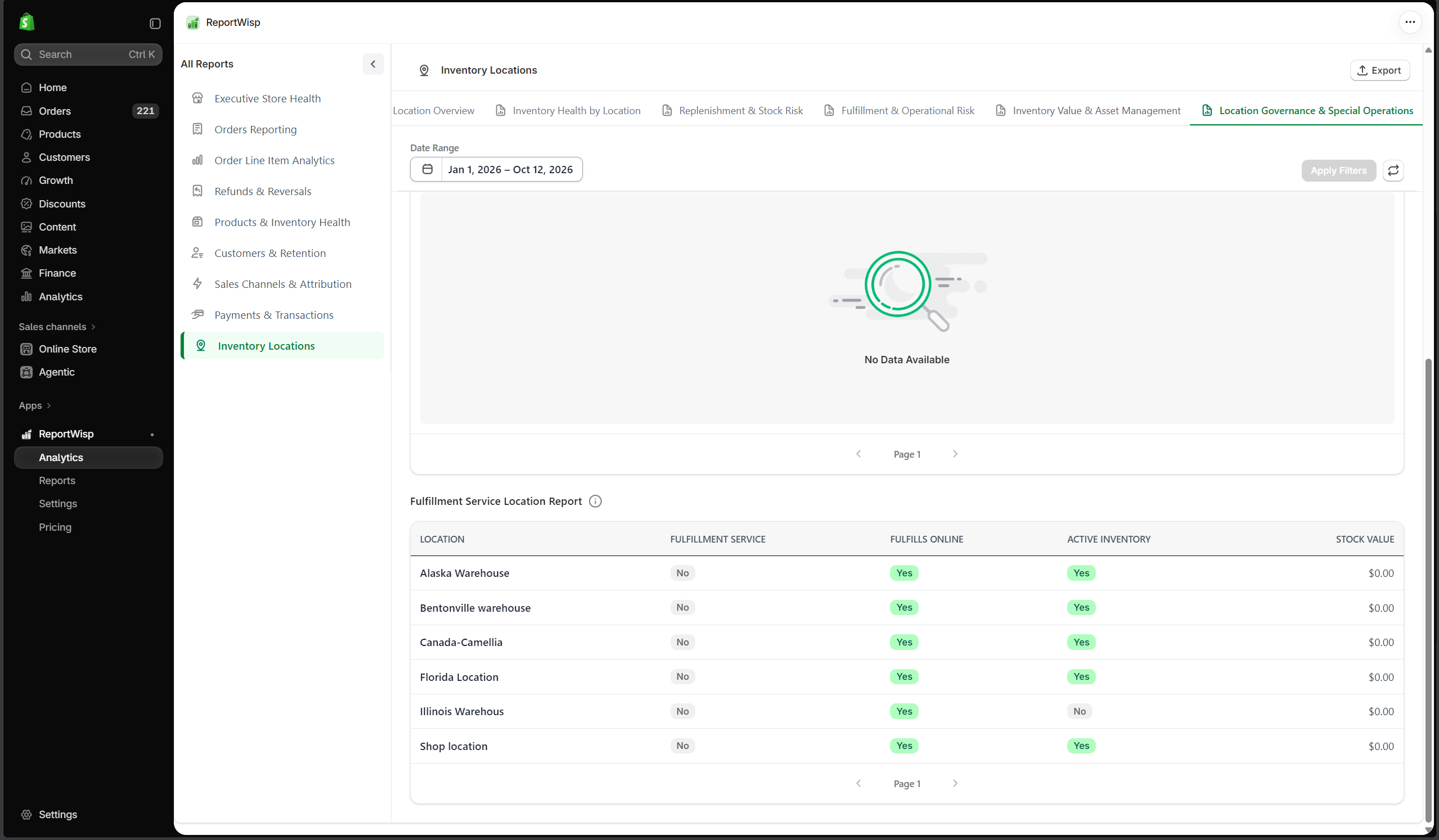
| Report | Type | What it presents | Decision-making support |
|---|---|---|---|
| Inactive Locations with Stock | KPI/Table | Inactive locations still holding inventory. | Helps identify stock governance issues. |
| Fulfillment Service Locations | KPI/Table | Locations connected to fulfillment services. | Helps understand fulfillment structure. |
| Inactive Location Stock Exposure | Chart/Table | Stock exposure in inactive locations. | Helps reduce operational and reporting risk. |
| Inactive Location Stock Report | Table | Detailed inactive location stock records. | Helps operations clean up location data. |
| Fulfillment Service Location Report | Table | Details of fulfillment service locations. | Helps manage fulfillment setup. |
Recommended use cases for Inventory Locations
Use this report to:
- Monitor stock across locations
- Identify locations with low stock
- Review stockout risk
- Plan transfers or replenishment
- Understand inventory value by location
- Review damaged or non-sellable stock
- Identify inactive locations still holding inventory
- Support fulfillment planning
11. Gift Cards
What this report category is
Gift Cards helps merchants review issued gift cards, redemption activity, balances, lifecycle status, customer usage, and gift card-related financial liability.
Gift card reporting is useful because gift cards affect both sales activity and future liability. A gift card may be sold today, but redeemed later.
Important note
Gift Cards is planned as an Advanced-level report category. Availability and detail may depend on gift card usage, Shopify permissions, gift card data availability, and ReportWisp release status.
Who should use it
This report is useful for:
- Store owners
- Finance teams
- Customer support teams
- Marketing teams
- Operations teams
11.1 Gift Card Overview
This tab gives merchants a summary of gift card activity. Use it to understand:
- How many gift cards exist
- How many are active
- Total issued value
- Remaining balance
- Gift card status
11.2 Redemption & Utilization
This tab helps merchants understand how gift cards are being used. Use it to answer:
- How much gift card value has been redeemed?
- Which gift cards are being used?
- Are customers actively redeeming gift cards?
- Is gift card usage increasing or slowing?
11.3 Liability & Outstanding Balances
This tab helps finance teams understand outstanding gift card value. Use it to answer:
- What gift card balance is still outstanding?
- How much liability remains?
- Are large gift card balances still unused?
11.4 Expiry & Lifecycle Management
This tab helps merchants track gift card lifecycle status. Use it to review:
- Expired gift cards
- Active gift cards
- Disabled or deactivated gift cards
- Gift cards nearing expiry where applicable
11.5 Customer Insights
This tab helps merchants understand customer-level gift card activity. Use it to answer:
- Which customers received gift cards?
- Which customers redeemed gift cards?
- Are gift cards used by new or repeat customers?
- Do gift card users return for additional purchases?
11.6 Sales Source & Channel Analysis
This tab helps merchants understand where gift card activity comes from. Use it to review:
- Gift cards by source
- Gift cards by channel
- Gift cards linked to orders
- Gift card sales behavior
Recommended use cases for Gift Cards
Use this report to:
- Review gift card balances
- Track gift card redemption
- Understand outstanding liability
- Support finance review
- Monitor customer gift card usage
- Analyze gift card sales and lifecycle status
12. Disputes & Risk
What this report category is
Disputes & Risk helps merchants monitor chargebacks, inquiries, disputed amounts, dispute reasons, dispute status, customer risk, gateway risk, and resolution performance.
Disputes are important because they can affect revenue, payment reliability, customer trust, and operational risk.
Important note
Disputes & Risk is planned as an Advanced-level report category. Availability and detail may depend on Shopify Payments, payment permissions, dispute data availability, and ReportWisp release status.
Who should use it
This report is useful for:
- Store owners
- Finance teams
- Risk teams
- Customer support teams
- Operations teams
12.1 Dispute Overview
This tab gives a high-level summary of dispute activity. Use it to understand:
- Total disputes
- Open disputes
- Disputed amount
- Dispute status
- Dispute type
- Dispute trend
12.2 Chargebacks & Financial Risk
This tab helps merchants understand financial exposure from chargebacks and disputes. Use it to answer:
- How much revenue is at risk?
- Which disputes are chargebacks?
- Which disputes are inquiries?
- Which disputes need immediate review?
12.3 Root Cause Analysis
This tab helps merchants understand why disputes are happening. Use it to review:
- Fraud-related disputes
- Product-not-received disputes
- Product-unacceptable disputes
- Duplicate transaction disputes
- Credit-not-processed disputes
- Other dispute reasons
12.4 Channel & Gateway Risk
This tab helps merchants compare dispute risk by channel or payment gateway. Use it to answer:
- Which channels create more disputes?
- Which gateways are linked to higher dispute activity?
- Are certain acquisition sources generating more payment risk?
12.5 Customer Risk Management
This tab helps merchants identify customer-level dispute patterns. Use it to understand:
- Customers with repeated disputes
- High-risk customer activity
- Refund and dispute overlap
- Customer behavior requiring review
12.6 Resolution & Operational Performance
This tab helps merchants monitor dispute resolution status. Use it to review:
- Disputes won
- Disputes lost
- Disputes under review
- Disputes needing response
- Evidence submission status where available
- Resolution timeline
Recommended use cases for Disputes & Risk
Use this report to:
- Monitor chargeback risk
- Review dispute reasons
- Identify customer or channel risk
- Prioritize disputes needing response
- Support payment risk management
- Reduce preventable disputes
- Improve support and fulfillment processes
13. POS & Retail Operations
What this report category is
POS & Retail Operations helps merchants review in-person sales, retail payment activity, tender transactions, cash drawer movement, staff activity, device-level activity, and retail store operations.
This category is useful for merchants using Shopify POS.
Important note
POS & Retail Operations is planned as an Advanced-level report category. Availability and detail may depend on Shopify POS usage, POS data availability, permissions, cash tracking setup, staff data, and ReportWisp release status.
Who should use it
This report is useful for:
- Retail store owners
- Store managers
- POS teams
- Finance teams
- Operations teams
- Leadership teams
13.1 POS Sales Overview
This tab gives a high-level view of retail sales activity. Use it to understand:
- POS sales
- Retail order volume
- Sales by location
- Store-level performance
- In-person revenue trends
13.2 Payment & Tender Analysis
This tab helps merchants review payment methods used in retail transactions. Use it to understand:
- Tender types
- Payment method mix
- Cash payments
- Card payments
- Manual payment activity
- Alternative payment methods
13.3 Cash Drawer Management
This tab helps merchants review cash drawer activity where available. Use it to understand:
- Cash sales
- Cash refunds
- Cash adjustments
- Opening and closing cash movement
- Cash drawer discrepancies where available
13.4 Staff Performance & Accountability
This tab helps merchants review staff-linked POS activity where available. Use it to understand:
- Staff transaction activity
- Staff sales contribution
- Refund or adjustment patterns by staff
- Retail team performance signals
13.5 Device & Store Operations
This tab helps merchants understand POS device and store-level activity. Use it to review:
- POS device activity
- Register activity
- Location-level operations
- Store performance signals
13.6 Transaction Health & Audit
This tab helps merchants review POS transaction quality and audit signals. Use it to understand:
- Failed or unusual POS transactions
- Manual adjustments
- Cash-related differences
- Transaction records for review
- Retail audit support
Recommended use cases for POS & Retail Operations
Use this report to:
- Monitor retail store performance
- Review POS payment activity
- Understand cash drawer movement
- Compare retail locations
- Review staff-linked transaction activity
- Support retail finance review
- Identify POS operational issues
How to Use ReportWisp in Daily Operations
ReportWisp is most useful when it becomes part of your store’s operating rhythm. Instead of checking reports only when there is a problem, use ReportWisp regularly to monitor performance, identify risks, and support team decisions.
Daily Review
Use daily reporting to catch urgent issues early.
Recommended reports:
- Executive Store Health
- Orders Reporting
- Products & Inventory Health
- Payments & Transactions
- Refunds & Reversals
Daily questions to ask:
- Are sales and orders healthy today?
- Are there unusual refund or payment issues?
- Are any important products low in stock?
- Are orders pending fulfillment?
- Are failed or pending transactions increasing?
Weekly Review
Use weekly reporting to understand short-term trends and team priorities.
Recommended reports:
- Executive Store Health
- Orders Reporting
- Order Line Item Analytics
- Products & Inventory Health
- Customers & Retention
- Sales Channels & Attribution
- Inventory Locations
Weekly questions to ask:
- Which products performed best this week?
- Which channels drove revenue?
- Are refunds increasing?
- Are customers returning?
- Are inventory risks visible?
- Which areas need action next week?
Monthly Review
Use monthly reporting for finance, planning, and strategic review.
Recommended reports:
- Executive Store Health
- Orders Reporting
- Refunds & Reversals
- Payments & Transactions
- Payout Reconciliation
- Products & Inventory Health
- Customers & Retention
- Gift Cards
- Disputes & Risk
Monthly questions to ask:
- What changed in revenue and order performance?
- Which products or channels drove growth?
- Did refunds, discounts, fees, or disputes reduce revenue quality?
- Are customers returning?
- Is inventory aligned with demand?
- Are payouts, payments, and gift card balances clear?
- What decisions should be made for the next month?
Role-Based Usage Guide
Different teams can use ReportWisp for different responsibilities.
Store Owner / Founder
Recommended reports:
- Executive Store Health
- Orders Reporting
- Customers & Retention
- Products & Inventory Health
- Sales Channels & Attribution
- Payout Reconciliation
- Disputes & Risk
Use ReportWisp to:
- Review overall business health
- Understand revenue quality
- Identify growth opportunities
- Monitor operational risks
- Review product, customer, and channel performance
- Make faster business decisions
Operations Team
Recommended reports:
- Orders Reporting
- Order Line Item Analytics
- Products & Inventory Health
- Inventory Locations
- Refunds & Reversals
- POS & Retail Operations
Use ReportWisp to:
- Monitor fulfillment status
- Track unfulfilled orders
- Identify product-level backlog
- Review location-level stock
- Monitor stock risks
- Investigate operational causes of refunds
Finance / Accounting Team
Recommended reports:
- Payments & Transactions
- Payout Reconciliation
- Refunds & Reversals
- Gift Cards
- Disputes & Risk
- Orders Reporting
Use ReportWisp to:
- Review payment activity
- Monitor refunds
- Understand payout movement
- Review gift card liability
- Track disputes and chargebacks
- Export table data for finance review
Marketing / Growth Team
Recommended reports:
- Sales Channels & Attribution
- Customers & Retention
- Orders Reporting
- Order Line Item Analytics
- Executive Store Health
Use ReportWisp to:
- Review channel performance
- Measure campaign-attributed revenue
- Understand new vs repeat customers
- Review customer quality by channel
- Identify high-value customers
- Improve campaign and retention decisions
Inventory / Merchandising Team
Recommended reports:
- Products & Inventory Health
- Order Line Item Analytics
- Inventory Locations
- Refunds & Reversals
Use ReportWisp to:
- Identify top-selling products
- Find slow-moving products
- Monitor low-stock and out-of-stock items
- Review inventory value
- Compare vendor and collection performance
- Investigate refunded products
Customer Support Team
Recommended reports:
- Refunds & Reversals
- Customers & Retention
- Order Line Item Analytics
- Disputes & Risk
- Orders Reporting
Use ReportWisp to:
- Review refund patterns
- Identify products creating customer issues
- Review customer refund risk
- Understand dispute causes
- Support better customer communication
Leadership / Management Team
Recommended reports:
- Executive Store Health
- Orders Reporting
- Customers & Retention
- Products & Inventory Health
- Sales Channels & Attribution
- Payments & Transactions
- Payout Reconciliation
Use ReportWisp to:
- Run weekly business reviews
- Run monthly operating reviews
- Align teams around shared numbers
- Identify risks and opportunities
- Make better planning decisions
- Track business performance across departments
Best Practices for Using ReportWisp
1. Start with Executive Store Health
Use Executive Store Health first to understand the overall store picture. Then move into detailed reports based on what needs attention.
2. Use the right report for the right question
Do not rely on one report for every decision.
For example:
- Use Orders Reporting for order-level sales and fulfillment.
- Use Order Line Item Analytics for SKU and product-level performance.
- Use Customers & Retention for customer behavior.
- Use Sales Channels & Attribution for marketing and channel quality.
- Use Payments & Transactions for payment activity.
- Use Products & Inventory Health for stock and product planning.
3. Use consistent date ranges
When comparing performance, use consistent periods.
Examples:
- Last 7 days vs previous 7 days
- This month vs last month
- This quarter vs previous quarter
Avoid comparing partial periods with full periods unless you clearly understand the difference.
4. Combine related reports before making decisions
One report may not tell the full story.
For example:
- If sales increased, also check refunds, discounts, payments, and inventory.
- If a product sells well, also check stock, refunds, and fulfillment backlog.
- If a channel drives revenue, also check refund rate, discount rate, and customer quality.
- If payouts look different, also check transactions, refunds, fees, disputes, and gift cards.
5. Use table exports for deeper review
At the current stage, ReportWisp supports table exports where available.
Use exports when you need to:
- Share records with your team
- Perform offline analysis
- Support accounting review
- Investigate detailed records
- Prepare internal business reviews
6. Turn reports into action items
Reports are most useful when they lead to decisions.
Examples:
- High refund rate → review product quality, descriptions, fulfillment, or support process.
- Low stock on best sellers → reorder, transfer stock, or adjust promotions.
- High discount leakage → review campaign strategy.
- Weak repeat customer performance → plan retention campaigns.
- High unattributed orders → improve UTM tracking.
- Pending payments → review payment workflow.
- Payout differences → review reconciliation details.
Final Notes
ReportWisp is designed to help merchants use store data more clearly and confidently.
The best way to use ReportWisp is to make it part of your store’s daily, weekly, and monthly operating rhythm.
Use:
- KPI cards for quick signals
- Charts for trends and comparisons
- Tables for detailed investigation
- Date filters for period-based review
- Table exports for team workflows and deeper analysis
By using ReportWisp consistently, merchants can better understand store performance, reduce manual reporting work, identify risks earlier, and make stronger decisions across sales, products, customers, inventory, finance, marketing, and operations.
Need Help?
If you encounter any issue during the use, contact the ReportWisp support team at: support@reportwisp.com
When reaching out, include:
- Store name
- Shopify store URL
- Screenshot of the issue, if available
- Step where the issue occurred
- Error message, if any
- Report category or table name, if the issue is related to report access or export
This helps our team review the issue faster.